SEO
Semrush Keyword Research: How I Find Keywords I Can Rank For
How I do Semrush keyword research: Keyword Magic Tool filters, Keyword Overview checks, Keyword Manager clusters, then tracking rankings after publishing.

Semrush keyword research helps me find the right keywords for a business or blog, not just the ones with the biggest search volume. When I start a new project, I want to know what people search for, what they expect to find, how difficult each keyword may be, and whether I have a realistic chance of ranking. That last part matters. If I start a weight loss blog, I can’t expect to rank for “weight loss” straight away: it would take a lot of authority, content, promotion, on-page SEO and link building. I’d rather find useful, lower-competition keywords first, get the initial momentum going, and then work towards the difficult ones.
Affiliate disclosure: links marked “affiliate link” earn me a commission if you buy, at no extra cost to you. How I review tools. I recorded this in January 2024, so the numbers are what Semrush showed then. For my verdict on Semrush as a whole, read my Semrush review.
Prefer to watch? Here is the 1.5-hour walkthrough.
- 00:52 Keyword Magic Tool
- 34:18 Keyword Overview
- 56:30 Keyword Manager
- 1:05:39 Organic Research
- 1:24:15 Keyword Gap
- 1:31:38 Position Tracking
- 1:49:38 Organic Traffic Insights
Which Semrush keyword research tool do I use at each stage?
| Stage | Tool | What it gives me |
|---|---|---|
| Find ideas | Keyword Magic Tool | Every variation of a seed keyword, with filters |
| Check one keyword | Keyword Overview | Volume, difficulty, intent, trend, CPC and the results page |
| Plan the content | Keyword Manager | Clusters, a mind map and a pillar page |
| Learn from competitors | Organic Research, Keyword Gap | Keywords their pages already rank for, and what I’m missing |
| Measure the results | Position Tracking, Organic Traffic Insights | Rankings, visibility and real traffic after I publish |
How do I find low-competition keyword ideas with the Keyword Magic Tool?
I enter a seed keyword, choose the country and filter the results down. The Keyword Magic Tool is one of my favourite tools in Semrush, because this is where the magic happens. One keyword can produce hundreds of thousands of variations, so I don’t scroll through them; I use the match types and filters to make the list manageable.
The match types group the ideas in different ways:
- All keywords gives the broadest collection.
- Broad match shows variations of the seed keyword in any word order.
- Phrase match keeps the seed phrase in the same form, in different orders.
- Exact match keeps the phrase in the same form and order.
- Related finds other ways people describe the topic, such as “lose weight” or “how to lose fat”.
I especially like Related when I don’t yet know all the terms people use in an industry. I take a promising phrase, open it in Keyword Overview and keep researching from there.
The Questions tab is another good source. A question usually tells me exactly what the searcher wants. It may become its own article, or I answer it inside a bigger guide: if I write a weight loss guide, I check the questions people ask and make sure the content covers the relevant ones. Questions can also point to People Also Ask opportunities.
Then I filter by volume, keyword difficulty, intent and sometimes CPC. Include keeps phrases containing particular words, and Exclude removes irrelevant ones. Word count finds longer phrases with clearer intent, and the SERP features filter shows whether the results include featured snippets, images, videos or a local pack.
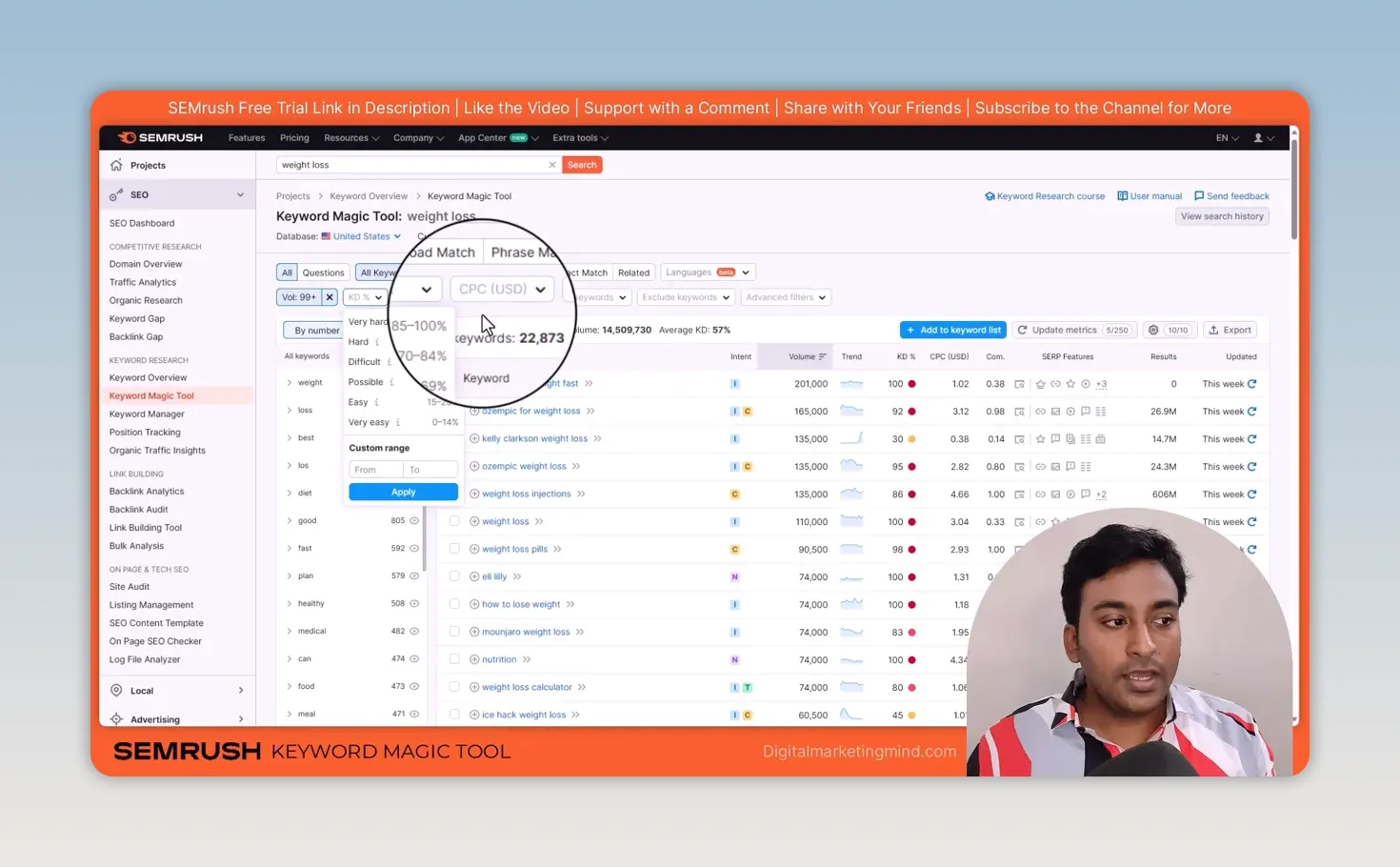
There’s no correct filter combination for every business. In my example, a minimum of 99 monthly searches took “weight loss” down to 22,873 keywords with an average difficulty of 57%, but that was a demonstration, not a rule: a keyword below 99 searches can still be valuable. The difficulty filter comes in ranges, from Very easy (0 to 14%) up to Very hard (85 to 100%), or a custom range. Once I have a smaller list, I sort by keyword difficulty, check each idea is relevant and save the useful ones to Keyword Manager. For two worked examples of this, from Reddit and from random words, see my guide on how to find low competition keywords.
What do I check in Keyword Overview before choosing a keyword?
Volume, difficulty, intent, trend and the results page, and no single number decides it. I open Keyword Overview when I want to look at one keyword closely, and I choose the country my customers are in.
- Volume is an estimate; the real number can be higher or lower.
- Keyword difficulty runs from 0 to 100, with higher meaning harder. It’s a guide, not a verdict.
- Intent matters just as much. Someone looking for information needs a different page from someone ready to buy, so I check that the content I plan matches what the searcher wants.
- Trend shows demand month by month. “Christmas gifts” is strong at the end of the year and weak the rest of it.
- CPC and competitive density describe paid search. Advertising competition is not the same as SEO keyword difficulty.
Finally, I look at the SERP analysis: the ranking pages, their referring domains and backlinks, the other keywords they rank for, and the SERP features on the page. That tells me what I’d be competing against far better than a difficulty score alone.
How do I organise related keywords into content with Keyword Manager?
By clustering them, then checking each cluster before I plan a page. Finding keywords is only the start; I still have to decide what to create. In Keyword Manager I can save a keyword list or give it seed keywords and let Semrush build clusters. From “weight loss” and “lose weight”, it built 41 clusters from 1,032 keywords that I could inspect by intent, volume and difficulty.
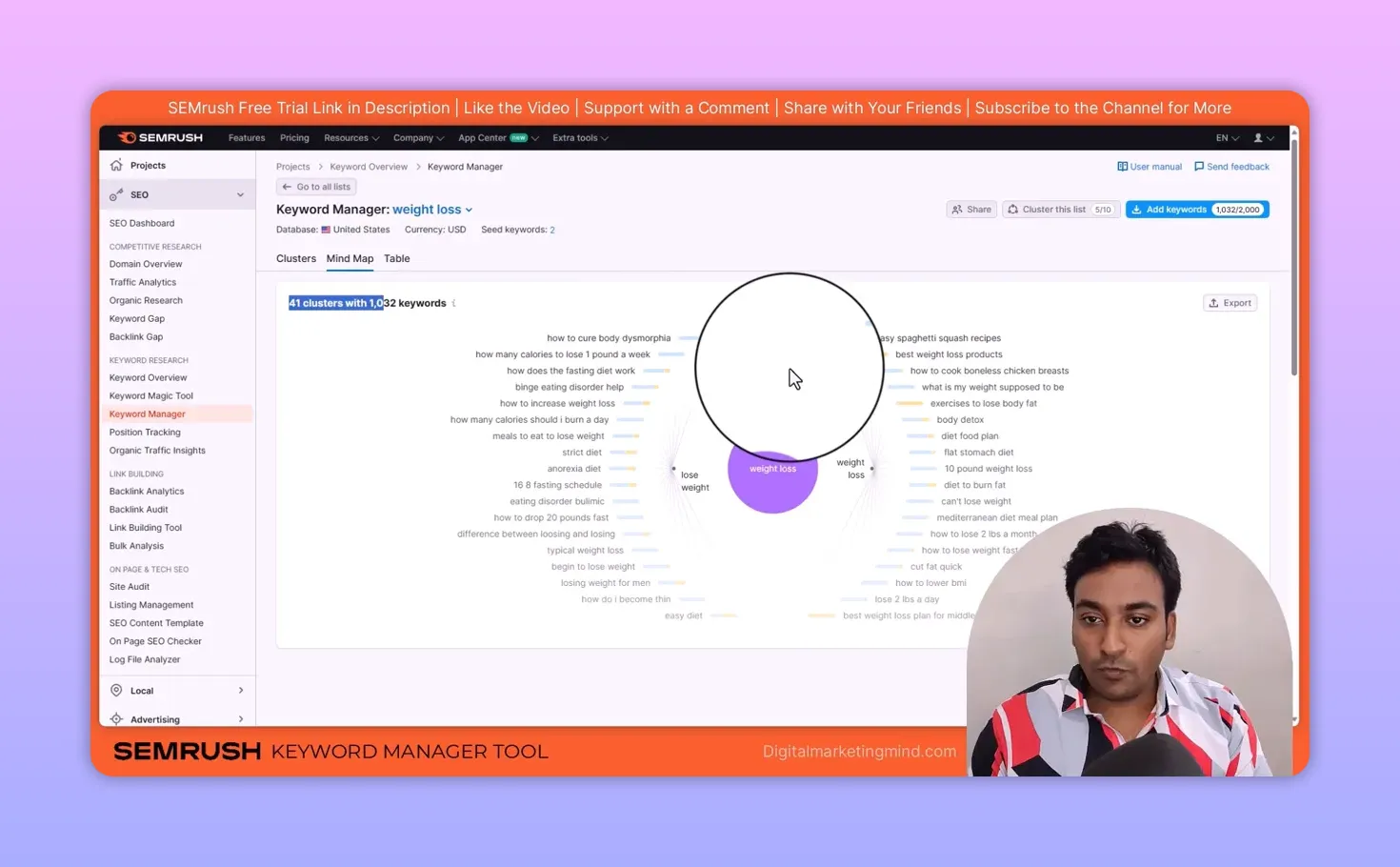
A cluster brings together keywords with similar intent. I might create a main pillar page with supporting articles around it or, if the subtopics belong together, one in-depth guide that answers them under separate headings. I check the keywords in each cluster first, because a group in a tool isn’t automatically a finished content plan. Keyword Manager has cluster, mind map and table views, so I work in whichever makes most sense.
How do I find keyword ideas that already work for competitors?
With Organic Research and Keyword Gap. Sometimes I don’t want to start from seed keywords at all; I want to see what already works for another website.
In Organic Research, I enter a competitor’s domain for the broad picture, or one URL to study a single page. I look at their ranking keywords, top pages, intent and position changes: a new keyword may be a topic they’ve just started ranking for, and a lost or declining one may be my chance to improve my own content. Then I filter by topic word, volume, difficulty or word count. I also check their top pages rather than copying a keyword list, because one good page can rank for many related searches, which tells me more about covering a topic than any single keyword.
Keyword Gap compares several sites at once. The categories I use most are Missing, where competitors rank and I don’t, and Weak, where I rank below them; Strong and Unique show what already works for my site. Again I filter for relevant topics and a manageable difficulty, and ask whether each missing keyword fits my business and content I can genuinely create.
My Semrush competitor analysis guide covers both tools step by step, with screenshots.
How do I track whether my chosen keywords are improving?
With Position Tracking, after I publish. I set the domain, search engine, device and location, then add the keywords I’m targeting. For a local business, location and local pack tracking are especially useful, because rankings change by place and device.
The reports show visibility, average position, ranking distribution, pages, competitors, and which keywords improved or declined. For MatchMaker.lk, a project I run for Sri Lankan users, I’ve noticed that Semrush’s estimated traffic is less useful than its visibility and position data; outside the big databases, the traffic estimate often comes out very low. So I don’t judge a project from one traffic figure. I look at which keywords moved, which pages changed and whether a competitor is gaining ground.
Position Tracking also shows featured snippet opportunities and, on supported plans, keyword cannibalisation: two or more of my own pages competing for the same keyword. When I find that, I decide which page should be the main one for that search.
How do I connect keyword rankings with real website traffic?
With Organic Traffic Insights. I connect Google Analytics and Google Search Console so their data sits next to Semrush’s. It helps me investigate the keywords Analytics hides as “not provided” and review each page’s performance in one place.
For a single URL, I can compare Semrush’s keyword data with Search Console’s clicks, impressions, click-through rate and position, alongside engagement from Analytics. That’s where I find a keyword worth tracking or a page worth improving.
What is my full keyword research process?
- Discover ideas in the Keyword Magic Tool.
- Check intent and competition in Keyword Overview.
- Organise related searches into content with Keyword Manager.
- Learn from competitors with Organic Research and Keyword Gap.
- Track what happens after publishing with Position Tracking and Organic Traffic Insights.
I don’t need to go after the hardest keyword first. Smaller, relevant keywords build the momentum to go after bigger ones later. If you want free ways to find ideas as well, see my ChatGPT prompts for keyword research and my Google Keyword Planner guide.
Try Semrush free here (affiliate link).
FAQ
What keyword difficulty should a new website target in Semrush?
Start with the Very easy and Easy ranges, which covered 0 to 29% when I recorded, and relevant long-tail keywords. Then check the actual ranking pages, because difficulty is only a guide.
Is Semrush search volume accurate?
It’s an estimate from Semrush’s own data, so the real number can be higher or lower. Use it to compare keywords rather than as an exact count.
Should I target keywords with fewer than 100 searches a month?
Yes, if they’re relevant. Low-volume keywords are often easier to rank for, and a page usually ranks for many related searches, not just one.
Keep reading
You Might Also Like
Convert SEO Keyword List to Comma Separated Keywords List
Convert SEO keyword list to comma separated keywords list in one paste. Drop a column from Excel, Ahrefs or Search Console in, get a joined line out.
5 min read

Semrush Competitor Analysis: Find Their Keywords and Links
How I do Semrush competitor analysis with five tools: Domain Overview, Traffic Analytics, Organic Research, Keyword Gap and Backlink Gap, and what to skip.
9 min read

How to Find Low Competition Keywords With Reddit and Semrush
How to find low competition keywords: run Reddit in Semrush, filter for very easy difficulty, informational intent and long phrases, then find a niche.
8 min read