SEO
Semrush Competitor Analysis: Find Their Keywords and Links
How I do Semrush competitor analysis with five tools: Domain Overview, Traffic Analytics, Organic Research, Keyword Gap and Backlink Gap, and what to skip.

Semrush competitor analysis helps me understand what other websites are doing before I decide what to do with my own SEO. I can’t work on my site without any outside knowledge and expect results: I need to know which keywords my competitors rank for, where their traffic comes from, which content performs well and which websites link to them. I use five tools under Semrush’s Competitive Research menu, starting with the overall picture and then going into the data that can give me an opportunity.
Affiliate disclosure: links marked “affiliate link” earn me a commission if you buy, at no extra cost to you. How I review tools. I recorded this in January 2024, so the figures below are what Semrush showed then. For my verdict on Semrush as a whole, read my Semrush review.
Prefer to watch? Here is the walkthrough.
- 01:00 Domain Overview
- 15:51 Traffic Analytics
- 23:47 Organic Research
- 42:22 Keyword Gap
- 49:46 Backlink Gap
Which Semrush competitor analysis tool answers which question?
| Question | Tool | Worth it for a small business? |
|---|---|---|
| How strong is this competitor overall? | Domain Overview | Yes, it’s the quickest summary |
| Where does their traffic come from? | Traffic Analytics | Rarely; the deep data costs extra |
| Which keywords and pages work for them? | Organic Research | Yes, my favourite of the five |
| Which keywords am I missing? | Keyword Gap | Yes |
| Which sites link to them but not me? | Backlink Gap | Yes, if you do link building |
How do I get a quick overview of a competitor’s website?
With Domain Overview. I enter a competitor’s domain and choose the database: worldwide, or a single country. I also check whether I’m looking at desktop or mobile data, because they can differ.
The first screen shows the domain’s Authority Score, organic and paid search traffic, ranking keywords, backlinks and referring domains, plus keyword intent: whether the site mainly ranks for informational, navigational, commercial or transactional searches. When I looked at semrush.com, it had an Authority Score of 83, about 21.4 million estimated monthly organic visits from 2.6 million keywords, and 46.9 million backlinks from about 155,000 referring domains. India sent the largest share of that organic traffic (20%), ahead of the US (17%) and France (15%).
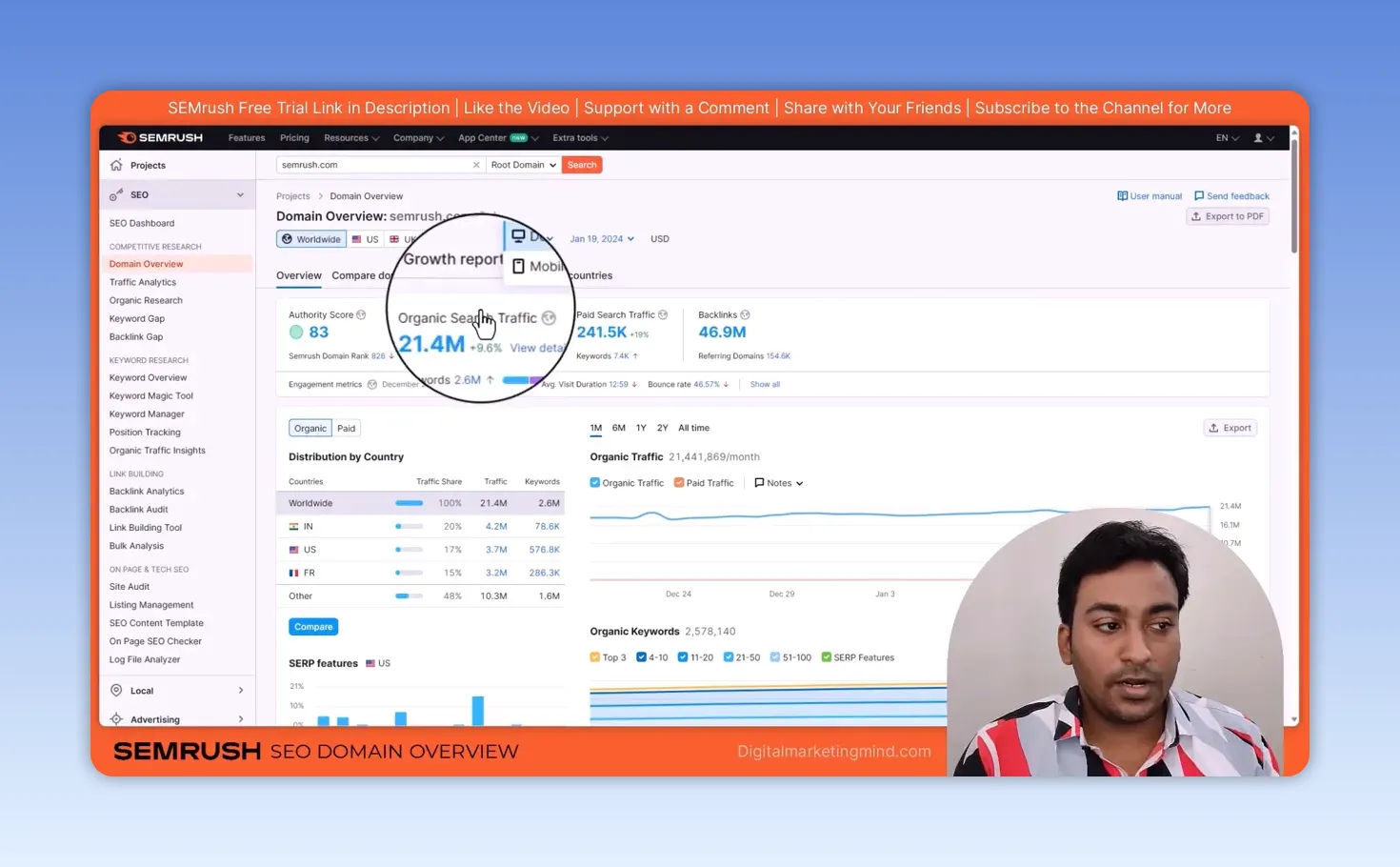
I don’t treat estimated traffic as the exact number of visits a competitor gets; it can be a bit more or a bit less. What interests me is the direction: is their organic traffic growing or declining, and is paid traffic moving the same way? I can change the chart’s time period, see traffic by country, and separate organic from paid.
Further down are top organic keywords, ranking position distribution, branded versus non-branded traffic, organic competitors, paid keywords, sample ads and backlinks. Every section links to a detailed report, which is useful when one number catches my eye.
How can I see where a competitor’s traffic comes from?
With Traffic Analytics, when I want to look beyond search rankings. It estimates visits, unique visitors, desktop and mobile traffic, pages per visit, average visit duration and bounce rate. Traffic Channels shows whether organic search, direct visits, referrals, social or paid sources matter most: for semrush.com in December 2023, organic search brought about 19.7 million of 31.8 million visits, and Google alone was the source of about 59%.
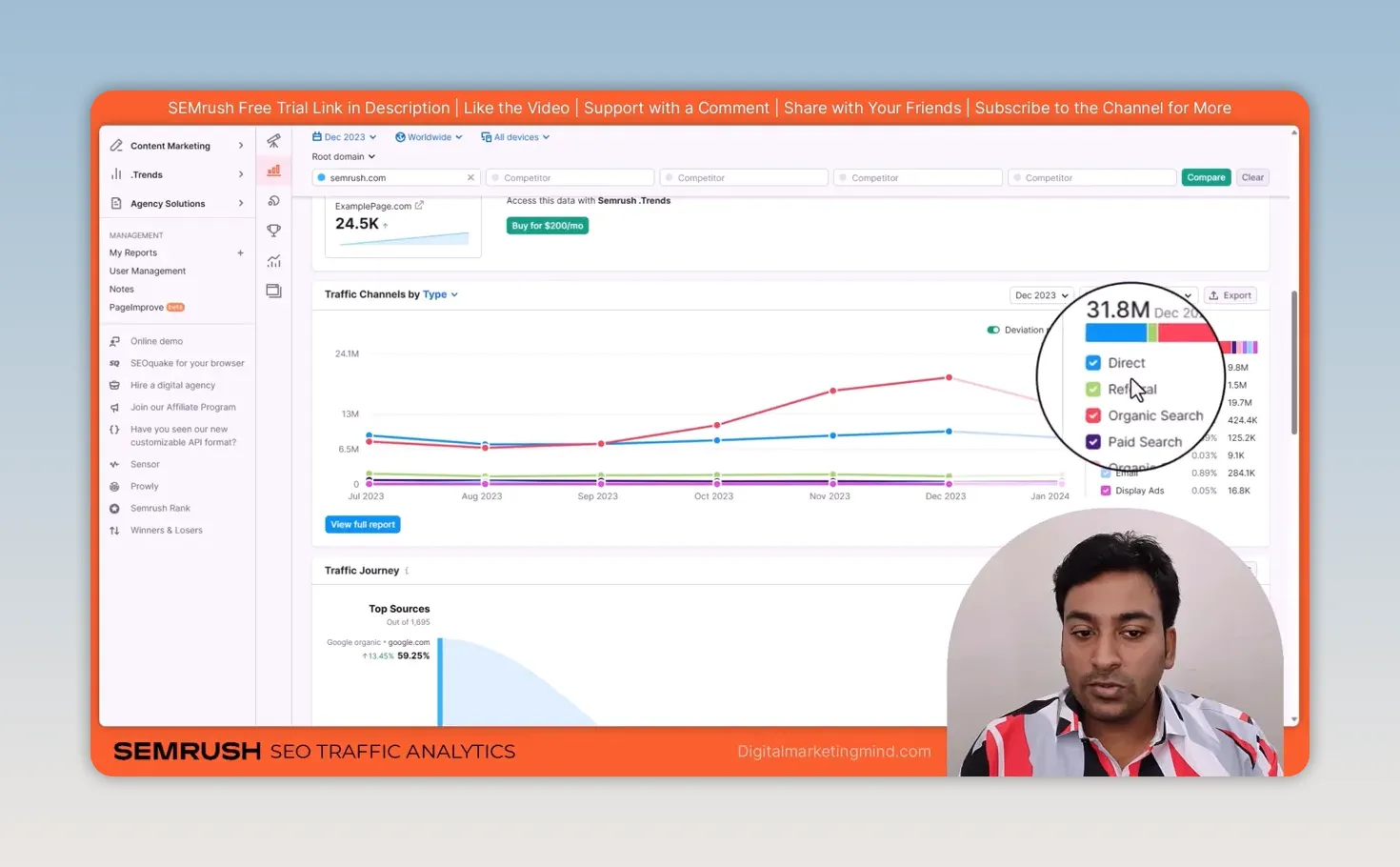
Traffic Journey shows the sources people came from and where they went next. Geo Distribution breaks down the countries, and the top pages, subfolders and subdomains reports show which parts of a bigger site attract attention.
I want to be honest about access, though. My subscription gave me only limited Traffic Analytics data; most of the deeper analysis needed a separate Semrush .Trends subscription, which was offered at $200 a month when I recorded. Semrush now sells this data as its Traffic & Market toolkit, so check the current price. If you run a small blog or a small business website, ask whether you really need that level of detail. For a big project, it may make more sense.
How do I find the keywords and pages already working for a competitor?
With Organic Research, one of my favourite tools, because it’s competitor-based keyword research. Traditional keyword research starts from seed keywords and works through a huge database; here I start from a website that is already ranking and see what works for it.
I enter a domain, subdomain or exact URL, and that choice matters. A domain can return millions of keywords, while one relevant page gives a narrower list: if I only care about a competitor’s weight loss article, I’d rather start with that URL than analyse every topic on the site.
First I check the overall ranking trend, estimated traffic, keyword intent and top pages. Position Changes shows keywords that are new, lost, improved or declined. A new relevant keyword can be a content idea; a competitor’s declining page can be a reason to improve my own page on that subject. I also check SERP features, such as featured snippets, image packs and People Also Ask, to see what kind of results the competitor appears in.
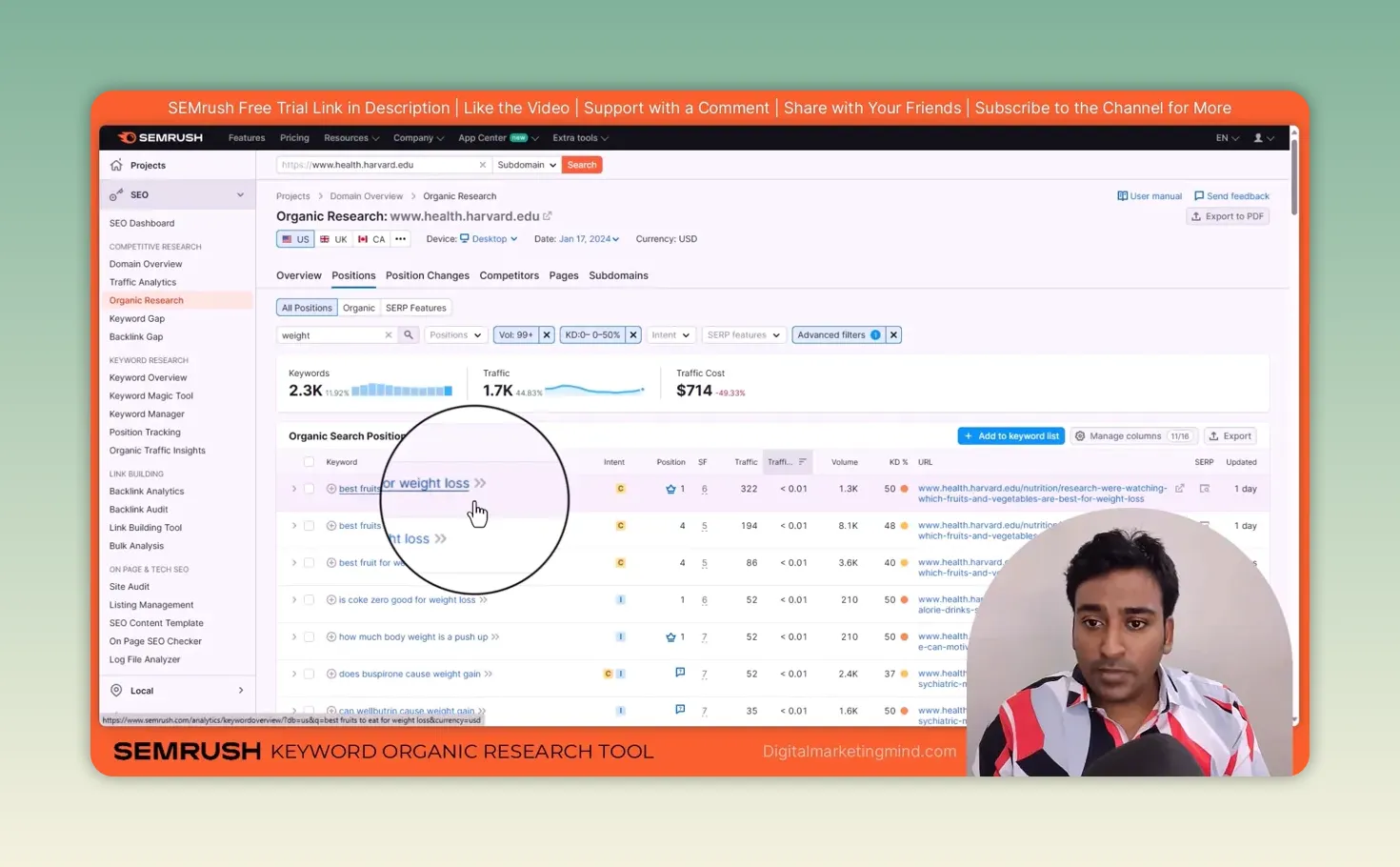
The real work happens in the Positions table. I don’t read thousands of rows. I filter by a topic word, add a keyword difficulty limit, set a minimum volume and, where useful, a word count for longer phrases, then sort by keyword difficulty. On Harvard Health’s site, filtering for “weight” with a volume of at least 99 and difficulty up to 50% left about 2,300 keywords, including “best fruits for weight loss”, where it ranked first.
For the rest of the keyword process, from the Keyword Magic Tool to tracking rankings, see my Semrush keyword research guide. A low difficulty score alone isn’t enough. I still read the keyword, consider its intent and decide whether I can create a useful page for it. Competitor research gives me ideas, not a reason to copy every topic. For free ways to research keywords too, see my ChatGPT prompts for keyword research and my Google Keyword Planner guide.
How does Keyword Gap show what my website is missing?
By comparing several websites at once. Organic Research looks closely at one site; Keyword Gap compares up to five. I add my domain and the competitors, choose organic, paid or product listing ad keywords, and run the comparison. I can compare whole domains or more specific parts of a site when that matches my question better.
The categories make the results easy to read:
- Missing: competitors rank, but the site I selected doesn’t.
- Weak: my site ranks below competitors for the keyword.
- Strong: my site ranks above all the compared competitors.
- Shared, Untapped and Unique: other ways to see where rankings overlap or belong to only one site.
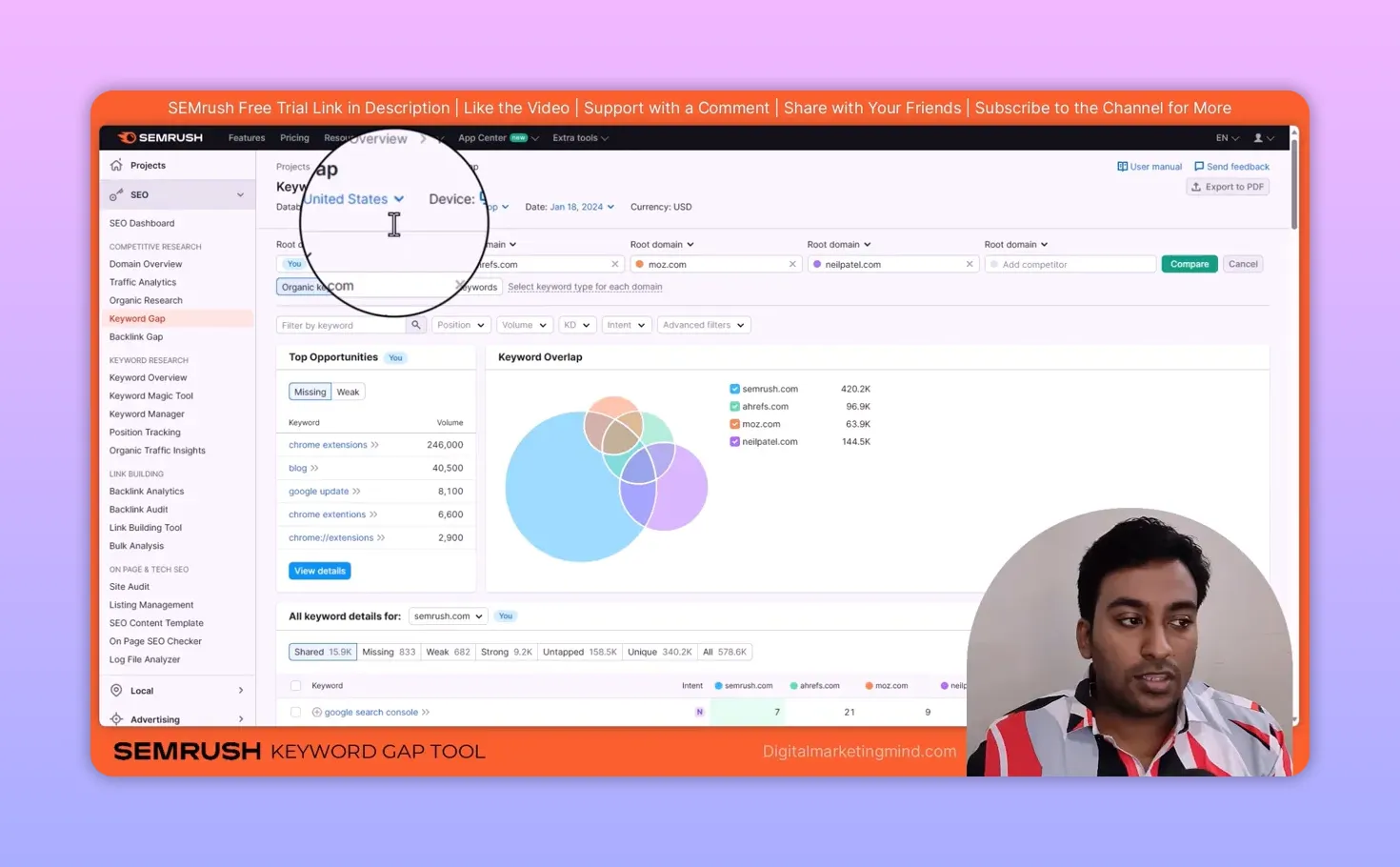
In my example, comparing semrush.com with ahrefs.com, moz.com and neilpatel.com, Semrush was missing 833 keywords and weak on 682, and “chrome extensions” topped its missing list. I usually start with Missing and Weak, then filter by volume, difficulty and intent. If a competitor ranks for a relevant keyword and I have no suitable page, I consider creating one; if I already rank but sit far below, I check my existing page first. For my own verified search performance, I use Google Search Console alongside these competitor estimates.
How do I find backlink prospects with Backlink Gap?
I add my domain and competitors and click Find prospects. Backlink Gap compares referring domains and shows the websites linking to competitors but not to me.
For each prospect I can see its domain, category, Authority Score, estimated monthly visits and how many of the compared sites it links to. A site that links to several competitors but not to me is worth investigating. The Best, Weak, Strong, Shared and Unique views sort the different backlink relationships.
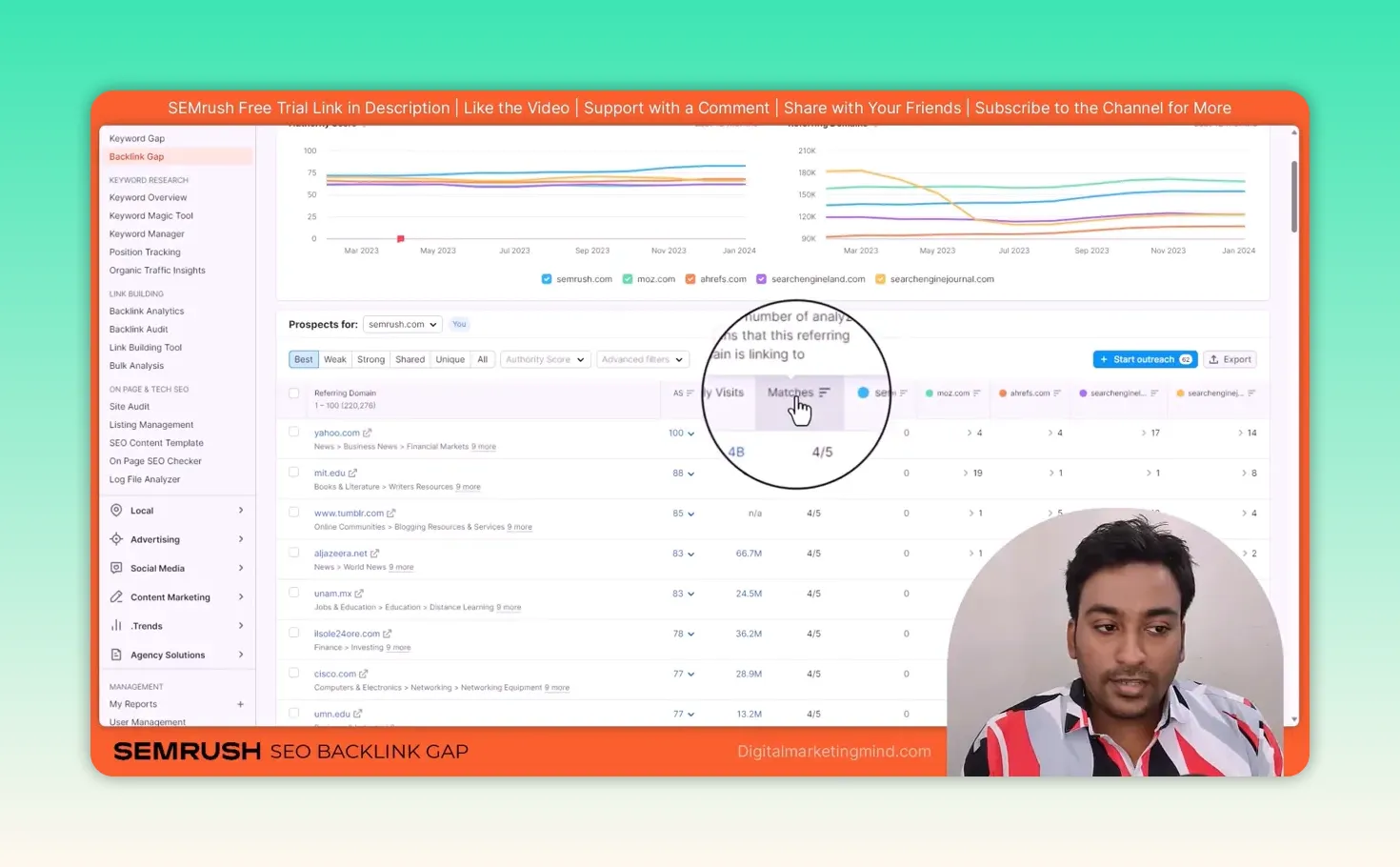
I don’t assume every referring domain is a good link for my business; I check that the site is relevant before choosing a prospect. From there, I export the list or send selected prospects into Semrush’s outreach tools. My guide to Semrush backlinks covers what I do next, from filtering the links to running the outreach.
What is my competitor analysis process?
Get the overall picture, understand the traffic, find proven topics, compare the keyword gaps, then investigate backlink prospects. The goal isn’t to copy a competitor. It’s to use what I learn about the market to make better decisions for my own website. If you also run ads, my guide to Semrush Advertising Research does the same for a competitor’s paid search.
Try Semrush free here (affiliate link).
FAQ
How accurate is Semrush’s competitor traffic data?
It’s an estimate, so a competitor’s real traffic can be higher or lower. Use it to compare sites and spot trends, and use Google Search Console for your own site’s real numbers.
Should I analyse a competitor’s whole domain or one page?
It depends on your question. A whole domain can return millions of keywords, while one relevant page gives a focused list for the topic you’re working on.
Do I need Semrush’s Traffic Analytics add-on?
For most small businesses and blogs, no. Domain Overview, Organic Research, Keyword Gap and Backlink Gap cover most competitor research; the extra traffic data suits large projects.
Keep reading
You Might Also Like
Convert SEO Keyword List to Comma Separated Keywords List
Convert SEO keyword list to comma separated keywords list in one paste. Drop a column from Excel, Ahrefs or Search Console in, get a joined line out.
5 min read
How can I find my domain SEO power?
How can I find my domain SEO power? Score any domain 0-100 on real Ahrefs Domain Rating from the official API, not an estimate. Free, no signup.
6 min read
Ahrefs Domain Authority Checker: Free Chrome Extension
A free Chrome extension I built that shows the Ahrefs Domain Rating of the site you are on, or of any link you right-click, with no login needed.
7 min read