SEO
Semrush Advertising Research: How I Research PPC Ads
How I use Semrush Advertising Research, Ads History, PLA Research and the PPC Keyword Tool to study competitors' paid keywords and ads, then plan my own.

Semrush Advertising Research helps me find the keywords my competitors advertise on, the ads they write and the pages they send paid traffic to. Instead of starting a campaign with nothing but a list of keyword ideas, I can see what is already happening in the paid search results and use that to plan my own campaign. I use four parts of Semrush for this: Advertising Research, Ads History, PLA Research and the PPC Keyword Tool. Each answers a different question, and together they show me where I could advertise and how to organise my keywords.
Affiliate disclosure: links marked “affiliate link” earn me a commission if you buy, at no extra cost to you. How I review tools. I recorded this in January 2024, and my background is SEO rather than running large PPC accounts, so treat this as a research workflow, not a bidding strategy. For my verdict on Semrush as a whole, read my Semrush review.
Prefer to watch? Here is the walkthrough.
Which Semrush tool should you use for PPC research?
| You know… | Tool | What you get |
|---|---|---|
| A competitor’s domain | Advertising Research | Their paid keywords, landing pages, ad copy and history |
| A keyword, but not who bids on it | Ads History | Every domain advertising on it, month by month |
| A product seller | PLA Research | Their Google Shopping keywords and product listings |
| The keywords you want to use | PPC Keyword Tool | Campaigns, ad groups, negatives and an export |
Semrush now groups its tools into toolkits, and the advertising tools sit in their own Advertising section, separate from the SEO plans I compared in my review. Check which plan or toolkit includes them before you rely on them.
How do I find a competitor’s paid keywords with Advertising Research?
I open Advertising Research, enter a competitor’s domain, choose the country I want to target and search. The country matters, because I want to study the paid search market where I’ll actually run ads.
The overview shows how many paid keywords Semrush has found, the estimated paid traffic and an estimated traffic cost. When I looked at semrush.com in the US in January 2024, it had about 1,600 paid keywords, 48,600 estimated visits and a traffic cost of about $244,100, all down on the previous period. I can switch the chart to six months, one or two years, or all time, which shows whether a domain is increasing or cutting back its advertising, rather than judging its strategy from one month.
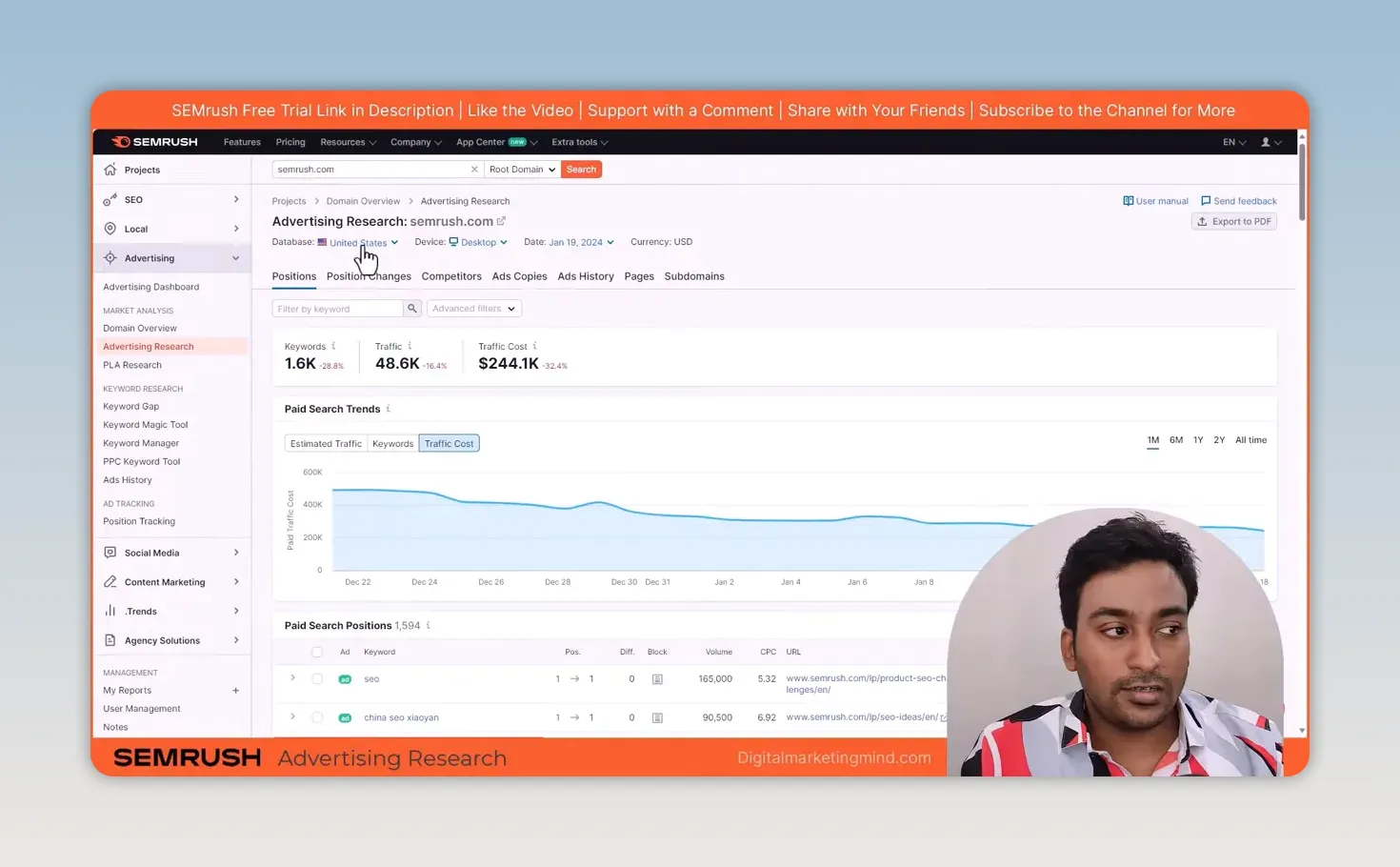
Then I open the Positions table, which shows the search terms behind the domain’s ads and the landing pages they point to. A competitor may send people searching for “seo” to one page and people searching for “local seo” to another; semrush.com sent “seo” (165,000 monthly searches at a $5.32 CPC) to a product page. That link between keyword and page is useful when I plan my own campaign.
The table also shows traffic, cost per click and competitive density. I treat these as research data, not a copy of the competitor’s real Google Ads account. My aim is to find promising opportunities to check further.
How can I spot changes in a competitor’s PPC strategy?
With Position Changes and Competitors. Position Changes lists keywords that are new, improved, declined or lost. If a competitor has started advertising on a new term, I look at that keyword and its landing page. If they’ve lost a position, I know something changed, although the report alone doesn’t tell me why.
The Competitors section lists other domains advertising on similar keywords and how many terms you share. That’s useful because the businesses I think of as competitors aren’t always the ones competing with me in paid search. I can click any of them and repeat the research.
What can I learn from a competitor’s ad copy and landing pages?
How they present their offer for different searches. Under Ads Copies, I can see the ad titles, displayed URLs and the keywords each ad is shown for. I sort by keyword count and click through to see which terms a single ad targets. semrush.com had 1,123 ad copies, and the top one, a “Try Semrush Free” ad, was shown for 17 keywords.
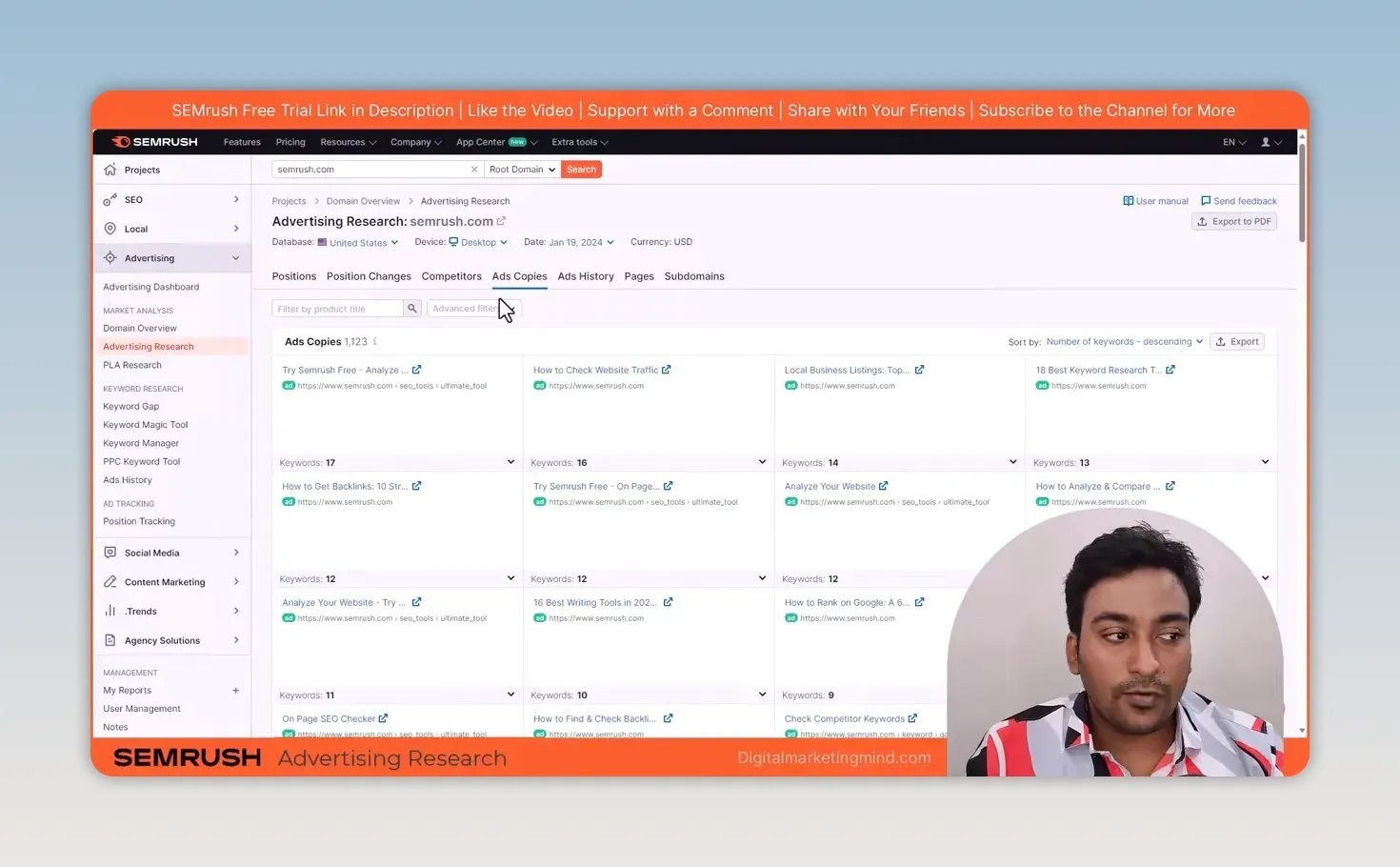
I don’t want to copy somebody else’s ad. I want to understand what they emphasise, which searches they use it for and whether the landing page matches the message. Then I can write an ad that suits my own product and send people to the right page.
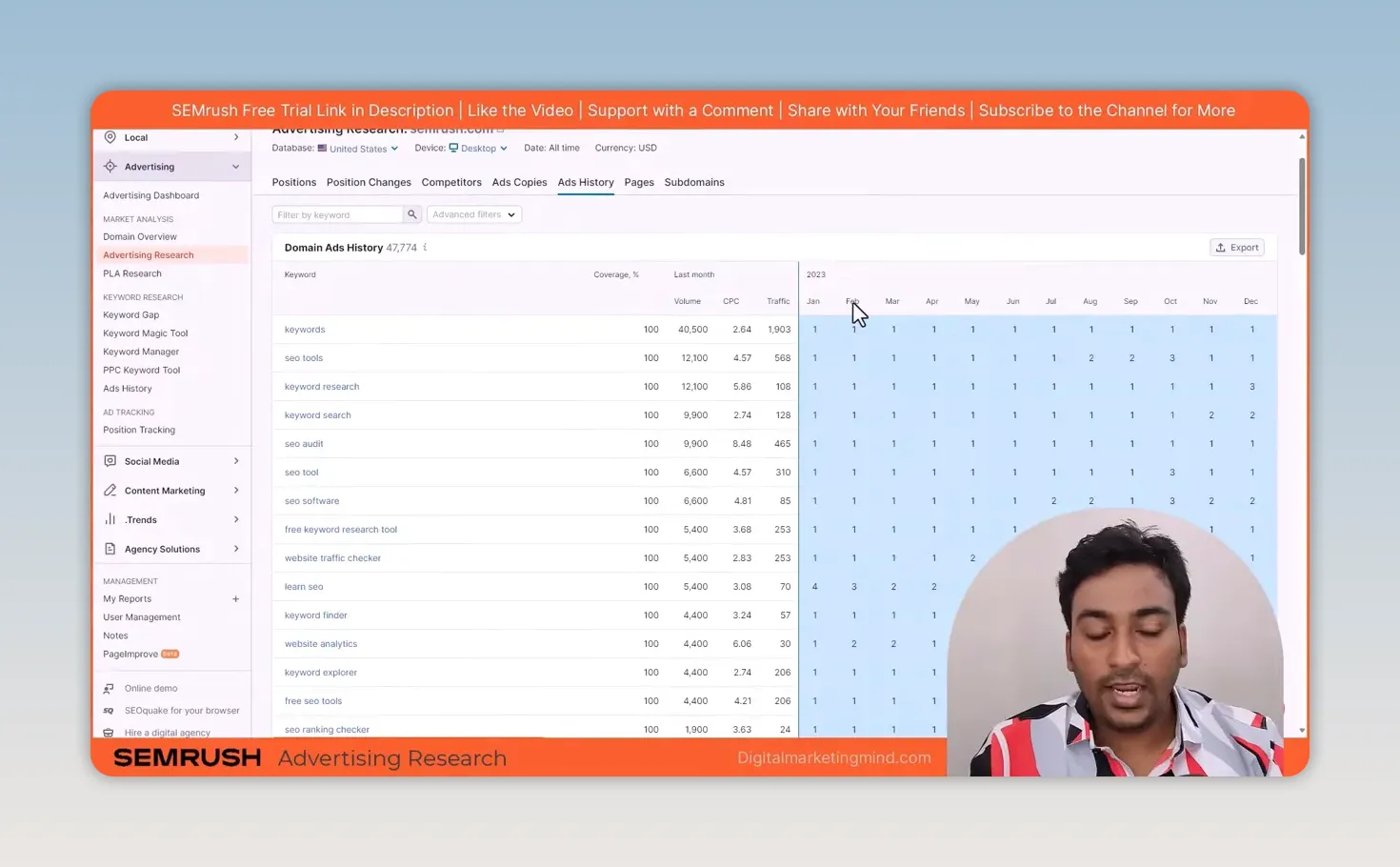
The domain’s Ads History adds time. It shows each keyword with a month-by-month grid of ad positions and a coverage percentage. semrush.com held first position for “keywords” in every month of 2023, while “learn seo” moved between fourth and second. Sorting by lower coverage shows terms where a domain appeared less consistently. That’s something to investigate, but I’d still check the keyword and its cost before deciding to target it.
Pages and Subdomains show where the estimated ad traffic goes, but that depends on your subscription: on the plan I used, both were restricted.
How do I find advertisers when I know the keyword but not the competitor?
With the standalone Ads History tool. Sometimes I have a keyword in mind but don’t know which domains advertise on it, so instead of a domain I enter the keyword. When I searched “loans”, it listed the domains running ads on it with their position history: in December 2023 alone, Semrush estimated American Express at about 854,000 ad visits across 11,232 paid keywords, and LendingTree at about 106,000 across 2,469.
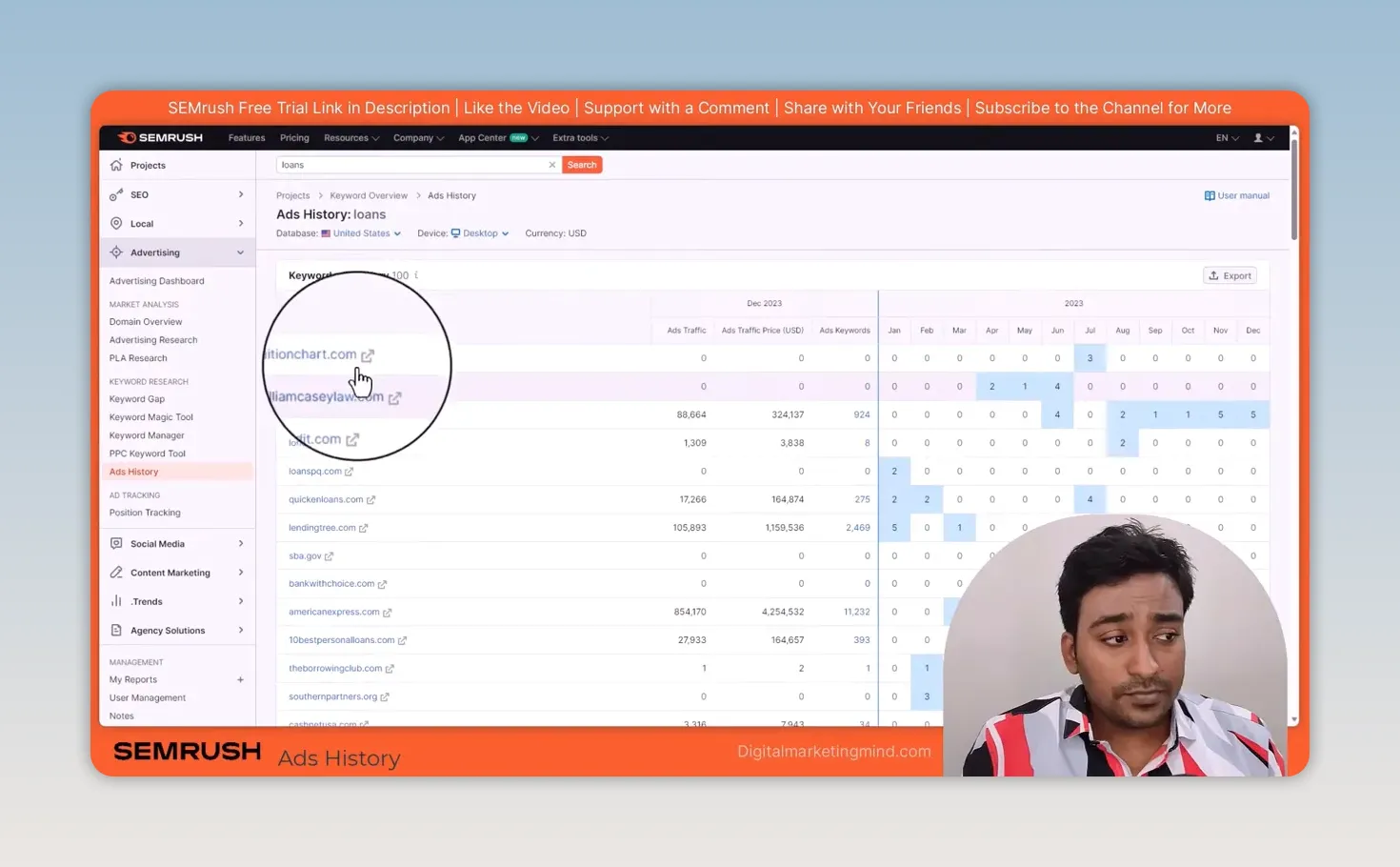
From there, I open an advertiser in Advertising Research and look at its other paid keywords, ads and landing pages. So I use domain research when I already know the competitor, and Ads History when I want to discover who is competing for a particular search.
How do I research competitors’ Google Product Listing Ads?
With PLA Research. PLA stands for Product Listing Ads, the product ads that can appear in Google results when someone searches for something like a digital camera or running shoes. Semrush researches them separately because product listings work differently from text ads; Google’s guide to Shopping ads explains the format itself.
I enter a domain such as eBay and check its PLA keywords, positions, linked pages and changes over time. The Competitors section shows other domains appearing for similar product searches; for eBay, big retailers such as Walmart and Amazon came up, but the same approach works for smaller competitors in your own market.
PLA Copies shows examples of the product listings in the report. eBay’s included a mini excavator listing at $5,599 that was shown for 154 keywords. I use these to study the products and searches involved, not to assume a large retailer’s strategy will work for my business.
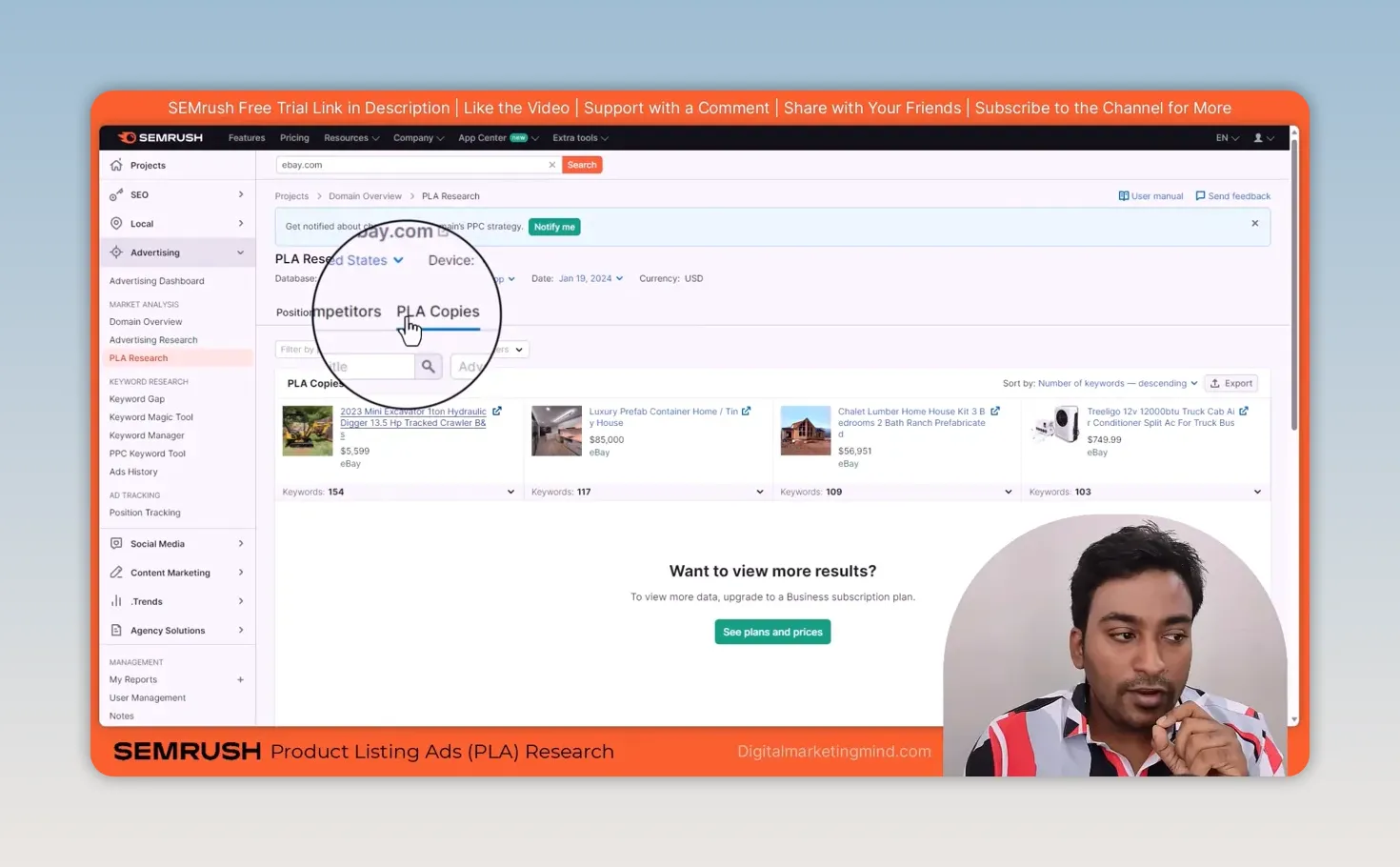
One practical limit: on the Pro plan I used, PLA Research showed only a basic summary, and more detail needed a Business subscription. Check what your plan includes before relying on it for a project.
How do I turn my research into organised PPC keyword groups?
With the PPC Keyword Tool. Finding keywords is one job; preparing them for a campaign is another. I open the tool and use an existing project or set up a new one.
I can add keywords manually, bring them in from Semrush reports (phrase match, related, a domain’s organic keywords or its paid keywords), or import a text or Excel file, such as one exported from Google Ads Editor. In my example, I brought in marketing-related suggestions from Semrush, selected keywords and chose a target country, with city or state targeting and auto-grouping as options.
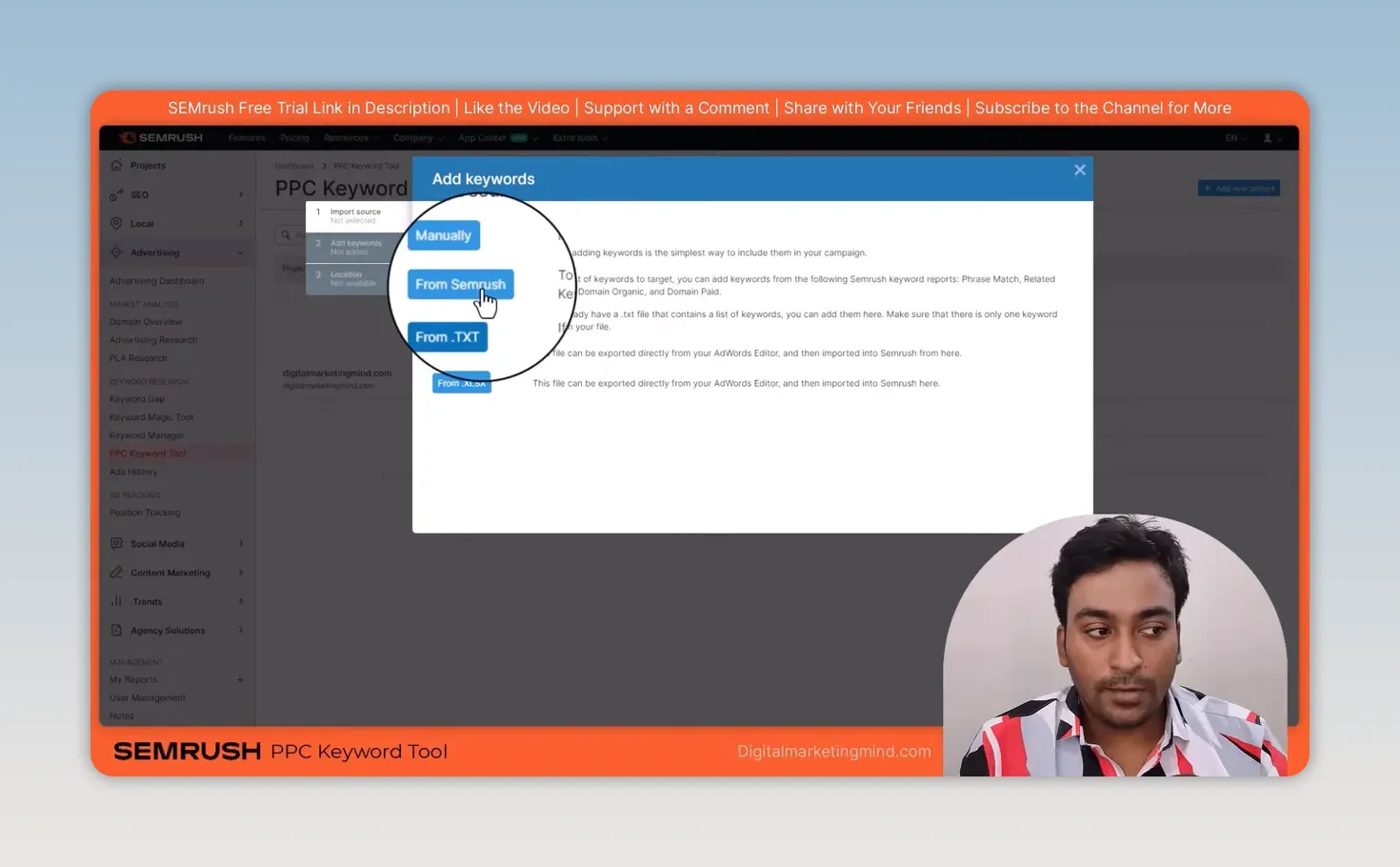
Once the keywords are in, I create campaigns and ad groups, add more keywords and move terms between groups. The tool finds duplicates, cleans up the list, adjusts match types and moves unsuitable terms to a negative keyword list. It also finds keywords that overlap between ad groups, so I can review them as group-level negatives.
That matters because a big list of keywords isn’t a usable campaign yet. I want groups I can understand and manage. When they’re organised, I export the data in a format ready for the PPC campaign. If you still need to build the initial list, my ChatGPT prompts for keyword research and my Google Keyword Planner guide cover that earlier step.
What is my process before I spend money on PPC ads?
- Research a known competitor’s paid keywords and landing pages in Advertising Research.
- Check their position changes, other advertisers, ad copy and ad history.
- If I have a keyword but no competitor, start with Ads History instead.
- For product searches, check PLA Research.
- Put the useful keywords into the PPC Keyword Tool, organise the groups and review negatives before exporting.
Semrush gives me a starting point for better decisions. It doesn’t tell me a keyword will be profitable for my business. I still need to choose relevant terms, make a suitable offer and build a page that helps the person who clicked. That’s how I turn competitor research into my own campaign rather than simply following somebody else’s. Ads and SEO work well together, too: my guide to SEO challenges explains why I sometimes run ads while SEO is still building, and my Semrush competitor analysis covers the organic side of the same research.
Try Semrush free here (affiliate link).
FAQ
Does Semrush show a competitor’s real Google Ads spend?
No. Traffic, traffic cost and CPC are Semrush’s estimates from its own data, not figures from the competitor’s account. Use them to compare advertisers and spot trends.
What is the difference between Advertising Research and Ads History?
Advertising Research starts from a domain and shows its paid keywords and ads. Ads History starts from a keyword and shows every domain advertising on it.
Can I export keywords from Semrush into Google Ads?
Yes. The PPC Keyword Tool exports your organised campaigns, ad groups and negative keywords in a format you can import into your PPC campaign.
Keep reading
You Might Also Like
Convert SEO Keyword List to Comma Separated Keywords List
Convert SEO keyword list to comma separated keywords list in one paste. Drop a column from Excel, Ahrefs or Search Console in, get a joined line out.
5 min read
Semrush Competitor Analysis: Find Their Keywords and Links
How I do Semrush competitor analysis with five tools: Domain Overview, Traffic Analytics, Organic Research, Keyword Gap and Backlink Gap, and what to skip.
9 min read

Semrush Keyword Research: How I Find Keywords I Can Rank For
How I do Semrush keyword research: Keyword Magic Tool filters, Keyword Overview checks, Keyword Manager clusters, then tracking rankings after publishing.
10 min read