SEO Tool Reviews
Subscribr Review: AI YouTube Scripts Built on Your Audience
My Subscribr review from a week on my Tamil and English channels. Audience personas, channel voice, outlier research, and an outline before every script.

In this Subscribr review, I tested an AI YouTube tool against a problem I know well: it is easy to generate a script, and much harder to write one that understands the people you are trying to help. Subscribr builds an audience profile and a channel voice first, researches ideas and outlier videos, and makes you edit an outline before it writes the script. That workflow is the difference from ChatGPT or Gemini with a long prompt. I tested it for about a week, so this is a first look, not an expert verdict.
Affiliate disclosure: links marked “affiliate link” earn me a commission if you buy, at no extra cost to you. That didn’t change what I wrote. How I review tools. I recorded this test in November 2025. Prices were checked on 28 September 2026.
Prefer to watch? Here is the full test.
Jump to a part of the video:
- 02:03 Audience analysis
- 04:42 Channel voice
- 05:38 Finding video ideas
- 11:34 Building a YouTube script
- 15:57 Generating the outline
- 19:04 Competitor research
- 20:01 Outlier videos
- 26:12 Subscribr vs generic AI
What changed since I tested it?
The product and the plans. When I recorded this, Subscribr was an ideas and scripting tool, and it was on an AppSumo lifetime deal. On 28 September 2026 its pricing page sells monthly plans that also produce finished videos, including faceless videos and AI avatars, and scriptwriting and competitor tracking are not on the free plan. I tested the ideas, research and scripting side described below, not the video production. Prices are further down.
How does Subscribr get to know your channel?
By building an audience profile and a channel voice before you ask for anything. Connect a YouTube channel and Subscribr creates a project for it. I connected my Tamil digital marketing channel and my English channel, where I cover SaaS, AI and SEO, and I pick the channel when starting a new chat, so an idea for one doesn’t begin with the other’s context.
The interface is straightforward. The important part is what happens before the script. In my opinion that background context matters more than another title or description generator, because a generic video is unlikely to help if you haven’t understood who it is for.
Does its audience persona match your own analytics?
In several ways, yes. I had already gone through my YouTube Analytics by hand, because I felt I was making some of the wrong content, and worked out who my audience really was. Then I compared that with the persona Subscribr generated, and found several similarities.
It described a tech-savvy small business owner or entrepreneur interested in SaaS tools and AI-driven SEO, who wants practical advice without marketing fluff, clear tutorials and trustworthy product reviews. That is close to the audience I have been trying to serve.
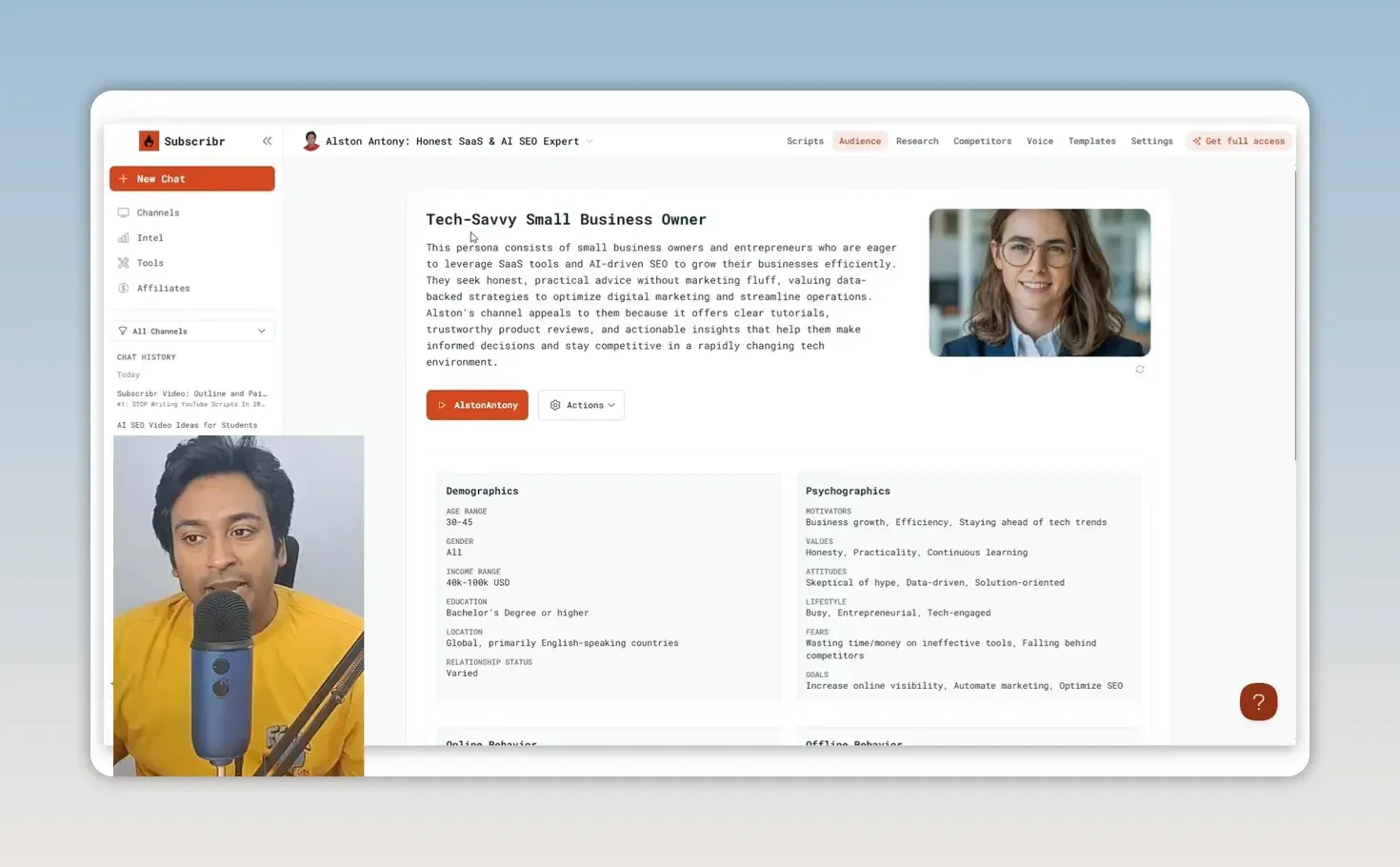
The profile also covers goals, fears, motivations, behaviour and questions, and you can refresh or edit it. That matters, because an AI-generated persona shouldn’t replace what you know about your own audience. If you want the audience’s own words rather than a generated profile, my BuzzAbout review covers researching real discussions.
Will the channel voice make the script sound like you?
It helps, but it can’t do it alone. Subscribr built a voice profile from one of my most popular videos; you can also build one from writing samples or another channel. Future chats and scripts then use the audience profile and the selected voice, instead of starting from a generic prompt every time.
That is useful preparation, but I still read and change the output. A voice profile can’t supply my experience or decide which claims I’m comfortable making. I want the script to help me explain something clearly, not make me sound like I’m reading someone else’s words, which is also why I keep a list of common ChatGPT words to avoid.
How did Subscribr find video ideas for your audience?
By mining growing channels and outlier videos, then tying them back to my channel. Its video-ideas prompt looked at growing channels, competitor content and videos performing unusually well. The suggestions included tool comparisons, AI release reviews, a free-tool tutorial, a technical setup tutorial and a course-style topic.
Some made sense, because I have made reviews, comparisons, SEO tutorials and technical guides before. One used Jasper, which I’d probably swap for a tool more relevant to what I cover now. That’s the point: the ideas are directions to judge, not a content calendar to accept.
Then I changed direction and asked about YouTube for business. Subscribr brought the conversation back to small business owners, AI tools and SEO and offered titles. I liked that flexibility; I wasn’t locked into the first five ideas.
What happens when you turn an idea into a script?
It asks planning questions first. I chose a title about YouTube SEO for small businesses and set a target length of 1,600 words. Then it asked: is this a tutorial or another format? Which tools will you demonstrate? Which business niche? What outcome? Do you have a case study?
I chose a tutorial, entered Subscribr and Google Search Console as the tools, and used a restaurant as the example business. I didn’t have a case study, so I wasn’t going to pretend I did.
You can also add research as URLs, text, files or selected YouTube videos. That is where I would spend extra time on a serious project: the more relevant material you give it, the better its starting point. It’s the same approach I take with keyword research, where my ChatGPT prompts for keyword research start from the topic and the people searching.
Why edit the outline before generating the full script?
Because it is cheaper to fix a plan than a finished script. Subscribr doesn’t turn your answers straight into a script. It first produces an outline with a hook and sections, which you can edit, and you can ask the chat to strengthen the hook before generating the draft.
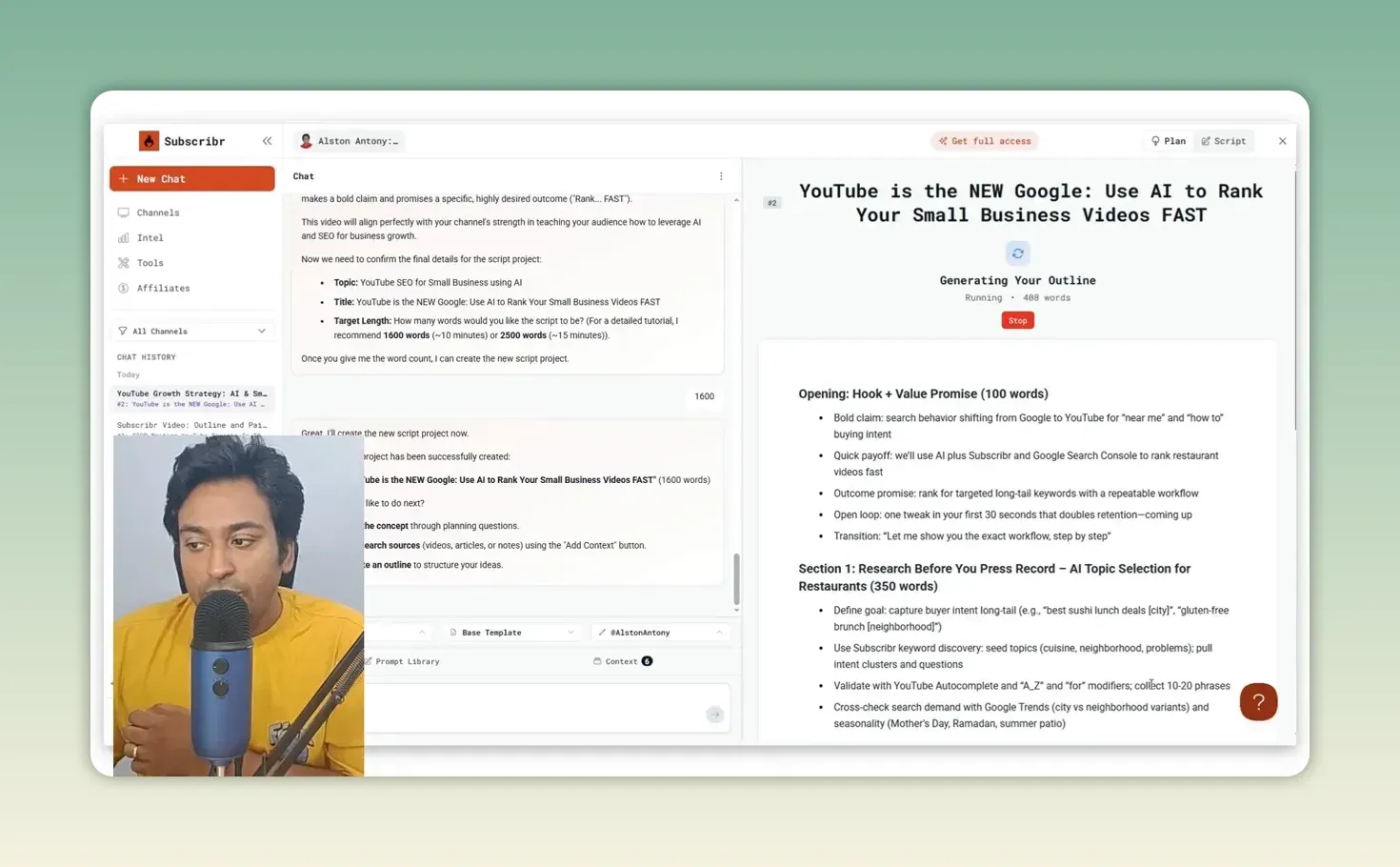
This is one of the strongest parts of the workflow. I can check whether the promise is realistic, whether the example makes sense, and whether the order will help someone follow along. The outline in my test is a good example of why: its opening promised “one tweak in your first 30 seconds that doubles retention”, which is the kind of claim I would cut unless I could back it up.
Subscribr then writes from that plan, using the audience, voice, instructions and research. The restaurant draft gave me a hook and a step-by-step direction, but it was still a starting point: I’d add my own explanations, remove anything I couldn’t support, and adjust the talking points. You can go back to the plan, or clear the script and generate again.
Can competitor and outlier research give you ideas without copying?
Yes, if you use it to find demand rather than videos to clone. The competitor section lets you browse channels it finds or add your own, filter videos by recency and outlier performance, and open a video to see its description, content and similar videos. You can also get a weekly email of competitor highlights.
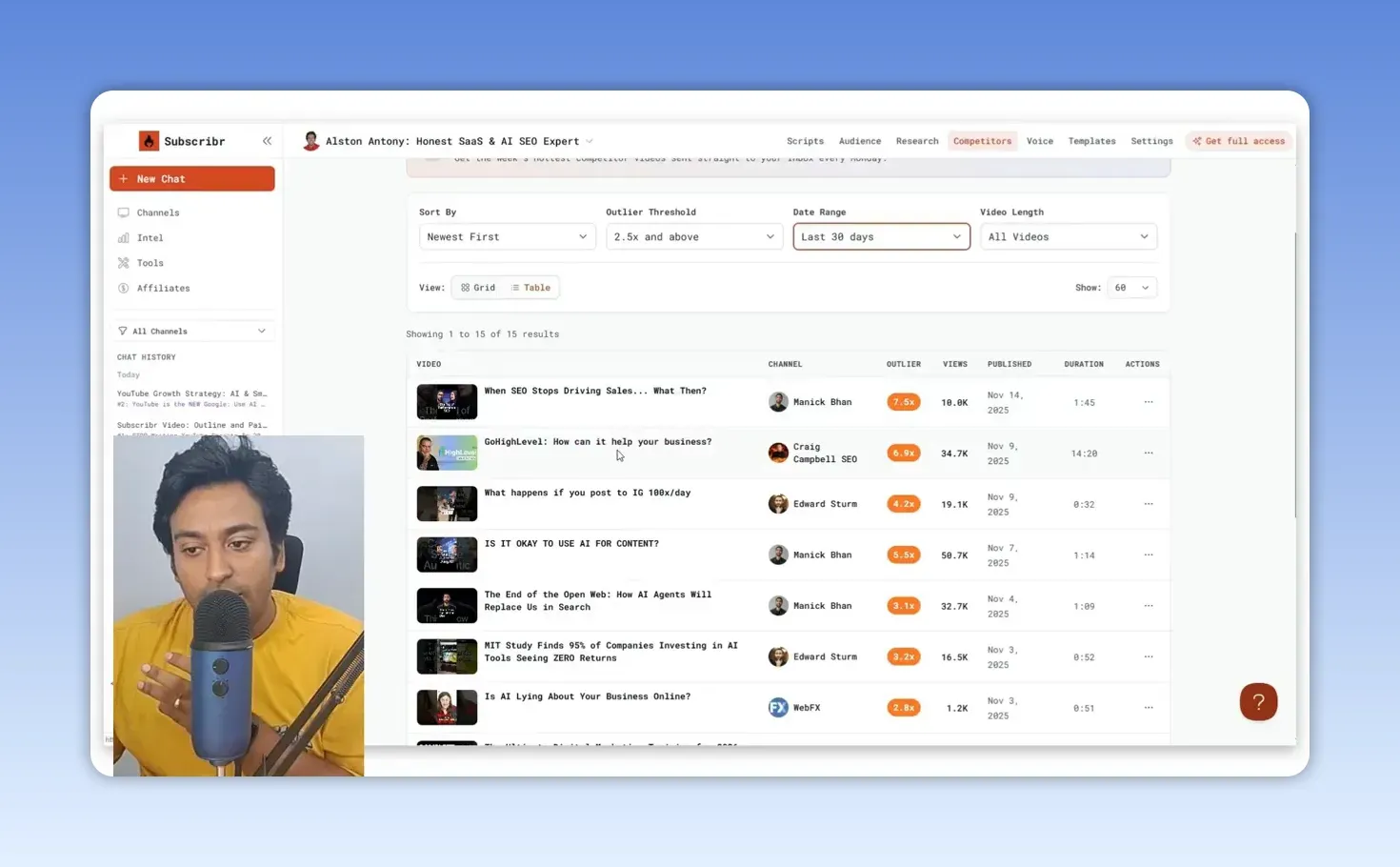
In one example I opened a software-related outlier and asked Subscribr what worked, what could improve and how the subject might fit my audience. That is how I would use it: find demand, understand why a topic worked, then make my own version with an honest angle.
There is also broader channel intelligence for discovering related channels and their outliers. One part didn’t work as expected at first in my test, although the search later returned related channels. You can inspect channels and bookmark them for later.
Are the templates and smaller tools worth using?
The templates, yes; the small tools, only for quick jobs. There are templates for different video formats, including reviews, which you can use as they are, clone and edit, or build from scratch. The review template looked detailed enough that I wouldn’t rush to write my own, but I like having the control.
There are also small tools for video breakdowns, descriptions, titles, tags, keywords, thumbnails and on-screen text. They are convenient for a single task, but not the reason to use Subscribr. Its keyword suggestions, for example, didn’t show the search volume or popularity score I wanted; if quick data were the main need, I’d compare it with vidIQ.
How much does Subscribr cost?
There is a free plan, and paid plans start at $99 a month. On 28 September 2026, Subscribr’s pricing page listed:
| Plan | Monthly | YouTube channels | Script credits/month | Thumbnails/month |
|---|---|---|---|---|
| Free | $0 | 1 | None | None |
| Growth | $99 | 3 | 60 | 150 |
| Pro | $249 | 5 | 180 | 500 |
| Max | $499 | Unlimited | 300 | 1,000 |
The free plan includes 3 idea batches and 10 intel searches a month. Annual billing gives two months free, and every paid plan also includes minutes of finished-video generation. The AppSumo lifetime deal I tested around, with tiers from $79 to $2,169, was marked sold out on 28 September 2026.
What I liked and what I didn’t
What I liked:
- The audience persona had several similarities with my own analytics, and it is editable.
- Every chat and script uses the channel’s audience and voice.
- Planning questions and an editable outline come before the script.
- Outlier research shows demand without pushing you to copy.
What I’d watch:
- Outlines and drafts can include claims you would need to cut.
- Keyword suggestions had no search volume or popularity score.
- One channel intelligence feature didn’t work at first.
- Scriptwriting now starts on the $99 plan.
Is Subscribr worth it compared with free AI tools?
If you will follow its method, yes. You can give ChatGPT, Gemini or NotebookLM enough sources and ask for ideas or a script, or set up a custom GPT with your channel context. Subscribr’s difference is that it arranges those steps into one channel-focused process:
- Understand the audience and the channel voice.
- Research ideas, competitors and outlier videos.
- Add your own sources and answer the planning questions.
- Edit the outline before generating the script.
- Use the draft as preparation, then add your own judgement.
I don’t read scripts word for word most of the time; I prefer points that help me explain a topic from my own experience. If you only want a quick description or raw keyword data, some features will feel redundant. If you want ideas and scripts that keep coming back to your channel and audience, that is where it feels different. Once the video is recorded, my Video To Blog AI review covers turning it into a blog post.
FAQ
Can I use Subscribr for more than one YouTube channel?
Yes. I connected my Tamil and English channels and picked the relevant one when starting a project. On today’s plans, the free plan covers one channel and Growth covers three.
What is Subscribr’s main advantage over a generic AI prompt?
The combination of channel-specific audience and voice profiles, research, planning questions and an editable outline before the script is written.
Connect one channel, compare its audience persona with your own analytics, and plan one video through the outline before you trust the script. Try Subscribr here (affiliate link).
Keep reading
You Might Also Like
Video To Blog AI Review: 70+ Posts From My Own Videos
My Video To Blog AI review after 70+ posts from my own videos: custom instructions, screenshots, chapters as outline, and my checks before publishing.
10 min read
WordRocket Review: 17,500 Words for $0.80 in API Costs
My WordRocket review. Four test articles came to about 17,500 words for $0.80 in OpenRouter usage. Useful keyword research; every draft needed checking.
9 min read
BuzzAbout Review: Audience Research From Real Discussions
My BuzzAbout review. I used Reddit, YouTube and Instagram discussions to find pain points, sentiment and audience language, then checked the source posts.
10 min read