SEO Tool Reviews
WordRocket Review: 17,500 Words for $0.80 in API Costs
My WordRocket review. Four test articles came to about 17,500 words for $0.80 in OpenRouter usage. Useful keyword research; every draft needed checking.

In this WordRocket review, I generated four test articles, a listicle, a product review, a product roundup and an informational post, totalling about 17,500 words for roughly $0.80 in OpenRouter usage, on top of the price of WordRocket itself. The keyword research, AI search questions, brand voice and sitemap-based internal linking were the strongest parts. Every article was a draft that needed checking: one had the wrong year, another invented hands-on experience, and several showed broken images.
Affiliate disclosure: links marked “affiliate link” earn me a commission if you buy, at no extra cost to you. That didn’t change what I wrote, including the mistakes I found. How I review tools. I tested WordRocket on 27 March 2026. Prices were checked on 24 September 2026.
Prefer to watch? Here is the full test.
How does WordRocket work, and what did 17,500 words cost?
WordRocket gives you the interface and workflow, and you bring your own API key for the AI models, paying the model provider separately. I connected OpenRouter; there’s also a Gemini API setting.
After generating one article of about 2,500 words and three of about 5,000, around 17,500 words plus a little research for an automation, my OpenRouter usage came to roughly $0.80.
That’s my result, not a price per article. Cost changes with the writing model, the research model, the length and your settings, so check OpenRouter’s model pricing before you estimate a bigger project. Then add the cost of WordRocket itself.
What should you set up before your first article?
An onboarding wizard walks you through the connections. I started with API settings, then the sitemap, publishing connections and brand voice.
The sitemap matters most for SEO. Add your site’s sitemap and WordRocket collects its URLs as internal-link candidates. It found 262 URLs on Coimbatore Junction and around 130 on another of my sites. That beats writing an article with no connection to the rest of the site.
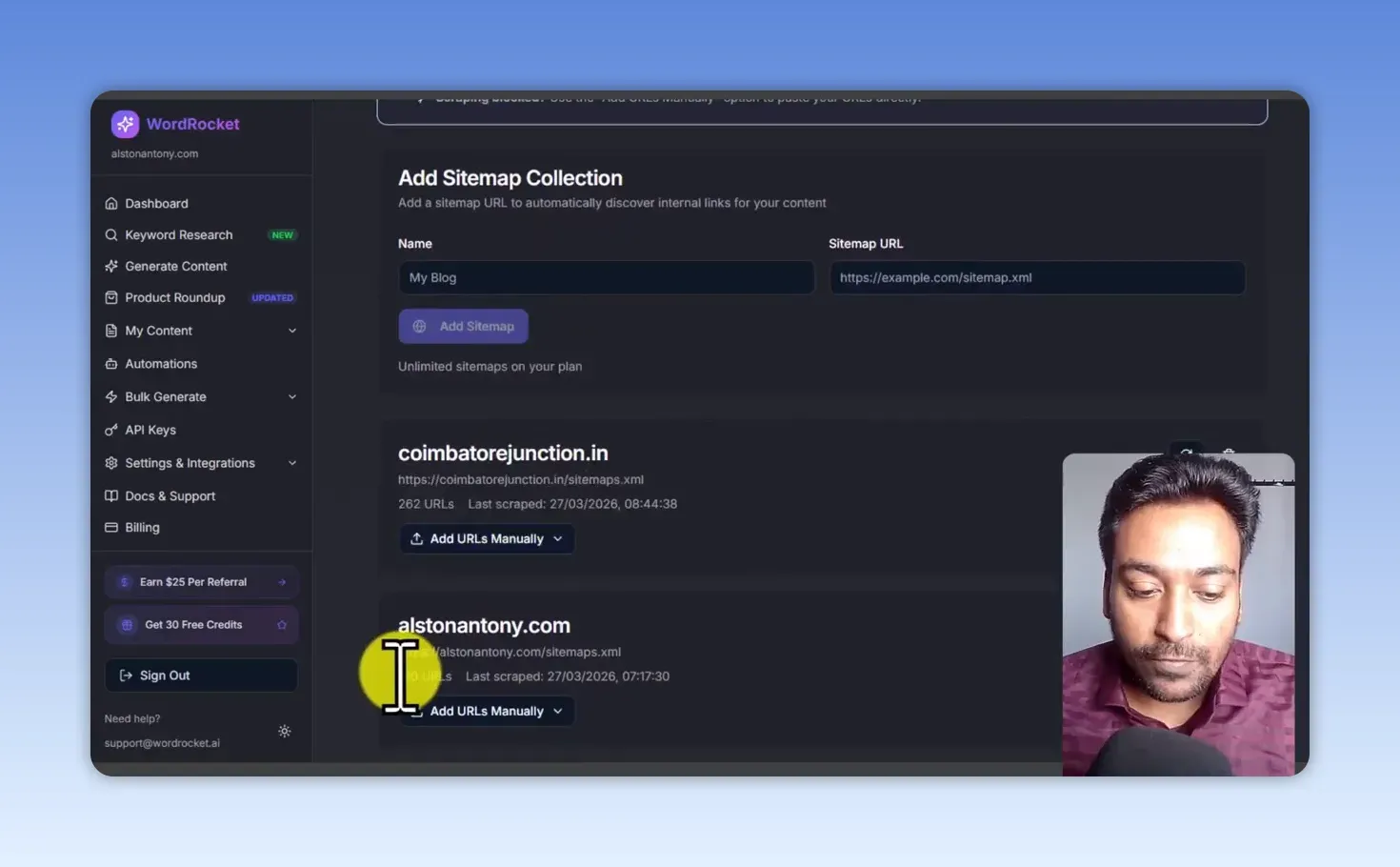
Settings also cover WordPress and Ghost publishing, client profiles for separate projects, a white-label option, and an MCP server connection for tools such as Claude Code. I was testing with one project, so I didn’t need client profiles.
Then spend time on the brand voice. I added a description, tone guidelines, a writing style, and phrases from my own spoken content. Ticking “first person” is not the same as teaching a tool how you write; it needs context and examples. I also saw wording I dislike, including far too many em dashes, so I’d put that into the brand voice and still edit every draft. My list of common ChatGPT words to avoid is the kind of language I look out for.
Is WordRocket’s keyword research useful?
Yes, more than I expected. Set a location, filter by word count, search volume and keyword difficulty, and switch between related and long-tail ideas.
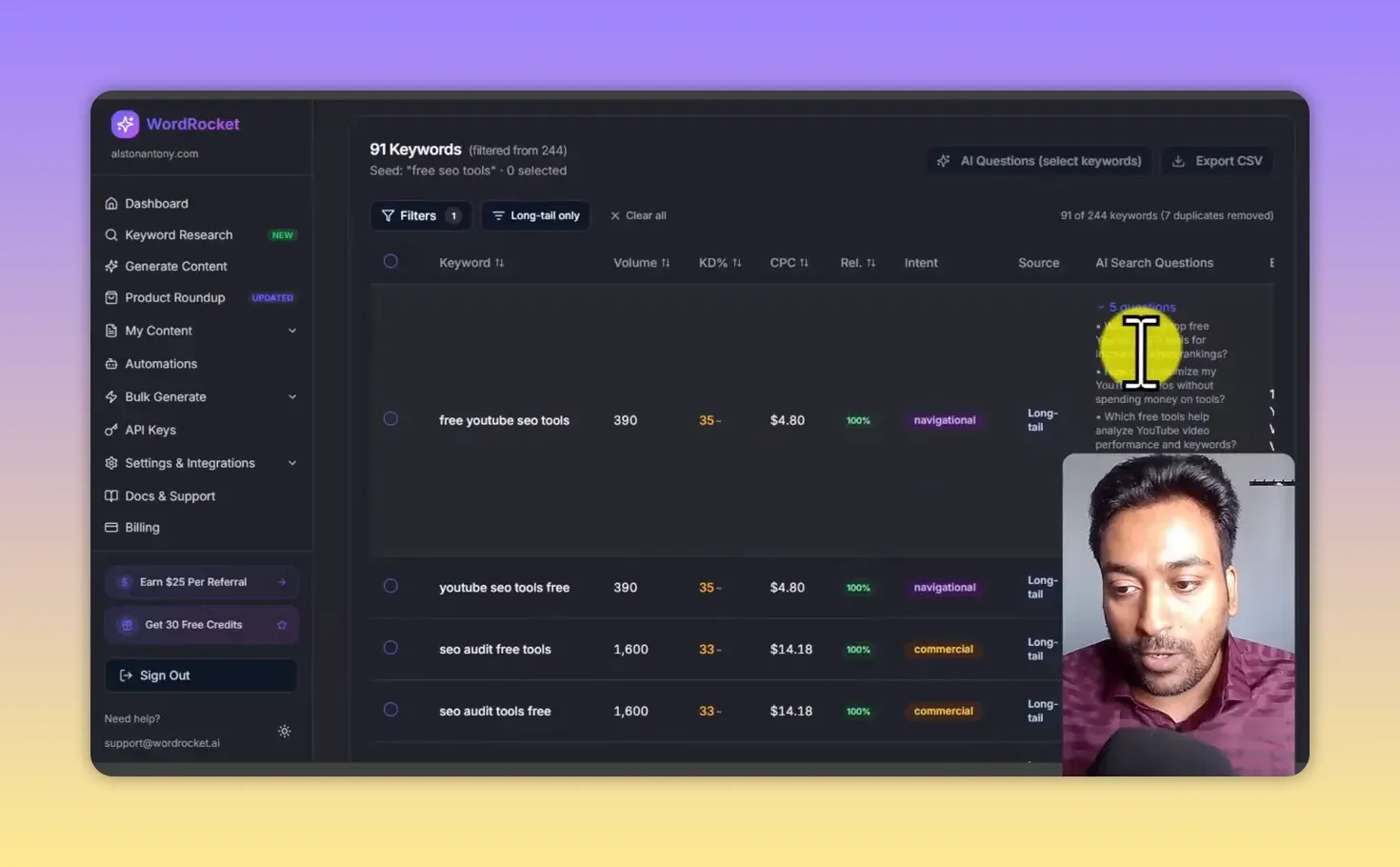
My seed “free seo tools” returned 244 keywords, 91 after I filtered to long-tail only. Each row shows volume, difficulty, CPC, relevance and intent: “free youtube seo tools”, for example, at 390 searches, KD 35 and a $4.80 CPC. Results weren’t always fast; I waited longer than expected and tried again before they appeared.
The feature I like most is AI Enrich, which writes the questions people might ask an AI search engine about a keyword. For “free youtube seo tools” it gave five, such as which free tools help analyze YouTube video performance. One of those makes a sharper article angle than the broad keyword. You can generate questions for many keywords at once and export the lot as CSV.
The keyword library saves your searches and datasets, though I didn’t see the generated questions saved there. If question-led research is what you mainly want, my Answer Socrates review covers a tool built for it.
How much control do you get over research and writing?
A lot. In the content generator you enter a topic and main keyword, turn on live research, and add separate web-search terms if a different query brings better context. You choose the writing and research models, can supply your own outline, set the article type and audience, pick your brand voice, and ask for up to 5,000 words.
Competitor analysis cuts both ways. You supply competitor URLs yourself; it doesn’t pick them. That’s more work, but the top results aren’t always the right models. For a “best tools” article, a product homepage helps less than a good comparison, so I’d rather choose the sources and hand them over.
Article elements add more choices: GEO optimization, first-person perspective, stories, a hook, readability level, sitemap-based internal links, a cover image, extra images, and instructions for image text and size. You can even ask for an interactive HTML element. I tried one for SEO tool types and got a working-looking component, but I’d test its functions and numbers before putting it on a live page.
What quality did the four articles have?
They were drafts, each with something I’d have to fix before publishing. A long article with tables and images can look finished and still need careful work.
The listicle
My free SEO tools article had a quick answer, key takeaways, a comparison table, internal links, FAQs, references and metadata. One section treated the current year as 2024 when I was testing in 2026, some images didn’t display, and I’d edit the wording.
The single-product review
The drone review had feature sections, pros and cons, who should buy or skip it, FAQs and a verdict. It also used product images I hadn’t supplied and included a “hands-on experience” section. I’d never publish that as my experience without testing the product, and I’d check every image against the real thing.
The product roundup
The best drones article had a cover image, a quick comparison table, product sections, pros and cons and a disclaimer. The year was right this time, but several images looked broken in the preview. I didn’t establish whether that was only a preview issue.
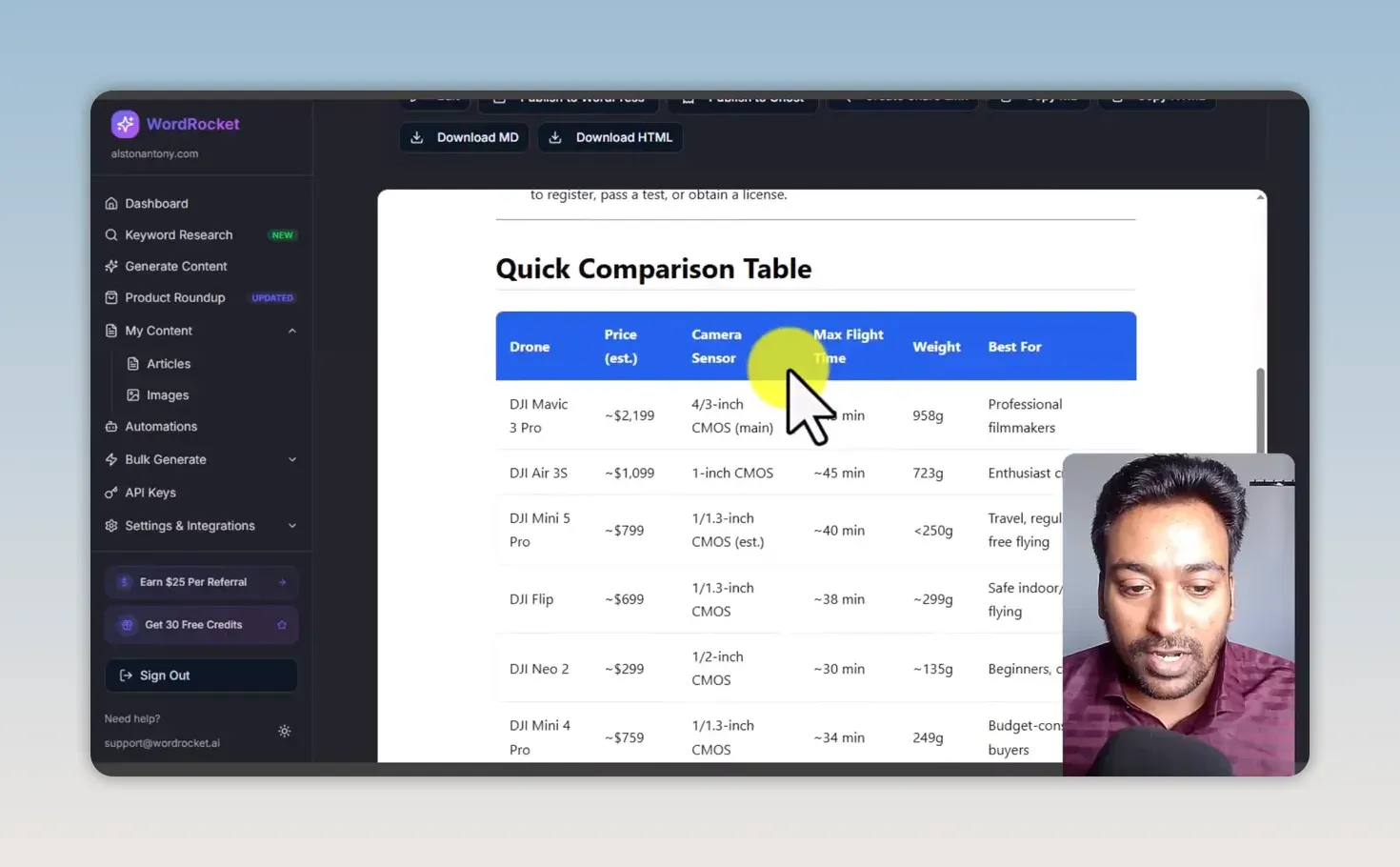
The table layout is useful, but the prices are marked as estimates and every spec needs checking before it goes live.
The informational article
My “what is an AI SEO tool” article explained the topic and included example tools. I tested its interactive element in an HTML previewer; it showed results, but I wouldn’t treat any generated detail as verified.
WordRocket keeps every article and image, along with the prompt that produced it, and exports to Markdown or HTML or publishes to WordPress or Ghost. My conclusion: verify dates, sources, product claims, images, links and any suggestion of first-hand experience. That matches Google’s guidance on helpful, reliable content: the finished page has to serve the reader, not fill a schedule.
Should you let WordRocket publish without review?
No. Automation can find topics, write articles and publish them. You set a niche, subtopics, excluded topics, topic sources, frequency, time zone, models, brand voice, length and images, then choose one of three levels: suggest topics for your approval, generate drafts, or publish automatically to a connected WordPress or Ghost site.
I chose the first level, where it suggests ideas and waits for my approval. After finding a wrong year and a section implying product experience I didn’t have, I’m not a fan of fully automated publishing. There’s also a bulk generator for batches of topics and keywords, which I haven’t tested because it’s not how I like to work.
How much does WordRocket cost?
WordRocket has a free plan, monthly plans from $10 and lifetime plans from $199, and on every plan you pay separately for the AI models through your own API key. From WordRocket’s pricing section, checked 24 September 2026:
| Plan | Price | Articles | Keyword research | Automations |
|---|---|---|---|---|
| Free | $0 | 10 a month | None | None |
| Starter | $10/month | Unlimited | None | None |
| Pro | $20/month or $199 lifetime | Unlimited | 20 searches a month (monthly), 10 (lifetime) | 5 (monthly), 2 (lifetime) |
| Premium | $49.99/month or $249 lifetime | Unlimited | 50 a month (monthly), 25 (lifetime) | 15 (monthly), 10 (lifetime) |
| Lifetime Agency | $399.99 once | Unlimited | 35 a month | 15 |
Keyword research, the feature I found most useful, starts on Pro. See the WordRocket deal here (affiliate link).
WordRocket pros and cons
What I liked:
- About $0.80 in API usage for roughly 17,500 words in my test
- Keyword research with filters, and AI Enrich questions for sharper angles
- Brand voice built from your own tone, style and phrases
- Sitemap-based internal linking
- Fine control over research, models, outline, audience and article elements
- A topic-approval mode instead of forced auto-publishing
What held it back:
- A wrong year in one article and invented hands-on experience in another
- Images that didn’t display or weren’t the real product
- Em dash-heavy wording that needs editing
- Competitor URLs have to be found and added by hand
- Keyword research was sometimes slow and doesn’t save the generated questions
- Model costs are separate from the WordRocket price
Is WordRocket worth it?
For the workflow, yes: the keyword ideas, brand voice, internal linking and low API cost in my test all earn their place. For publishing quality, be cautious. Treat every article as a draft, check it line by line, and keep automation on topic approval.
If you buy it, start using it soon after purchase and review real output for your own niche; that’s the only way to know it fits. You can get WordRocket here (affiliate link). For contrast, the AI article writer in my ClickRank review failed outright. If you have your own videos to work from, my Video To Blog AI review covers turning them into drafts instead.
FAQ
Does WordRocket include the cost of the AI models?
No. You connect your own API key, such as OpenRouter or Gemini, and pay that provider for model usage separately from WordRocket.
Is $0.80 the guaranteed cost for 17,500 words?
No. That’s roughly what my test used. Model choice, research, length and settings all change the API cost.
Keep reading
You Might Also Like

Video To Blog AI Review: 70+ Posts From My Own Videos
My Video To Blog AI review after 70+ posts from my own videos: custom instructions, screenshots, chapters as outline, and my checks before publishing.
10 min read
LeadSniper Yellow Pages Review: Finding Local SEO Clients
My LeadSniper Yellow Pages review. One plumber search in New York gave 41 leads with phones, websites and social links, and how I qualify them as clients.
9 min read
LeadSniper Google Search Scraper Review: B2B Prospecting
My LeadSniper Google Search scraper review. Two footprints for doctors in Chennai found 53 LinkedIn leads, exported to Excel, and what to check first.
9 min read