SEO Tool Reviews
Answer Socrates Review: 1,326 Keyword Ideas From One Topic
My Answer Socrates review. One search for AI for business became 1,326 keyword ideas in 206 clusters. What worked, what didn't, and the free plan limits.

In this Answer Socrates review, one search for “AI for business” produced 829 questions. Recursive searching and the other question sources took it to 1,326 keyword ideas, which clustering grouped into 206 topics. It is best as a question discovery and content planning tool: recursive questions and clustering are the standouts, while the intent labels and some data panels need checking by hand. The free plan is enough to try the workflow before you pay.
Affiliate disclosure: links marked “affiliate link” earn me a commission if you buy, at no extra cost to you, and my code ALSTON10 gives you 10% off for three months. Neither changed what I wrote, including what didn’t work. How I review tools. Prices were checked on 24 September 2026.
Prefer to watch? Here is the full test.
What is Answer Socrates?
Answer Socrates is a web-based keyword research and content idea tool built around the questions people ask. There is nothing to install and no proxies to set up: you create an account, enter a topic, pick a country and language, and search.
Instead of one flat list, it splits results into sections:
- Question keywords
- Google’s People Also Ask questions
- Recursive questions
- Social media questions
- Preposition and comparison keywords
- Alphabet (“Letters”) suggestions
- Related queries
- Keyword clustering
How many questions did one search find?
My first search for “AI for business”, set to the United States and English, returned 829 questions in about four to five seconds. That is already a lot of content ideas from one broad topic.
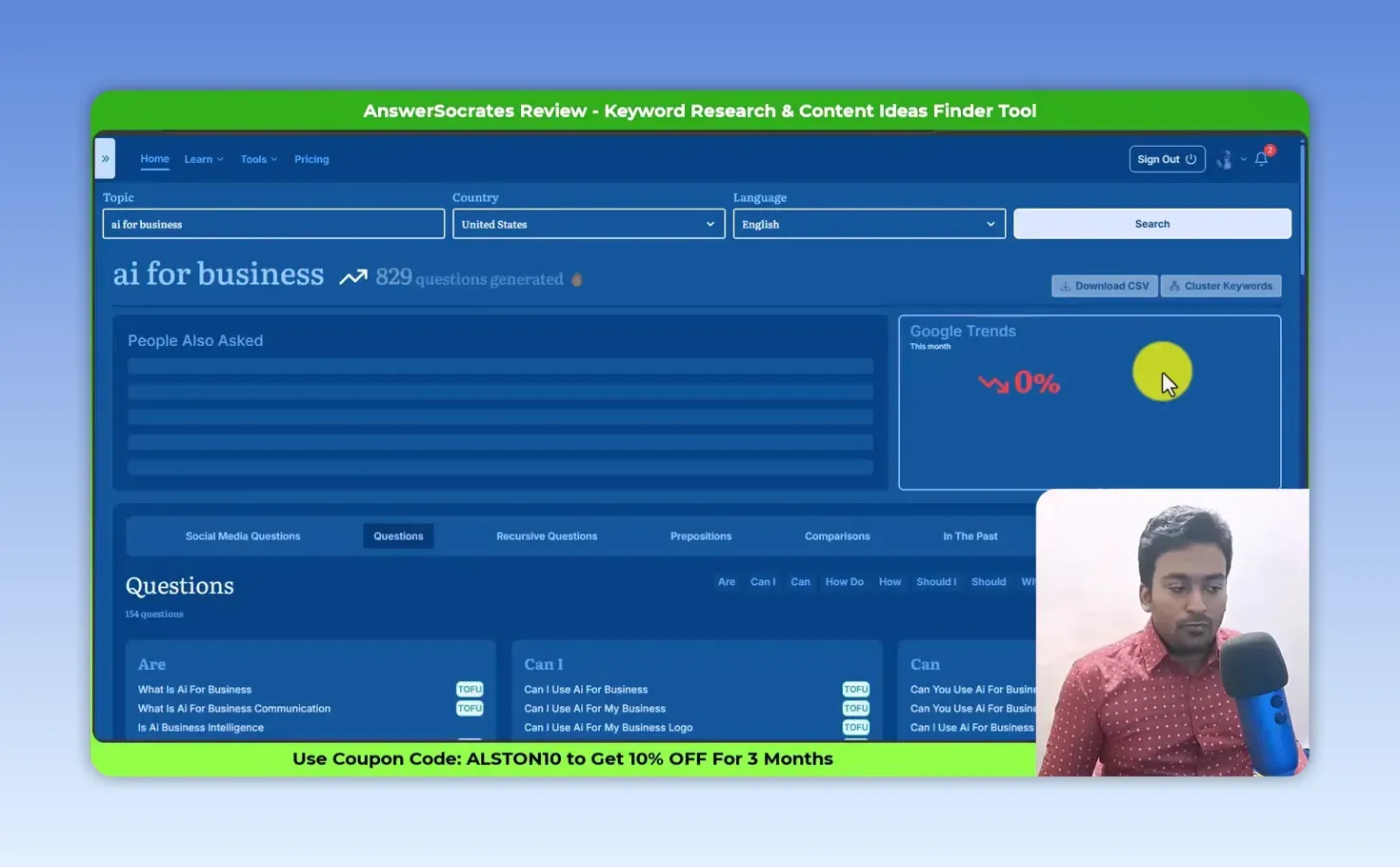
The country and language filters matter if you are researching for a local market. The results page also has a Google Trends panel when data is available. In this search it showed 0% with no chart, even though it worked for other keywords I tried, so expect the odd gap. There is a People Also Ask panel too, which shows the questions Google tends to surface around the topic and where people want more explanation.
How do question keywords and intent labels help you plan content?
Each question can become a post, a subheading, an FAQ or a section in a longer guide, and the labels give you a first sort. The Questions tab builds suggestions from question words such as “are”, “can I” and “how do”; in my test it produced 154 of them on its own.
Each question gets labels such as top of funnel (TOFU), middle of funnel, bottom of funnel, long-tail and local. Top-of-funnel searches are usually broad and informational; bottom-of-funnel searches lean commercial, closer to a decision.
Treat the labels as a starting point, not a verdict. A keyword can be long-tail without getting the label, and “local” mostly appears when a city or place is in the query. I still look at the keyword itself, the search results and the business goal before deciding what to make.
Why are recursive questions the best feature?
Because they keep digging after the first round. Answer Socrates takes popular questions it has already found and researches around each of them, which surfaces a second layer of questions and subtopics you would not reach from the seed keyword.
The recursive tab alone listed 477 questions. Together with the other question sources, the “AI for business” research grew from 829 to 1,326 ideas, reaching into what AI is, how businesses can use it, business management, planning and more.
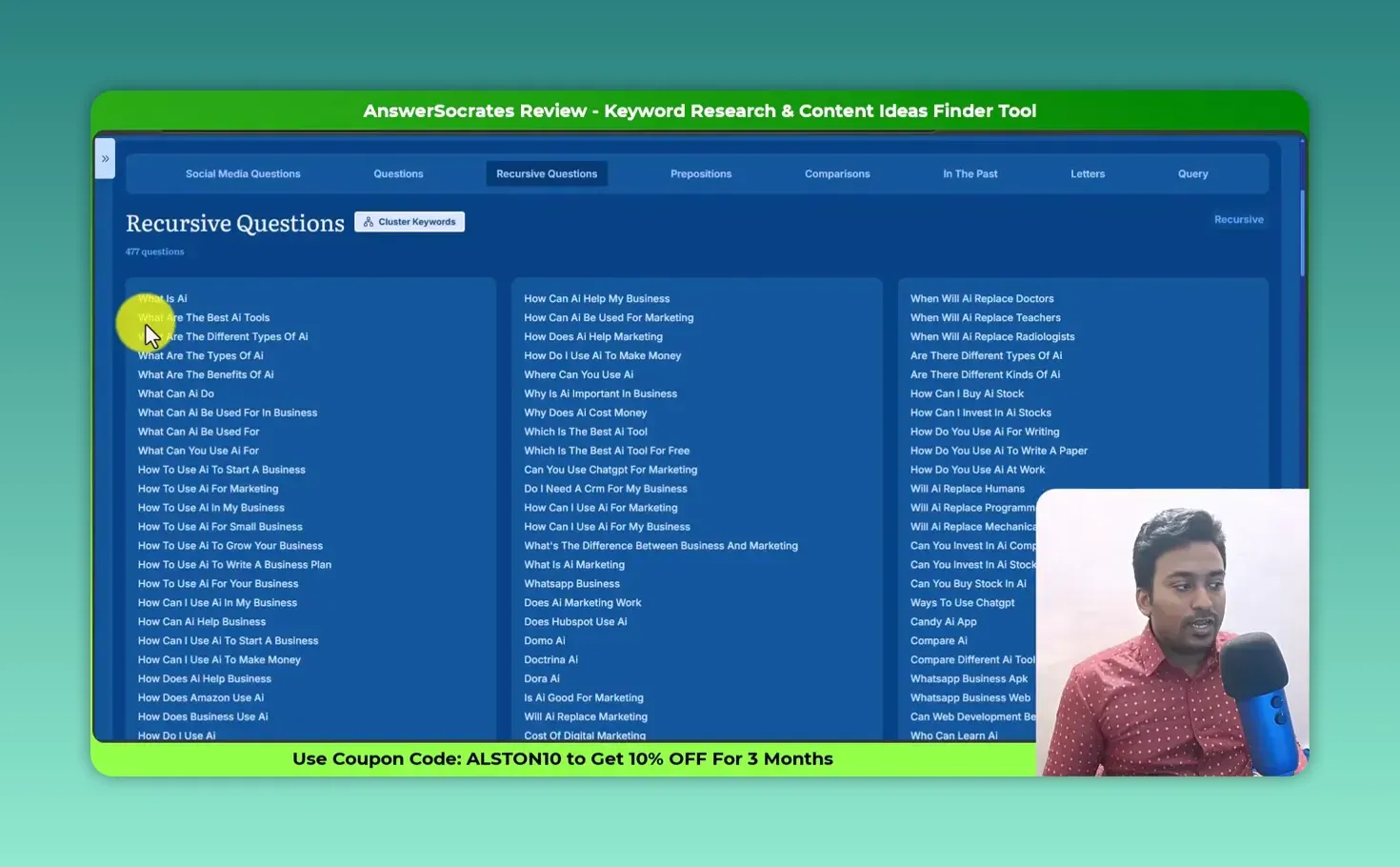
This is the section I’d use for topical maps, pillar pages, FAQ sections and supporting articles. It stops you writing one shallow article that misses the smaller questions a topic depends on.
What do the other sections add?
Each gives a different angle, and not every section suits every topic.
Social media questions
These come from social platforms rather than search suggestions. I found them valuable because the wording is more detailed and the problems are stated more directly.
Prepositions and comparisons
Prepositions add words around your keyword to find new combinations. Comparisons use words such as “versus”, “compare” and “better”, which surface decision-stage and comparison content.
In the past
Useful for historical or past-tense queries. I’d use it selectively, because it adds little for many keywords.
Letters
It appends each letter of the alphabet to the keyword to pull longer, more specific suggestions, the same approach some of my favorite keyword tools use.
Query
Shows related searches around the topic. From “AI for business” I found a narrower angle, “AI for business course”, worth researching as its own topic.
How does keyword clustering turn ideas into a plan?
Clustering groups related keywords so you can decide whether they belong in one complete article or in separate supporting pages. Finding thousands of keywords is easy; knowing which belong together is the hard part.
Of the 1,326 keywords, it clustered 925 (69.76%) into 206 topics and left 401 unclustered. Topics included “what is ai for business”, “best free ai for business plan” and “can you use ai for business”.
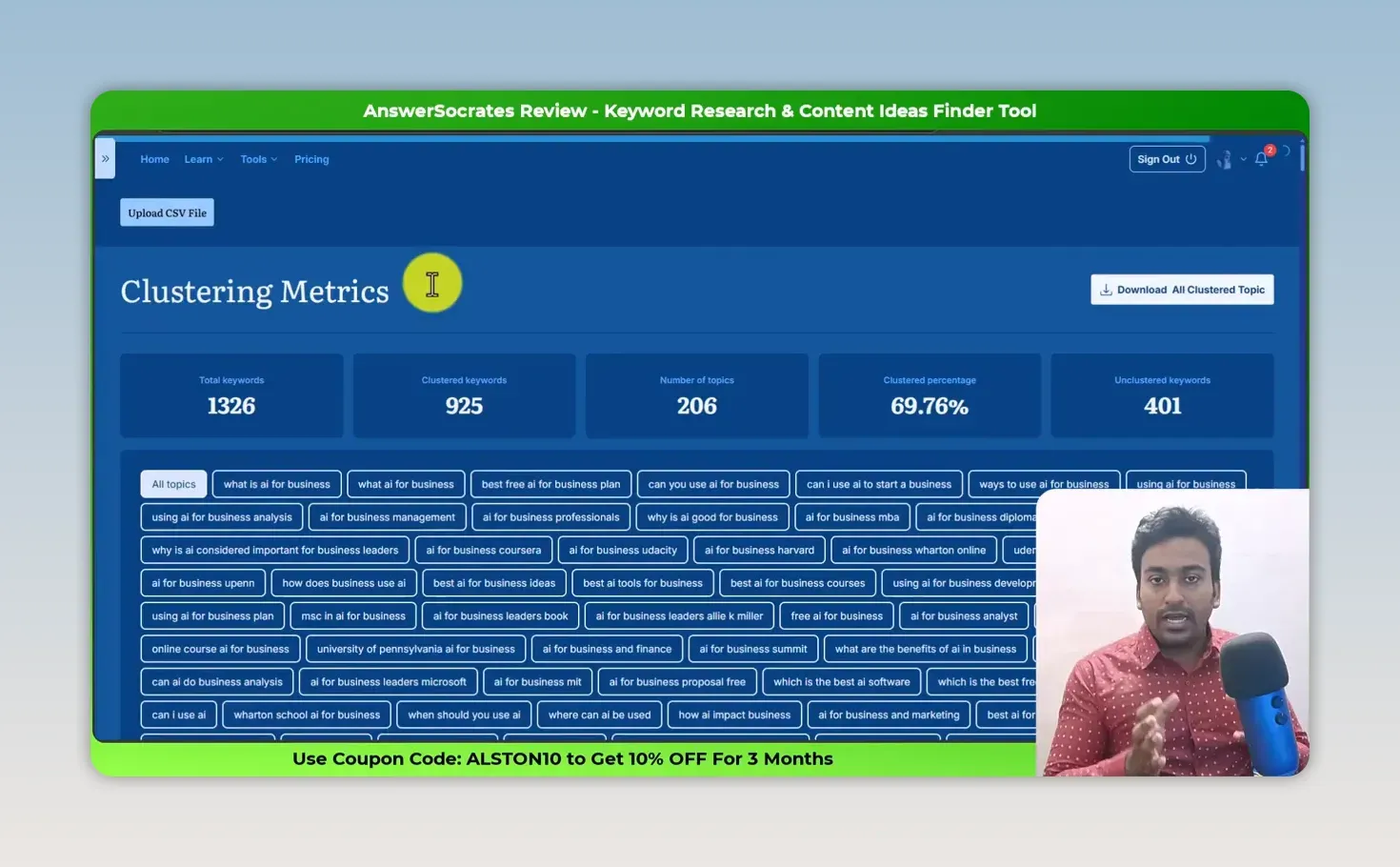
Open a cluster and you see the keywords inside it, with CPC, competition index and the cluster’s total search volume. I don’t decide on volume alone. I ask:
- Does this match what my audience needs?
- Is it relevant to the business or project?
- Can I make something genuinely useful?
- Do the current Google results need a better answer?
- Should these keywords be one guide or several connected pages?
Why export the data to a spreadsheet?
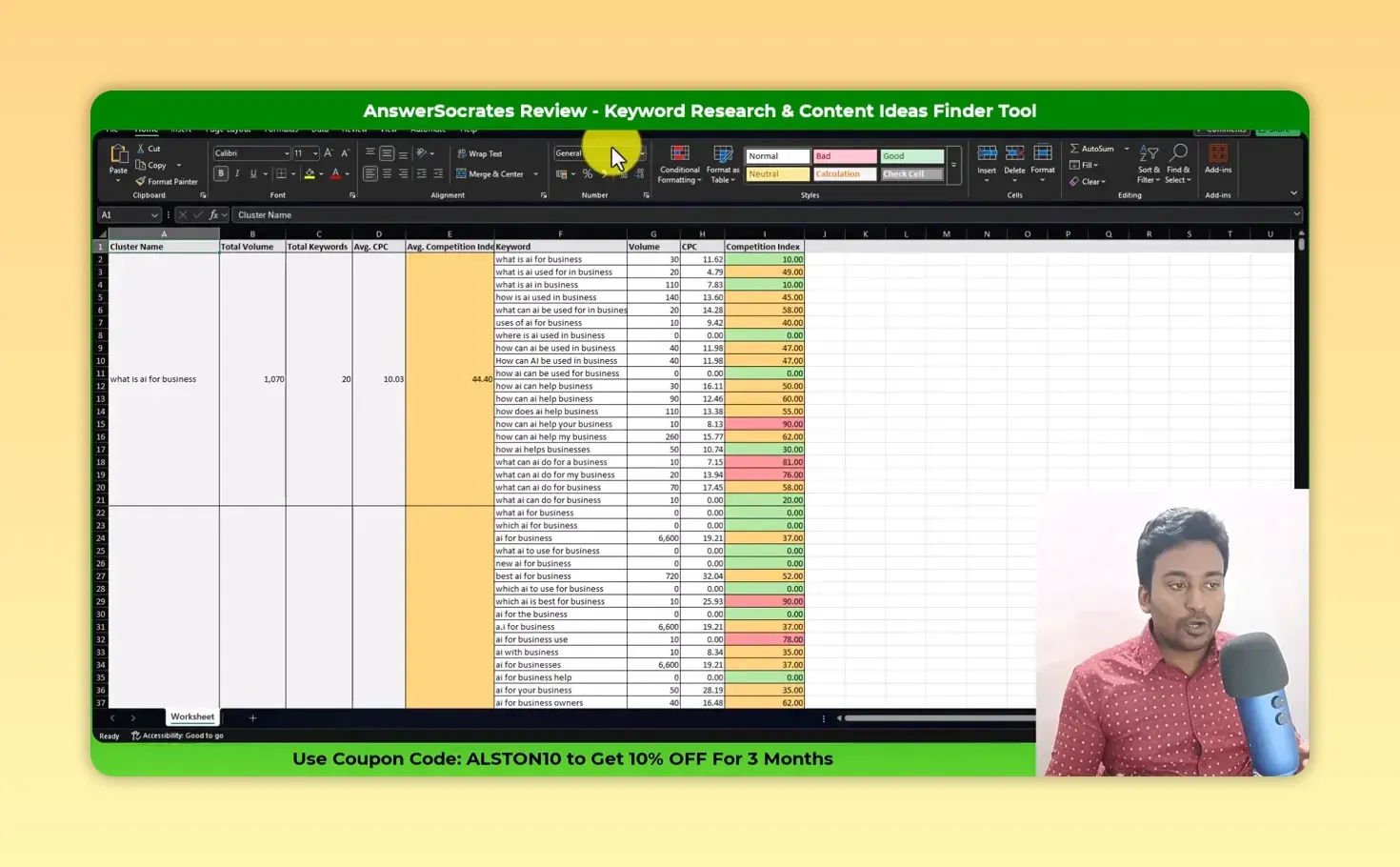
Because a large keyword list is far easier to filter, sort and prioritize in a spreadsheet than inside the tool. Answer Socrates exports to CSV, and I prefer working in a color-coded table.
In the export, the “what is ai for business” cluster held 20 keywords with a combined volume of 1,070, an average CPC of $10.03 and an average competition index of 44.40.
My workflow:
- Find questions and related keywords in Answer Socrates.
- Export the CSV.
- Clean the list and remove irrelevant ideas.
- Review intent, relevance, business value, search results and competition.
- Group what’s left into pages, clusters and FAQ opportunities.
Once it’s exported, you can also hand the sheet to an AI tool for a second pass. My ChatGPT prompts for keyword research include ones for clustering and cleaning a list, and my column to comma converter turns an exported column into a comma-separated list for tools that want one.
What could Answer Socrates do better?
- Stronger filtering, especially filtering by words, and a better table view inside the tool
- More accurate intent labels, since the long-tail label misses some longer keywords
- Reliable Google Trends data, which didn’t appear for this search
- Nothing replaces human review: it finds opportunities, but it can’t decide which pages deserve to exist for your audience
How much does Answer Socrates cost?
There is a free plan, and paid plans start at $19 a month, with a 7-day money-back guarantee on all of them. The free plan gives you 3 keyword searches and 1 recursive search a day, 1,500 cluster credits and one CSV download a month, but no SEO metrics, so the volume, CPC and competition columns in my export need a paid plan. From the Answer Socrates pricing page, checked 24 September 2026:
| Plan | Monthly | Yearly | Keyword searches | Recursive searches | Cluster credits |
|---|---|---|---|---|---|
| Free | $0 | $0 | 3 a day | 1 a day | 1,500 a month |
| Socrates Lite | $19 | $190 | 1,200 a year | 360 a year | 36,000 a year |
| Seneca | $39 | $390 | 6,000 a year | 1,200 a year | 144,000 a year |
| Aurelius | $69 | $690 | Unlimited | 6,000 a year | 480,000 a year |
| Senate (teams) | $299 | $2,990 | Unlimited | 24,000 a year | 1,200,000 a year |
Every paid plan includes SEO metrics and unlimited CSV downloads. The page now also lists an LLM Brand Tracker and API and AI assistant (MCP) access on the higher plans, which I haven’t tried.
To upgrade, go to Answer Socrates here (affiliate link) and use code ALSTON10 for 10% off for three months.
Answer Socrates pros and cons
What I liked:
- One search turned into hundreds of questions within seconds
- Recursive questions find the second layer of questions behind a topic
- Social media questions bring wording that search suggestions miss
- Clustering with volume, CPC and competition per cluster
- CSV export for proper filtering in a spreadsheet
- A free plan that covers the core workflow
What held it back:
- Intent labels are a guide, not always right
- Limited filtering and no strong table view inside the tool
- The Google Trends panel didn’t load for my test keyword
- Search metrics need a paid plan
Is Answer Socrates worth it?
Yes, as a question discovery and topic research tool, for small business owners, bloggers, SEOs and content creators who want to get from one broad idea to a content plan. Don’t use it to create hundreds of articles because you found hundreds of keywords.
Find the questions, group them, understand the intent, pick out real audience problems, and build the pages that deserve to exist. Start on the free plan; if recursive questions, clustering and the CSV export earn their keep, upgrade here (affiliate link) with code ALSTON10.
For a tool that pairs keyword research with on-page changes and a Search Console agent, see my ClickRank review.
For the discussions behind those questions, where people describe the problem in their own words, see my BuzzAbout review.
FAQ
Does the free Answer Socrates plan show search volume?
No. The pricing page lists “No SEO metrics” on the free plan, so volume, CPC and competition need a paid plan. You still get the questions, a daily recursive search and clustering credits.
Can Answer Socrates find questions people ask in ChatGPT?
Its pricing page now says it finds the questions people ask “on Google and inside ChatGPT”. I tested the Google-based question research, not that feature, so I can’t vouch for it yet.
Keep reading
You Might Also Like
Morningscore Review: Gamified SEO Missions and AI Tracking
My Morningscore review from a test on zplatform.ai. SEO missions with guides, 953 keyword ideas, daily rank tracking, ChatGPT prompt tracking and AI fixes.
9 min read

Bishopi Review: Domain Research Tools and SEO Data Tested
My Bishopi review from a March 2026 test. Dropped domains, valuation and age history held up; keyword ideas, related searches and backlinks fell short.
10 min read

BuzzAbout Review: Audience Research From Real Discussions
My BuzzAbout review. I used Reddit, YouTube and Instagram discussions to find pain points, sentiment and audience language, then checked the source posts.
10 min read