SEO Tool Reviews
ClickRank Review: Strong AI Agent, Weak AI Writer
My ClickRank review from a test on my own WordPress site. The Search Console AI agent impressed me, one-click titles worked, and the AI writer failed.

This ClickRank review comes from connecting the tool to one of my own WordPress sites, with hundreds of pages and real Search Console data, and using every feature on it. The AI SEO agent, which answers plain-English questions about your Search Console data, was the best thing in it, and one-click title and meta description changes worked well. Schema, internal links and content edits all needed checking by hand, and the AI article writer failed outright.
Affiliate disclosure: links marked “affiliate link” earn me a commission if you buy, at no extra cost to you. That didn’t change what I wrote, including the parts that failed. How I review tools. I tested ClickRank in November 2025 on coimbatorejunction.in, a site I own. Prices were checked on 23 September 2026.
Prefer to watch? Here is the full test.
Is ClickRank a replacement for Ahrefs or Semrush?
No. ClickRank has useful workflows, but Ahrefs and Semrush are more than their feature lists: they sit on huge databases that a startup tool cannot match. I treat ClickRank as a layer on top of your own Search Console data, not a replacement for a full SEO platform.
How easy is ClickRank to set up?
Very easy. I verified the site with ClickRank’s WordPress plugin, and there is also an option to add a verification code by hand. The site runs GeneratePress, and verification went through quickly. Then I connected Google Search Console, picked the property, and ClickRank started pulling the data into its dashboard. No technical knowledge needed.
The site I tested on is Coimbatore Junction, a local site I run. For 19 October to 18 November 2025, the dashboard showed 2,406 clicks, 238.6K impressions, a 1% CTR and an average position of 8.8.
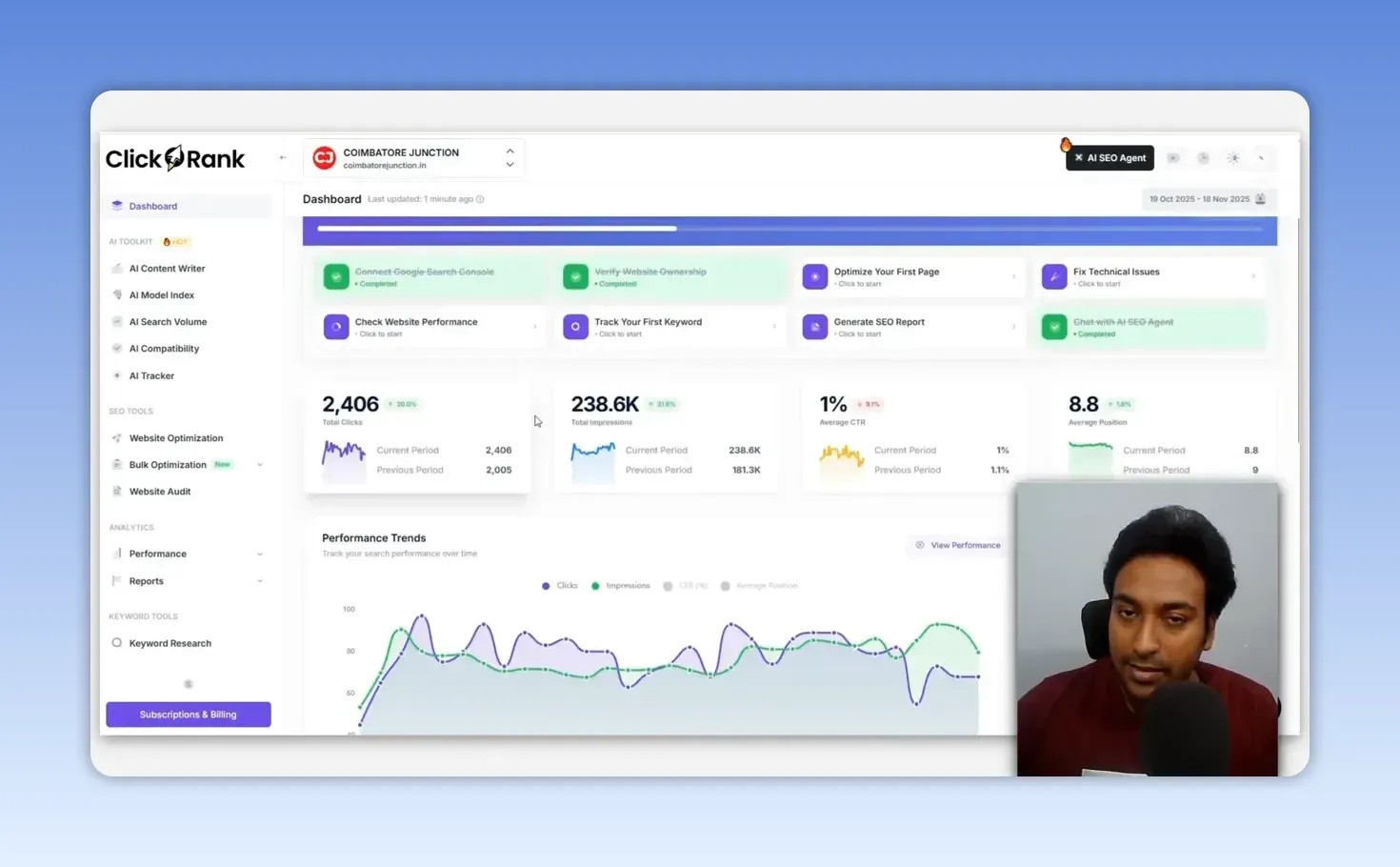
The dashboard also covers growth, performance trends, geographic performance and keyword distribution: how many keywords rank in the top three, in positions four to ten, and on page one. Nearly all of it is already in Google Search Console. What ClickRank adds is a more visual layout, connected to its optimization tools, which helps an owner who doesn’t want to export and filter Search Console data by hand.
What did the site audit find?
The audit reported 2,021 issues across errors, warnings and notices, including missing meta descriptions, missing canonical tags, duplicate headings and multiple H1 tags. The crawl was slow at times and the completion message was unclear; the data only appeared after I refreshed.
The multiple H1 finding was the most useful. I checked the page by hand and it was real: a dynamic template section was pulling several pieces of content in as H1s, a big problem I then had to fix by moving them to a lower heading level. That is why I follow the same four steps with any audit tool:
- Find the issue.
- Verify it manually.
- Understand its impact.
- Fix it properly.
ClickRank lists technical problems clearly but doesn’t give much help on fixing them. I’d like better tooltips, practical instructions and a sense of priority.
Can ClickRank update titles and meta descriptions in one click?
Yes, and this was one of the strongest parts of the test. I filtered pages by impressions and average position to find pages getting impressions while ranking around positions 6 to 20. They already have some visibility, so a better title can move them toward page one.
I picked a page about Isha Temple ranking around position 18. It had impressions but no clicks, which made sense at that position. ClickRank showed its current title, meta description and the queries bringing impressions, such as “isha temple coimbatore” with 46 impressions and no clicks.
The auto-optimize option suggested five new titles, each with a forecast CTR improvement. They were relevant and understood the page. I applied one, and it changed the title tag on the live site within moments.
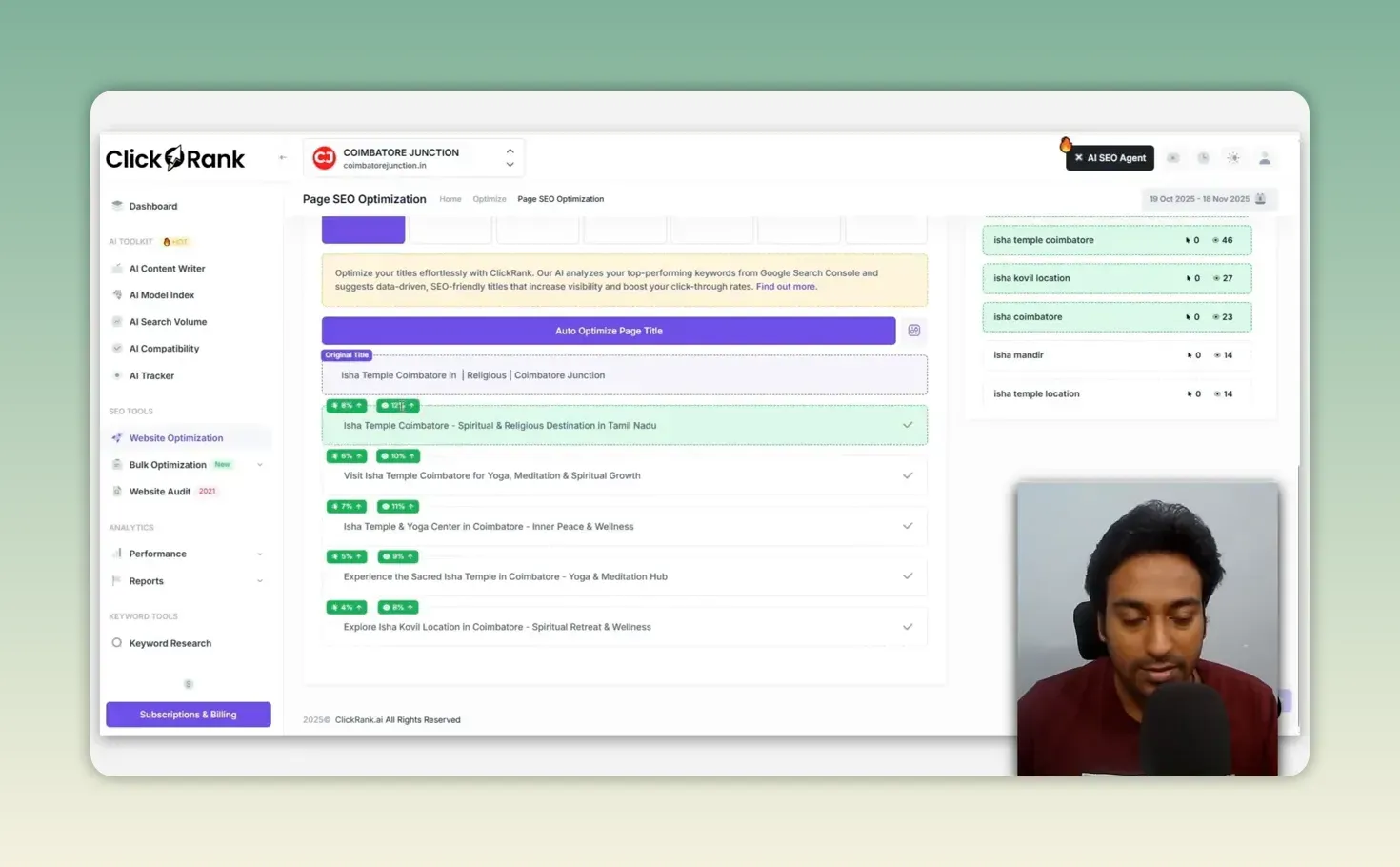
Meta descriptions work the same way, with styles including question-based, professional, how-to, emoji and a custom prompt. The descriptions it wrote matched the page and picked up its subject, including the spiritual setting and the Shiva statue.
A title or description still has to read naturally, match search intent and describe the page honestly. A higher CTR only helps if the page satisfies the person who clicks.
Bulk title and meta description optimization is there too. I tried it on two pages, it changed both titles, and a status indicator showed the result. I’d like the bulk tools to cover image alt text and internal links as well, with better priority controls.
How well did schema, internal links and content optimization work?
All three produced something usable, and all three needed checking before I would trust them.
The auto-generated schema looked promising at first. It built webpage structured data from the page title, description, author, image, logo, address and URL. Checking it further turned up warnings and missing details, so I would not publish it without testing it in Google’s Rich Results Test. My guide to the Rich Results Test covers what a pass does and doesn’t tell you.
Internal links matter because they build authority and topical relevance you control; you can’t earn third-party backlinks every day, but you can always strengthen your own structure. ClickRank suggested some good links, to related pages about the location, bus routes, events and categories. Applying them automatically was inconsistent: some links appeared, others I couldn’t find. That needs to be more reliable before I’d hand internal linking over to it.
The AI content optimization rewrote sections of a page. In one case a line of prompt text ended up inside the content, and the primary keyword changed to something irrelevant. I would never publish an automatic edit without reading every line.
Is the ClickRank AI content writer any good?
No. It was the weakest part of the test. It brainstormed decent titles, introductions and heading structures, but article generation failed. For an AI writer that did produce full drafts, see my WordRocket review.
Even if it had worked, the workflow jumps too quickly from headings to a finished article. There is no step to add bullet points, first-hand experience, evidence, facts, target keywords or your own insight. My process for serious SEO content:
- Research
- Evidence
- Outline
- First-party insight
- Draft
- Verification
Without that context, AI content turns generic. Use AI for ideas, analysis, structure and repetitive work, not as a stand-in for experience. My ChatGPT prompts for SEO keyword research keep the strategy in your hands while the model does the legwork.
Are ClickRank’s AI search tracking and keyword research useful?
Partly. The AI tracker is the interesting one, and the rest needs validating before you act on it.
AI model index
It mainly checks whether AI bots are blocked by robots.txt or Cloudflare rules. A quick check, not a major feature.
AI compatibility
It scores coverage for models such as ChatGPT, Gemini and Llama, and flags gaps like missing authority signals, no links to public review platforms, or content that describes more than it analyzes. Some advice didn’t fit: it marked a normal article down for lacking technical documentation. I’d like it to show the exact sections behind each issue and how to fix them.
AI tracker
It combines organic rankings with AI status, AI position, mentions, citations, the AI answers themselves and position history. Watching traditional search and AI search together, rather than as separate jobs, is the right idea. For a dedicated AI visibility tracker, see my Visby AI review.
Keyword research
You get related keywords, intent, PPC competition, CPC, search volume, age and gender split, and top results. The demographic data is unusual. The source database isn’t stated, and the AI search volume tool had limited location options, so I’d check the numbers elsewhere before a business decision. For question-led research, I use a dedicated tool; see my Answer Socrates review.
Why is the AI SEO agent the best feature?
Because it lets you question your Search Console data in plain English and get a table back, which is the fastest way I’ve seen to find opportunities without filtering Search Console by hand. It works like a ChatGPT-style chat connected to your site’s data.
I asked it for keywords close to moving from page two to page one, and it returned a table of keywords with impressions, CTR and position. Then I asked for similar opportunities around event keywords. It matched the right queries, such as “upcoming events in coimbatore 2025”, and returned pages around positions 10 and 12. It also picked out critical issues, such as the duplicate H1s and missing canonicals, and put them in order of urgency.
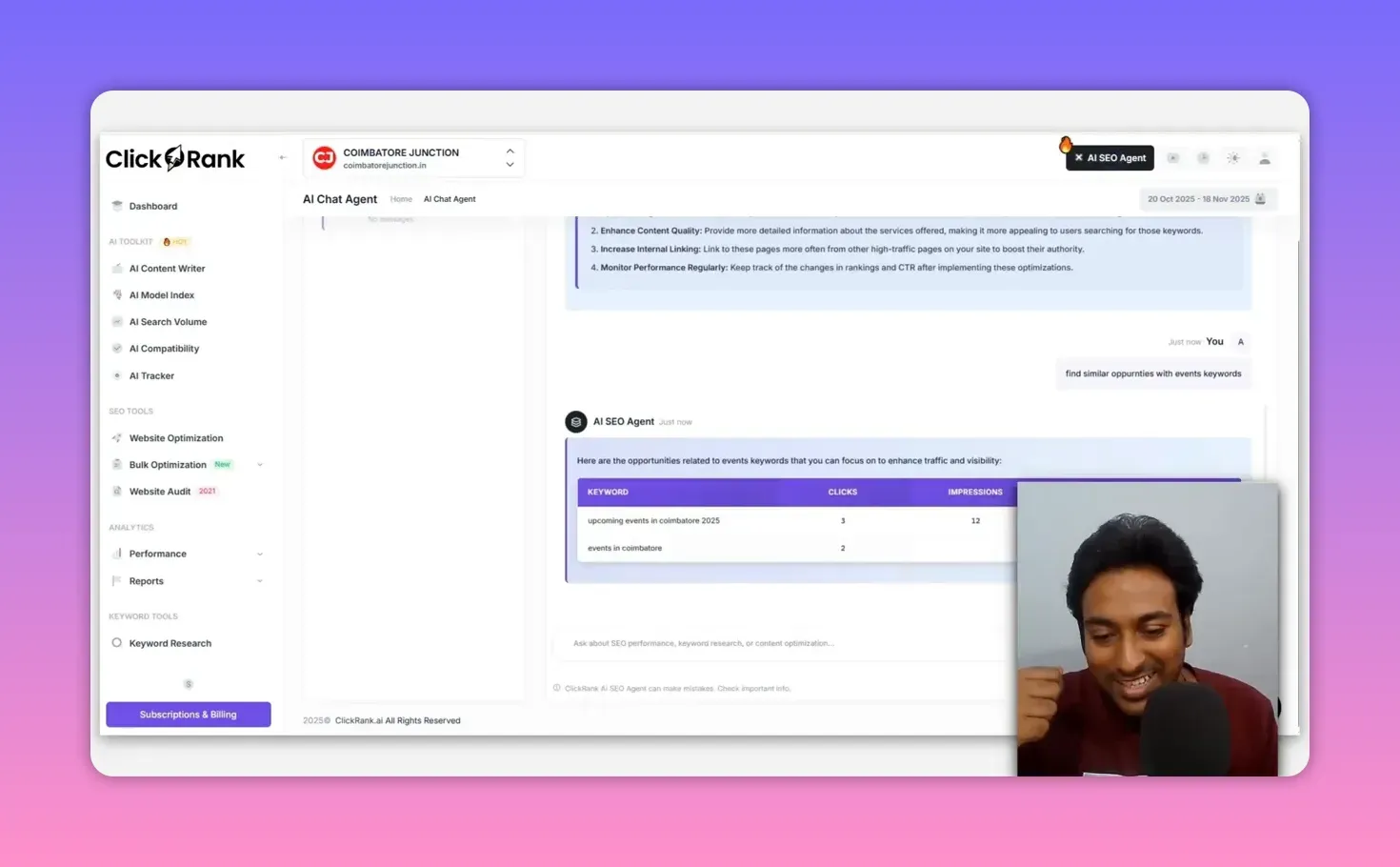
It was slow at times, had loading problems, and there was no stop button while it generated. ClickRank’s own note under the chat box says the agent can make mistakes. Even so, the custom analysis was useful, and it’s the main reason I’m interested in ClickRank.
How much does ClickRank cost?
ClickRank starts at $59 a month for one website. There is no free plan listed and no lifetime deal: its pricing FAQ says it doesn’t offer one yet. Every plan has a 7-day money-back guarantee. From ClickRank’s pricing page, checked 23 September 2026:
| Plan | Monthly | Yearly | Websites | Pages crawled | Crawl interval |
|---|---|---|---|---|---|
| Solo | $59 | $590 | 1 | 2,000 | Monthly |
| Business | $79 | $790 | 3 | 10,000 | Every two weeks |
| Agency | $399 | $3,990 | 10 | 60,000 on the plan card, 30,000 in the comparison table | Weekly |
All three plans list unlimited optimizations. If you want to try it, start with ClickRank here (affiliate link).
ClickRank pros and cons
What I liked:
- Setup with WordPress and Search Console took minutes
- One-click title and meta description changes were relevant and went live fast
- The audit caught a real multiple-H1 problem on my site
- The AI SEO agent turns Search Console data into answers you can act on
- Tracking organic and AI search in one place
What held it back:
- The AI article writer failed, and skips the research and outline stage
- Auto-generated schema came with warnings and missing details
- Automatic internal linking was inconsistent
- A content rewrite leaked prompt text and swapped in an irrelevant keyword
- Slow crawls, loading delays and no stop button in the agent
- Keyword data from an unstated source
Is ClickRank worth it?
For analysis and repetitive on-page work, yes, if you check its output. The best way to use it is to find a real opportunity, understand the data, improve the title or meta description, fix the technical problems it surfaces, and watch performance from one place. The AI writer is not a reason to buy it.
There are still bugs, loading delays, inconsistent internal linking, schema that needs checking and keyword numbers I would verify. If those improve, it becomes a strong tool. Use it to cut repetitive work, and keep your own research and judgment in front of every important change. If that fits how you work, you can try ClickRank here (affiliate link).
For a different take on Search Console data inside a dashboard, my CrawlWP review looks at a WordPress plugin built around indexing.
FAQ
What happens to ClickRank’s changes if I cancel?
ClickRank’s pricing FAQ says optimizations stay active on your site as long as its code remains installed. Remove the code and you should expect them to go.
Does ClickRank store my Search Console data?
The vendor says no: its pricing FAQ states that Search Console data is fetched straight into your session from Google’s servers and not stored on ClickRank’s servers. I haven’t verified that independently.
Keep reading
You Might Also Like

Visby AI Review: Tracking My Brand Across AI Answers
My Visby AI review. Real ChatGPT, Gemini and Claude answers and citations per prompt, competitor share of voice, GA4 traffic and a beta report builder.
10 min read

Knwn Review: AI Prompt Tracking Tested on a Young Site
My Knwn review from a test on zplatform.ai. Prompt tracking was the useful part; the scores, citations and gap ideas needed checking against the answers.
9 min read
CrawlWP Review: I Tested Its Indexing Tools on a Live Site
My CrawlWP review from a live WordPress test. IndexNow worked, Google API submissions stayed in progress, and the plugin now does far more than I tested.
11 min read