SEO Tool Reviews
Visby AI Review: Tracking My Brand Across AI Answers
My Visby AI review. Real ChatGPT, Gemini and Claude answers and citations per prompt, competitor share of voice, GA4 traffic and a beta report builder.

This Visby AI review comes from setting the tool up for alstonantony.com after I bought its lifetime deal. Its best feature is letting you open a tracked prompt and read what ChatGPT, Gemini or Claude actually answered, with the sources it cited and the brands it named. The report builder was still in beta and the task board needs more implementation help, so treat Visby as a way to find where your brand is missing, then measure whether your fixes change that.
Affiliate disclosure: links marked “affiliate link” earn me a commission if you buy, at no extra cost to you. I bought Visby on an AppSumo lifetime deal with my own money. Neither changed what I wrote. How I review tools. I tested it in April 2026. Prices were checked on 24 September 2026.
Prefer to watch? Here is the full walkthrough.
How easy is Visby to set up?
Easy. A wizard asks for your domain and project details, then suggests competitors it detects, which you can edit before carrying on.
The dashboard then gives an overview of the project: scores and pending work across SEO, GEO and page speed, with each task one click away. Further down are prompt visibility, funnel stages and traffic. It’s a good starting point, but the scores aren’t the reason to use the tool.
Can you see what ChatGPT, Gemini and Claude say about your brand?
Yes, and this is Visby’s strongest part. The prompt visibility section suggests prompts based on your site, you can add your own, and opening a prompt shows each AI platform’s actual response next to its citations and the brands it mentioned.
I tracked “Which SEO tools are recommended by experts?” for alstonantony.com. On 4 April 2026, both the Gemini and Claude answers gave my site a visibility score of 0%. The Claude answer cited 5 sources and named 8 brands, starting with Semrush and Ahrefs.
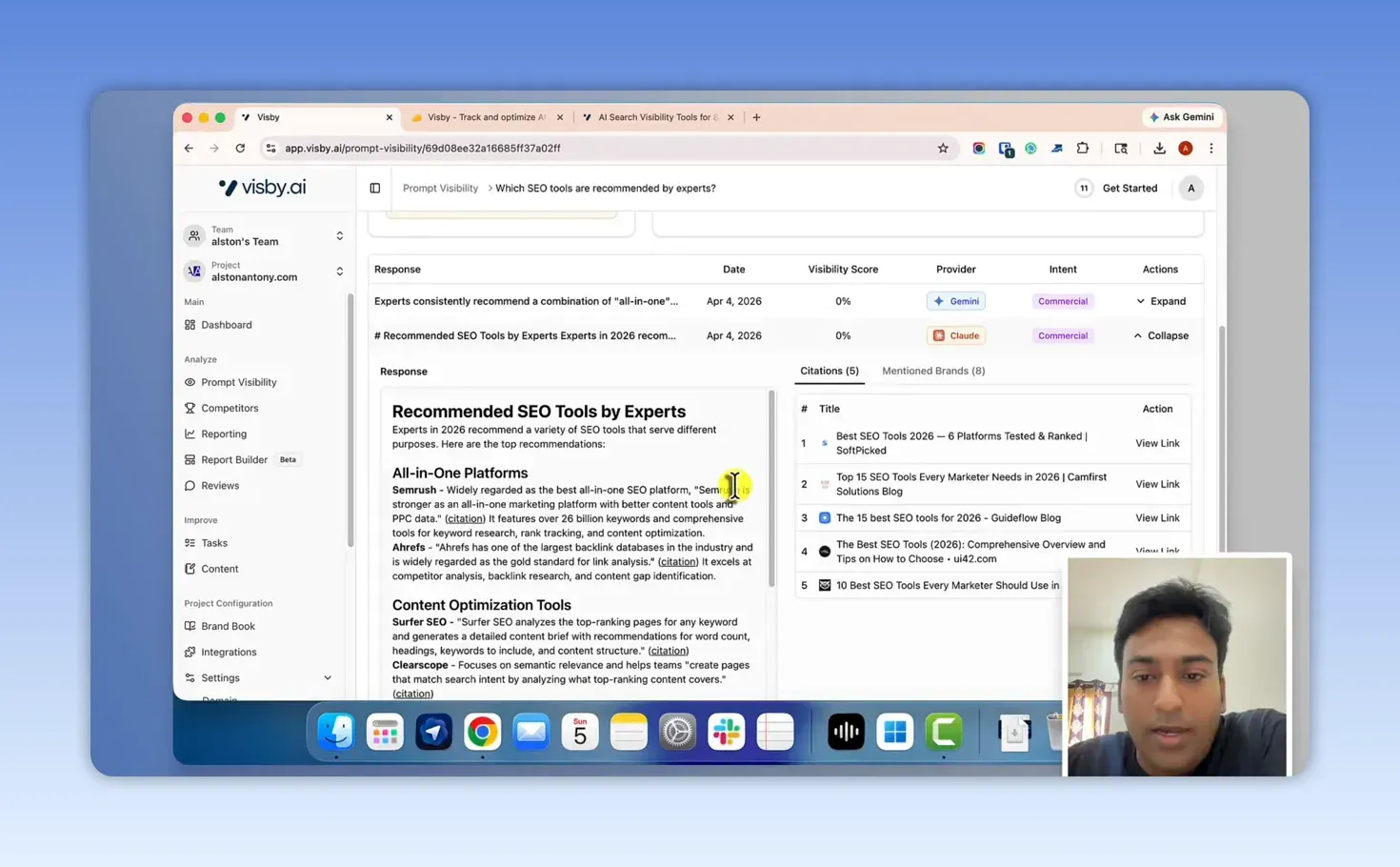
Reading the answer tells you more than the score. An AI naming your brand and an AI citing your site as a source are different things, and you only see which happened by looking. What you’re seeing is the output. The sub-queries a model runs to build that answer stay hidden, as I explain in my query fan-out guide.
The limit is refresh frequency. Some prompt data showed a 30-day update cycle on my plan, which is slow when you’ve made a change and want to see what happened. The current pricing suggests why: Starter allows 45 AI answers a month for 15 tracked prompts across 3 engines, which is one check per prompt per engine per month.
How do funnel stages help you choose prompts?
Visby groups visibility into awareness (top of funnel), middle-of-funnel and bottom-of-funnel prompts, but only works if you add prompts at each stage. Track only broad questions and the bottom-of-funnel view has nothing to tell you.
I’d track questions from every stage and compare the answers and citations. A broad prompt shows which brands an AI platform already knows; a specific one shows who appears when someone is close to choosing. The value comes from tracking the prompts that matter to your business, not from adding as many as possible.
What does Visby show about competitors?
It compares share of voice and share of funnel across your tracked prompts, with charts by funnel stage and a competitor table where you mark each site as a direct competitor, indirect competitor or not a competitor.
My example is honest rather than flattering. I compared alstonantony.com with much bigger sites while it was going through an SEO recovery. Share of voice came out at 6.2% for Semrush, 5.4% for Ahrefs, 2.9% for Moz, 1.2% for Neil Patel, and 0.0% for my site.
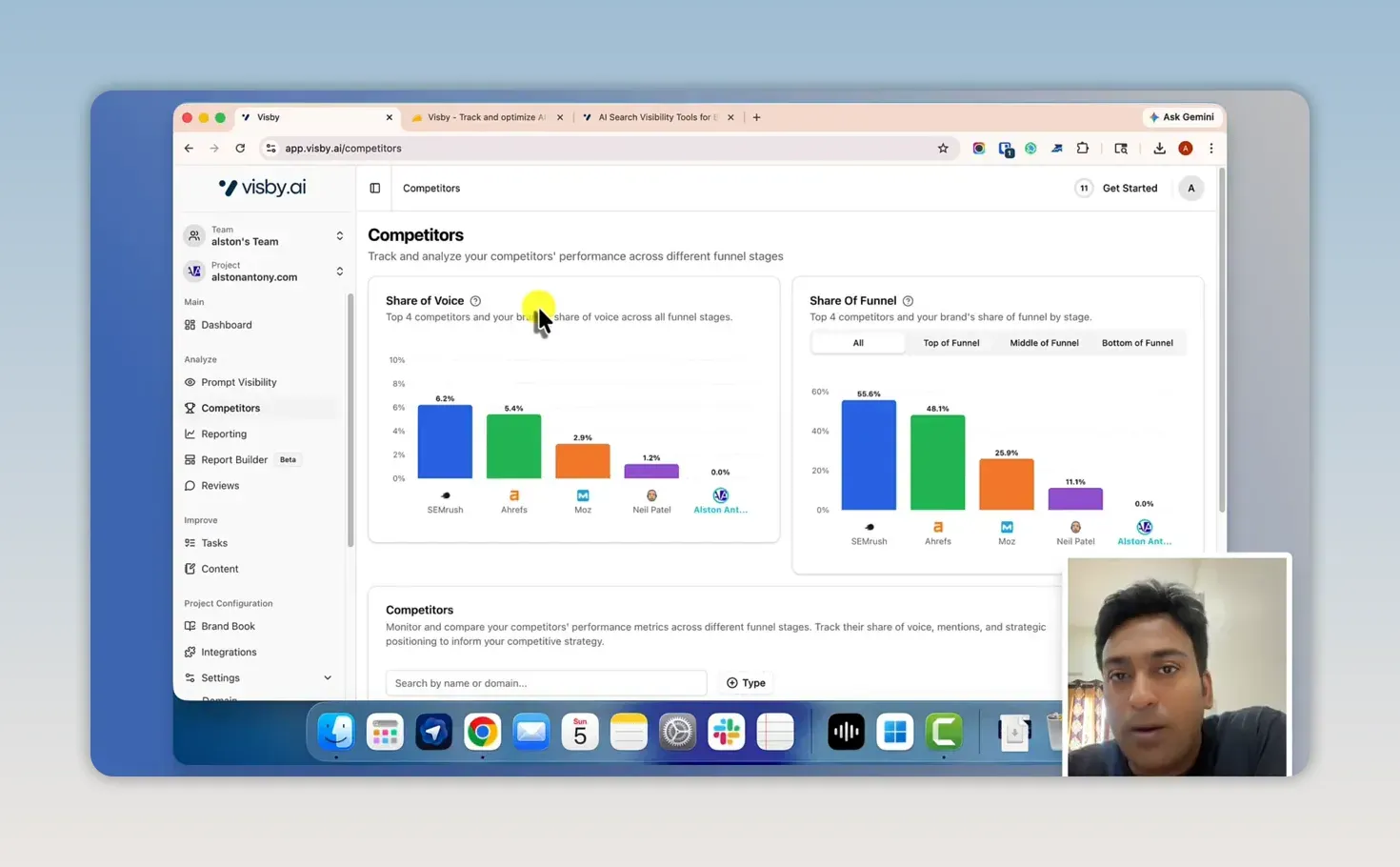
It still shows how the feature works: it points you at the prompts where other brands appear and yours doesn’t. For a useful comparison, pick competitors you can realistically beat on the prompts you want to win.
Can you connect AI visibility to website traffic?
Yes. I connected Google Analytics, and Visby pulled AI referral traffic into its dashboard and reports, split by ChatGPT, Gemini, Claude, Perplexity and Copilot, with the pages each one sent visitors to. It also connects to Google Search Console for search data.
Having that in one place helps if you don’t want to build your own dashboard. A citation still isn’t the finish line. The question is whether AI visibility sends useful visitors, and the answer can be sobering: my ZPlatform.ai case study shows 241,500 Copilot citations turning into 2,500 clicks.
Is the report builder ready for client reporting?
Nearly. It’s a fast, simple slide editor: start from a blank template or a full report, move through slides, add widgets, edit text, change the theme, refresh the data and export a PDF.
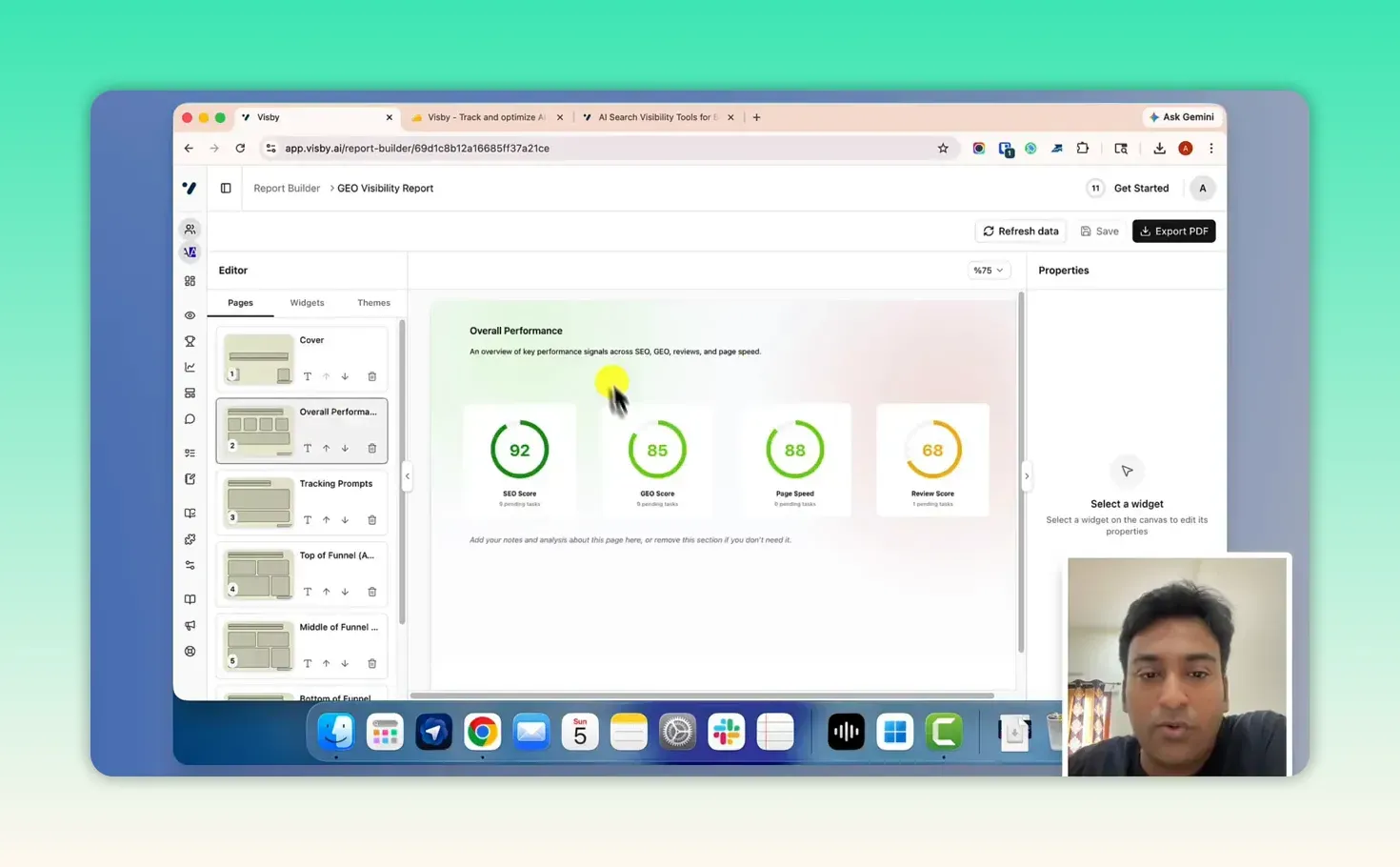
It was marked beta in my test, and some options, including custom templates and some important widgets, weren’t there yet. Check it covers everything a particular client needs before you promise a full report.
What about the reviews and tasks sections?
The review sentiment section groups brand or product reviews as positive, negative, neutral or mixed. My project didn’t have enough review data to test it properly, so I can’t judge it.
The task board is more concrete. It works like Trello, with pending, in progress, review and done columns, and each task has a summary, an action and acceptance criteria that change with the site.
This is where I’m most critical. Some tasks need more help to implement: if a task says add FAQ schema markup, a starting draft or clear instructions would make it useful. Status changes were manual in my test, and I’d like a recheck button after I fix something. A non-technical owner could struggle with some tasks without a better tutorial.
Can Visby turn a content gap into something you can publish?
It can give you a draft, but not one to publish as it is. The content section finds gaps around your tracked prompts; you pick one and generate a brief, or start from your own idea. One suggestion for my site became “How is AI Transforming SEO Strategy in 2026?”, an editable draft with a meta title and description that understood my site’s topic.
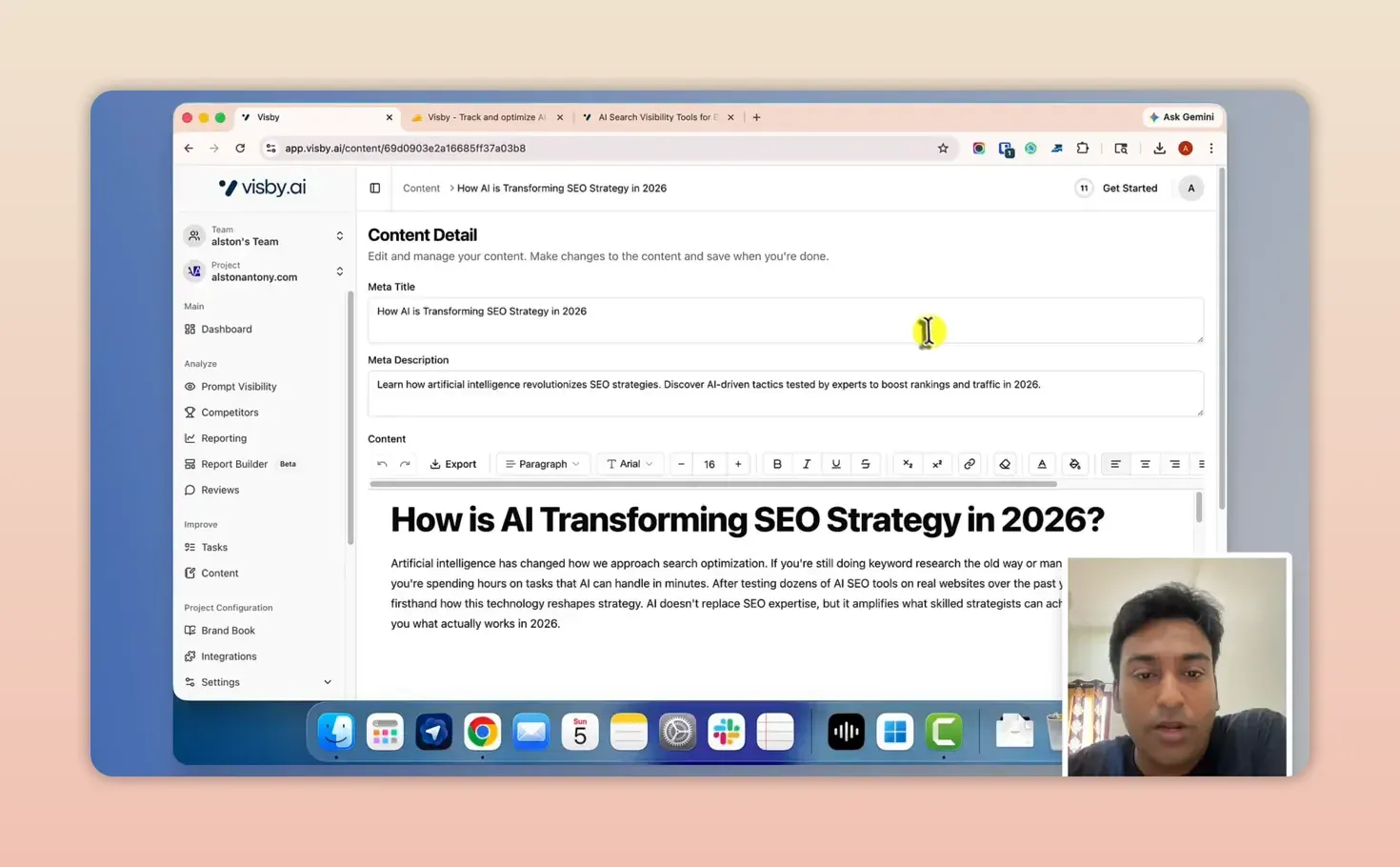
Read it closely before using it. The opening paragraph even claimed first-hand experience (“after testing dozens of AI SEO tools on real websites”) on my behalf, which is exactly the kind of line you verify or cut. Then make it fit your experience, publish, and check over the following weeks whether your tracked prompts start citing the page.
What else is in Visby?
- A brand book, filled in during setup and editable
- Integrations, with Shopify listed as coming soon during my test
- Settings for your domain, plus a sitemap to help Visby understand the site’s structure
- Help material and a public changelog
How much does Visby cost?
The Starter plan is $79 a month and Growth is $199 a month, with a free trial on Starter. Both track 3 AI engines chosen from ChatGPT, Claude, Gemini and Google AI Overviews. From Visby’s pricing page, checked 24 September 2026:
| Plan | Price | Domains | Tracked prompts | AI answers a month | Articles a month | Seats |
|---|---|---|---|---|---|---|
| Starter | $79/month | 1 | 15 | 45 | 5 | 1 |
| Growth | $199/month | 3 | 90 | 270 | 15 | 3 |
| Enterprise | Custom | 5+ | 250+ | 750+ | 25 | 10+ |
I bought it as an AppSumo lifetime deal, listed at $59 when I recorded the video. Check whether that deal still runs, and what its prompt and refresh limits are, before you decide. See the Visby deal here (affiliate link).
Visby pros and cons
What I liked:
- Real AI answers, citations and mentioned brands for every tracked prompt
- Funnel-stage views instead of one blended score
- Share of voice and share of funnel against competitors you classify
- AI referral traffic by platform and landing page from Google Analytics
- A quick, simple report builder with PDF export
- An easy setup wizard and a clean interface
What held it back:
- A 30-day refresh on some prompt data, which fits the plan’s answer allowance but is slow for testing changes
- The report builder was beta, missing custom templates and some widgets
- Tasks lack implementation help, with manual status changes and no recheck
- The content drafts need heavy editing, including made-up first-person claims
- Review sentiment needs a lot of review data before it’s useful
Is Visby worth it?
It is worth it if you want to see what AI platforms actually say about your brand and who they cite instead of you. The prompt, response, citation, competitor and traffic views work together well. Treat the report builder as developing, the tasks as a checklist that needs your own know-how, and the content drafts as ideas to test.
Decide on your need and the plan’s limits, especially prompt refreshes, not on the deal. The test is simple: can you use what Visby shows you to find where your brand is missing, improve the site, and measure whether it worked? If yes, you can get Visby here (affiliate link). For what AI search is and how it picks sources, start with my AI SEO guide. For daily prompt tracking in a simpler tool, see my Knwn review.
FAQ
Which AI platforms does Visby track?
Each plan tracks 3 engines, chosen from ChatGPT, Claude, Gemini and Google AI Overviews. The traffic reports, which come from Google Analytics, separately break out visits from ChatGPT, Gemini, Claude, Perplexity and Copilot.
How is Visby different from an SEO rank tracker?
A rank tracker records where your page sits in search results. Visby records what an AI answer says for a prompt: whether it mentions your brand, which sources it cites and which competitors it names. For a tool that combines both, see my ClickRank review.
Keep reading
You Might Also Like
Knwn Review: AI Prompt Tracking Tested on a Young Site
My Knwn review from a test on zplatform.ai. Prompt tracking was the useful part; the scores, citations and gap ideas needed checking against the answers.
9 min read
Morningscore Review: Gamified SEO Missions and AI Tracking
My Morningscore review from a test on zplatform.ai. SEO missions with guides, 953 keyword ideas, daily rank tracking, ChatGPT prompt tracking and AI fixes.
9 min read
ClickRank Review: Strong AI Agent, Weak AI Writer
My ClickRank review from a test on my own WordPress site. The Search Console AI agent impressed me, one-click titles worked, and the AI writer failed.
11 min read