SEO Tool Reviews
Bishopi Review: Domain Research Tools and SEO Data Tested
My Bishopi review from a March 2026 test. Dropped domains, valuation and age history held up; keyword ideas, related searches and backlinks fell short.

In this Bishopi review, I went through the tool’s domain research and SEO workflows one by one instead of judging it from a feature list. The domain side was the strong part: dropped domains, age and archive history, valuations and sales data in one place. The SEO side was uneven in my test, with fewer keyword ideas than expected, a Related Searches tool that returned nothing useful, and slow backlink pages. Since then, Bishopi has moved its SEO data into separate APIs, so check what the current plans include before you buy.
Affiliate disclosure: links marked “affiliate link” earn me a commission if you buy, at no extra cost to you. That didn’t change what I wrote, including the parts that didn’t work. How I review tools. I recorded this test in March 2026. Prices and plans were checked on 24 September 2026.
Prefer to watch? Here is the full test (24 minutes).
What changed since I tested it?
The plans. When I recorded the video, one dashboard held domain research, monitoring, keyword research, competitor analysis and backlinks, with the tools grouped in a left sidebar. On 24 September 2026, Bishopi’s pricing page sells its plans as domain research, valuation and monitoring, and offers keyword, backlink and SERP data as pay-as-you-go APIs. It lists a rank tracker as coming soon.
I couldn’t find Keyword Gap, Link Gap, the competitor dashboards or People Also Ask on its public pages. They may still be inside the app, but I can’t confirm that from outside an account. The SEO sections below describe the dashboard as I tested it in March. If those tools are why you are interested, open the free plan and check they are there first.
What can I find with Bishopi’s domain research tools?
Recently dropped domains, a domain’s age and archive history, WHOIS records, registered names containing a word, TLD trends and past sales. This is where Bishopi differs from a tool built around keyword rankings.
Fresh Drops lists recently dropped domains with their price, a value score, SEO metrics, keywords and an estimated resale range. Use the search and filters; a long list is hard to work through without a particular kind of domain in mind.
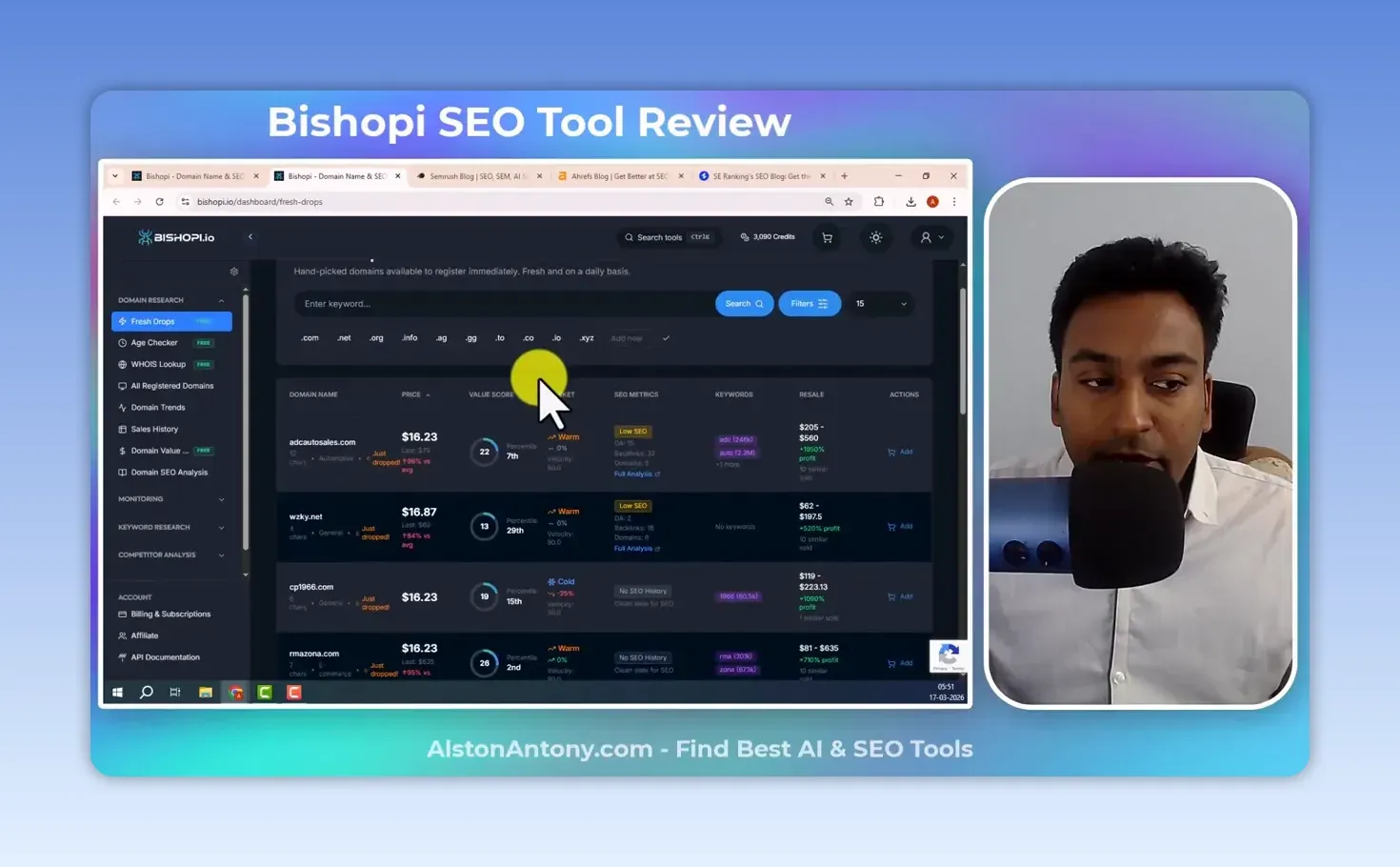
When I look at an expired domain, I want more than whether it is available. An old domain or one with backlinks can have value, but it has to be used carefully. The Domain Age Checker shows the age, when the domain was first discovered and its history in the Wayback archive, which tells me what used to be on the site, especially if I am thinking of rebuilding it along the same lines. I still open the archived pages myself in the Wayback Machine.
There is also a WHOIS lookup. All Registered Domain Search takes a word and finds registered domains containing it, which is a quick way to see how competitors name their sites. Domain Trends gives a snapshot of TLD and market activity, and sales history shows what other names actually sold for.
How useful is the domain valuation and SEO analysis?
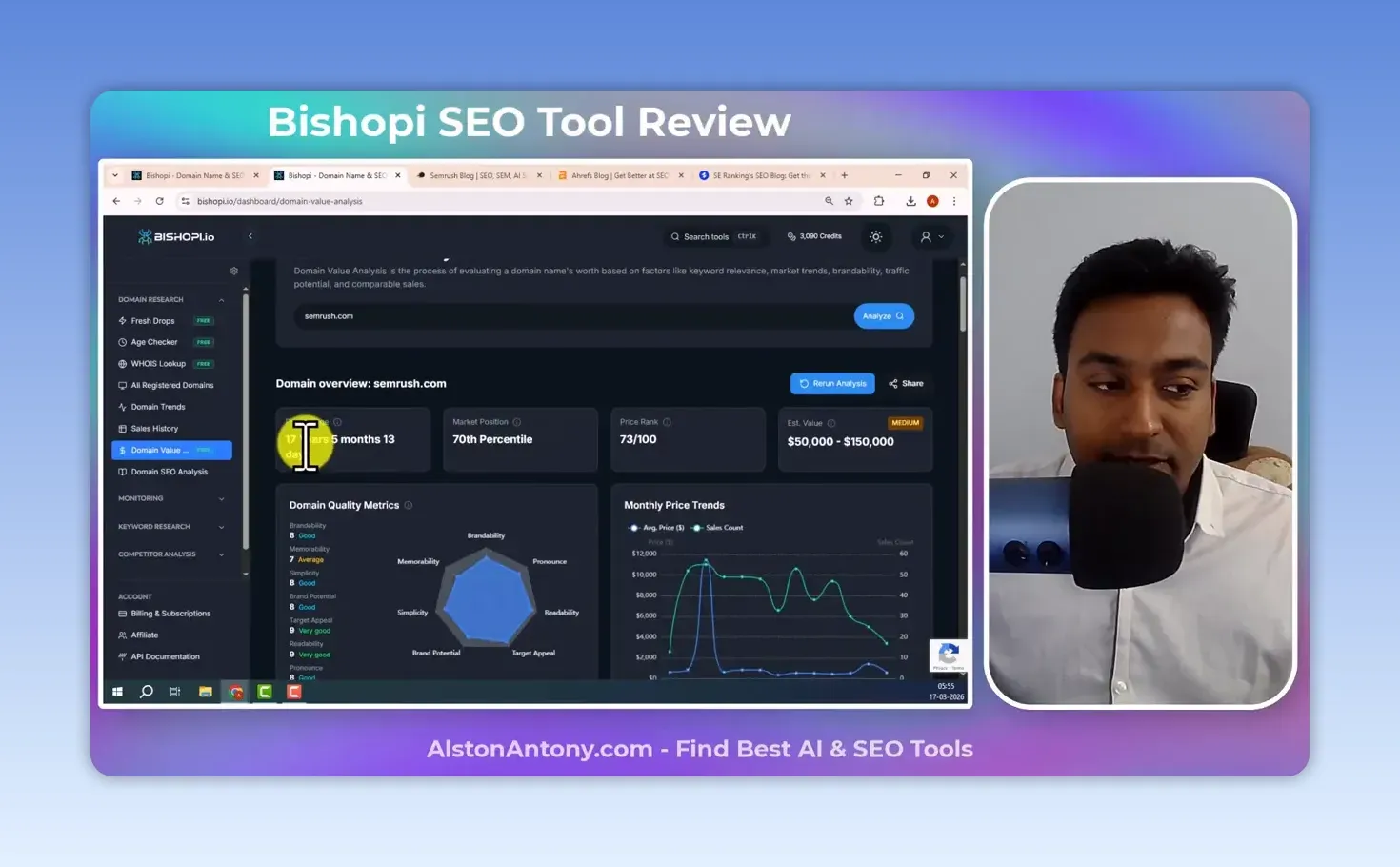
Useful as a starting point. Domain Value Analysis takes a domain and builds a report on its age, estimated value, market position, quality metrics, TLD popularity, similar sales, keywords and market history.
For semrush.com it returned a 70th-percentile market position, a price rank of 73/100 and an estimated value of $50,000 to $150,000, marked medium confidence. I treat that range as a reason to investigate, not a price I could buy or sell at.
Domain SEO Analysis is the other view. Enter a domain and it brings together domain authority, page authority, spam score, citation flow, trust flow, rankings, keywords and backlink counts, then lets you move into ranked keywords, top pages, competitor domains, referring domains, and new and lost backlinks. Open an interesting keyword and it shows the page ranking for it.
That’s a quick snapshot before going deeper. For Ahrefs Domain Rating specifically, which is a different metric from DA, my free bulk DR checker takes up to 20 domains at once.
Can I use Bishopi to monitor domains and a brand?
Yes. Domain Monitor watches domains you care about, including ones whose expiry date matters to you, and Brand Monitor follows a brand keyword. Both are simple ideas. I’d test the alerts with domains and terms from your own work before depending on them. On the current plans, the number of domain monitors and how often they check depend on the tier, and brand monitoring starts on Growth.
What did I get from the keyword research tools?
Mixed results. Keyword Explorer takes a keyword or website and a location, and shows search volume, global volume, trends, CPC and variations. It returned fewer keyword ideas than I expected, even where the displayed count suggested more were available.
SERP Analysis answers a different question: what am I up against for this search? It showed keyword difficulty, SERP features, volume, ad competition and bids, plus the ranking pages with their authority and link metrics. I’d still open those pages rather than decide from a difficulty number.
Keyword Discovery returned a larger, paginated list of related terms that I could filter by volume and select from, which is the useful way to narrow a broad topic. My ChatGPT prompts for keyword research cover the rest of the process.
How do Keyword Gap and People Also Ask work?
Keyword Gap compares two domains. You look for missing keywords, where the other site ranks and yours doesn’t, then switch to the untapped, unique and other views. Comparing semrush.com with Ahrefs, the tabs read Missing 423, Untapped 423, Unique 795 and All 1,218.
The Shared tab read 0. Semrush and Ahrefs compete for many of the same searches, so zero shared keywords between them is a number I would question, and it makes me check the rest of the comparison before trusting it. Run the gap on two sites you know well first, so you can tell whether the results look right.
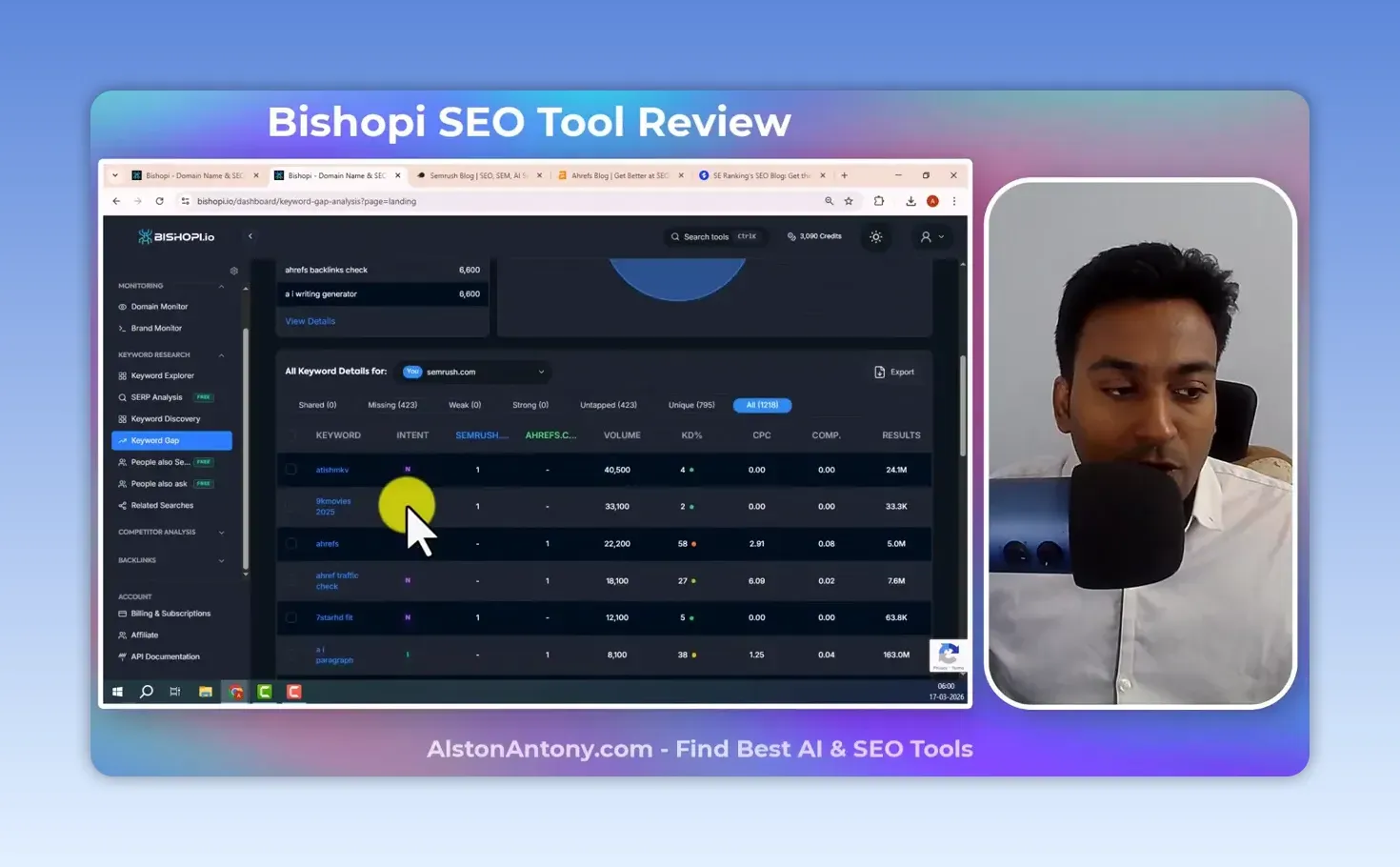
It finds opportunities, but it needs judgment. The word “ahrefs” is in that list. A competitor ranking for its own brand name is not a keyword you should target.
Bishopi keeps People Also Search, the related searches, apart from People Also Ask, the questions tied to a term. People Also Ask has chart and tree views, and I liked the tree because I could follow one question into the next. Related Searches is meant to find connected terms, but it didn’t return data properly in my test, so check it in the free plan before relying on it. If questions are the main thing you want, my Answer Socrates review covers a tool built for exactly that.
What can I learn about competitors?
Competitor Analysis Overview gave me organic traffic estimates, ranking keywords, keyword movement, country distribution, position trends and top competitors for a domain, with the ranking keywords one click away.
Competitor discovery is the part I find most useful. A business I never thought of as a competitor can still rank for a large bunch of my keywords, and Bishopi surfaces those overlapping domains so I can look at them. It also shows top organic pages, subdomains and country data; for a quick look at which competitor URLs seem to bring in traffic, top pages is where I’d start.
Is the backlink data enough to find link opportunities?
It covers the right ground, but it wasn’t reliable in my test. The Backlink Analysis overview puts backlink totals, broken links, referring domains, authority and trust metrics, follow and nofollow ratios, link attributes, placement and top anchors on one screen. There are also views for top linked pages, referring domains, referring traffic and anchor text, which breaks anchors into one-word to four-word terms.
Link Gap compares domains so you can find sites linking to a competitor but not to you. That’s a list to investigate, not a promise those sites will link to you. Referring Traffic points at the pages and sources the tool estimates are sending visits.
This is also where the problems showed. Some backlink figures didn’t display at first. Top Pages was slow and needed a refresh before the backlink distribution appeared. I’d have liked to sort the referring-traffic results, but I couldn’t find a way to.
How much does Bishopi cost?
There is a free plan, and paid plans start at $29 a month. Plans are built on monthly credits; Bishopi puts a typical analysis at roughly 20 credits. My test account showed 3,090 credits.
| Plan | Monthly | Billed yearly | Credits/month | Domain monitors |
|---|---|---|---|---|
| Free | $0 | $0 | 100 | 0 |
| Starter | $29 | $23/mo ($276/yr) | 2,500 | 10, checked every 120 min |
| Growth | $49 | $39/mo ($468/yr) | 5,000 | 25, checked every 60 min |
| Professional | $129 | $103/mo ($1,236/yr) | 15,000 | 100, checked every 30 min |
| Enterprise | from $249 | 35,000+ | 500+ |
From Bishopi’s pricing page on 24 September 2026, excluding VAT. The free plan needs no card, and each paid plan has a 7-day free trial.
What I liked and what I didn’t
What I liked:
- Domain research, valuation, history and sales data sit together.
- The Wayback history in the age checker is a fast first check on an expired domain.
- Competitor discovery surfaced overlapping domains I hadn’t considered.
- The People Also Ask tree view is easy to follow.
What I didn’t:
- Keyword Explorer returned fewer ideas than its count suggested.
- Keyword Gap showed 0 shared keywords between semrush.com and Ahrefs, which doesn’t look right for two direct competitors.
- Related Searches didn’t return data properly.
- Backlink pages were slow, some figures didn’t display at first, and referring traffic had no sort option I could find.
- The current plans lead with domain tools, and the SEO data I tested is now offered as separate APIs.
Would I recommend Bishopi?
For domain research, it is worth trying. Moving from a dropped domain to its age, archive history, value and past sales without leaving one tool is the part that sets Bishopi apart, and it is the part the current plans are built around.
For keyword and backlink research, I wouldn’t choose it on the number of sections alone. In my test the keyword results were thin in one place, Related Searches didn’t work, and parts of backlink research were slow. If you want an all-in-one SEO tool that tells you what to do next, my Morningscore review covers one built for that.
FAQ
Does Bishopi have a free plan?
Yes. The free plan gives 100 credits a month with no card required, and every paid plan has a 7-day free trial.
Are Bishopi’s domain valuations accurate?
Treat them as an estimate. The report combines age, market position, quality metrics and comparable sales, and it labels its own confidence, as it did with medium for semrush.com.
Start on the free plan, run the domains and keywords you actually work with, and pay only if the data holds up. Try Bishopi here (affiliate link).
Keep reading
You Might Also Like

Semdash Review: Big SEO Database, Metrics to Double-Check
My Semdash review. Competitor, keyword, backlink and traffic research held up; keyword difficulty, some inputs and the AI visibility data needed checking.
10 min read

Semrush vs Morningscore: Which SEO Tool Fits Your Business?
Semrush vs Morningscore after using both: keyword depth, backlinks, audits, content tools and price, and which one suits a beginner or an agency.
9 min read

Semrush Review: Every Major Tool Tested, and Is It Worth It?
My Semrush review after using every major tool: keyword research, site audits, backlinks and PPC, what I would skip, pricing, and who should pay.
28 min read