SEO Tool Reviews
LeadSniper Yellow Pages Review: Finding Local SEO Clients
My LeadSniper Yellow Pages review. One plumber search in New York gave 41 leads with phones, websites and social links, and how I qualify them as clients.

In this LeadSniper Yellow Pages review, one search for plumbers in New York collected 41 business listings, which I exported to Excel with names, addresses, phone numbers, websites, ratings and social links. The extension made collecting and exporting easy, and it is sold as a one-time lifetime licence rather than a subscription. The list is only the start: finding the businesses you can actually help, and pitching them something that fits, is still your job.
Affiliate disclosure: links marked “affiliate link” earn me a commission if you buy, at no extra cost to you. That didn’t change what I wrote. How I review tools. I ran this test on 20 July 2026 with a Pro licence. Prices were checked on 24 September 2026.
Prefer to watch? Here is the full test.
Why did I test LeadSniper for local business leads?
Because finding local businesses to pitch is one of the biggest pain points for anyone selling SEO, web design or reputation management, and I didn’t want another subscription that caps how many results I can pull. LeadSniper (the vendor spells it Leads-Sniper) runs as a Chrome extension, also works in Edge, and is sold as a one-time lifetime purchase.
There is a free trial (affiliate link), and I’d start there before buying. When I checked, it came with around 40 credits, and the vendor says no credit card is needed. That’s enough to run your own niche and country and see whether the results suit your market.
This review covers the Yellow Pages scraper only. LeadSniper also sells Google Maps and Google Search scrapers, which are other ways to find businesses; my Google Maps scraper review and Google Search scraper review cover them. Whichever source you use, a list of businesses is not a list of clients. You still have to look at each one and decide what service, if any, makes sense for it.
Which countries does the Yellow Pages scraper cover?
The vendor’s page lists Yellow Pages sites in the United States, Canada, the United Kingdom, Switzerland, South Korea, Germany and Australia. The country list in the extension also showed Italy when I recorded, so check the dropdown for your market.
If your target country isn’t on the list, this scraper won’t help you. Check that before you plan a campaign around it.
How do you search Yellow Pages by niche and location?
Pick the Yellow Pages target in the extension, enter the type of business and the location, and click Start Scraping.
- Choose the target directory. I used USA (yellowpages.com).
- Enter a keyword. I used plumber.
- Enter a location. I used New York.
- Click Start Scraping.
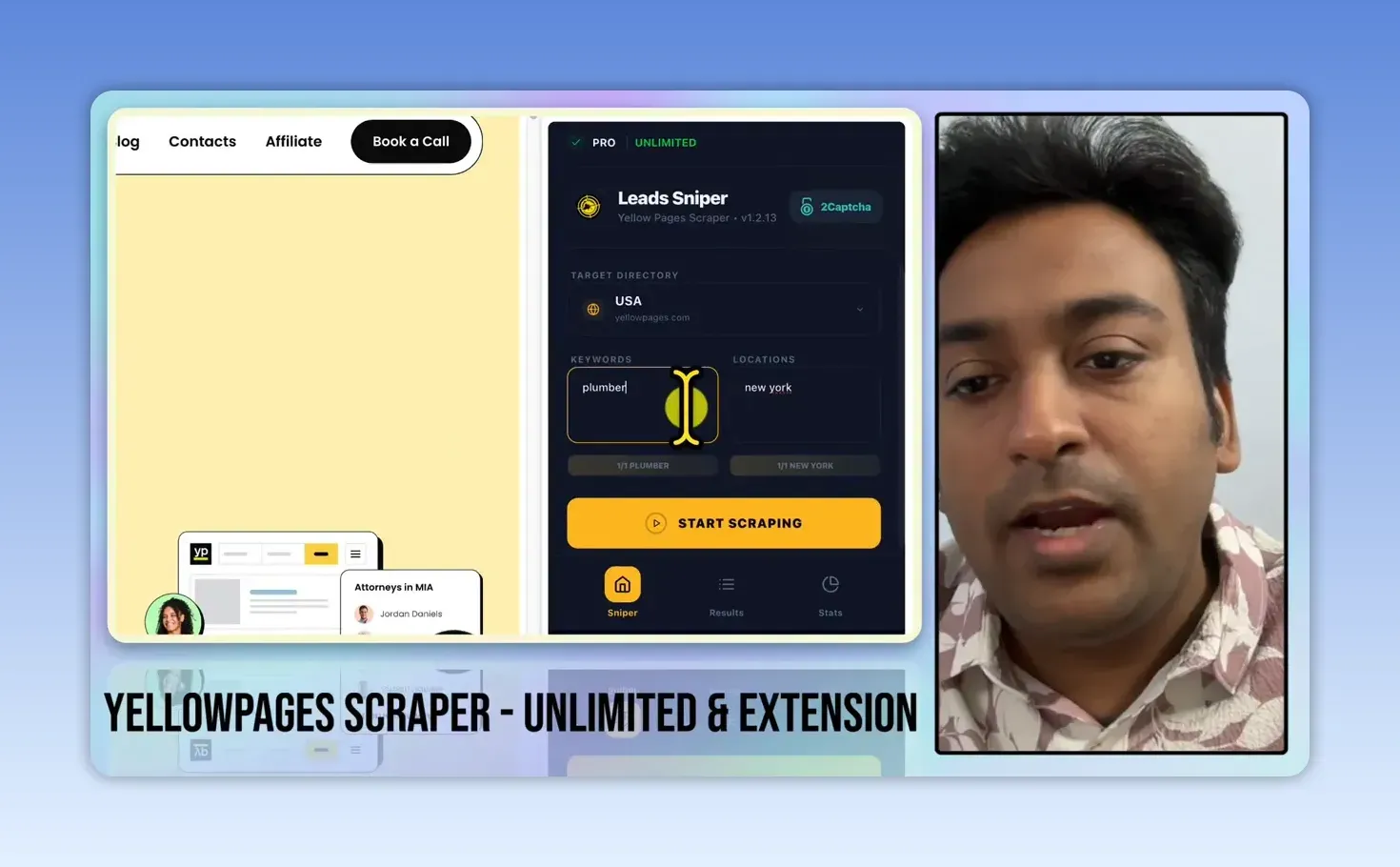
You can add several keywords or locations, and the extension combines them into more searches, so the scraping grows quickly: a related service across several cities, for example. When I’m testing a tool I keep it to one niche and one location, which makes it easier to understand what came back.
The niche matters as much as the tool. Build a list of the businesses you are actually prepared to research and approach.
What happens while LeadSniper collects listings?
The extension works through the Yellow Pages results in your own browser. You can watch the lead count rise and see how long the run has taken, and it handles duplicate listings, which matters when several keywords or locations return the same business.
Running in your browser rather than in the cloud cuts both ways. You control what happens, but a large run can be interrupted by a CAPTCHA. You can solve it yourself and carry on. The extension also has a 2Captcha option, a paid third-party service, for runs where you aren’t at the screen.
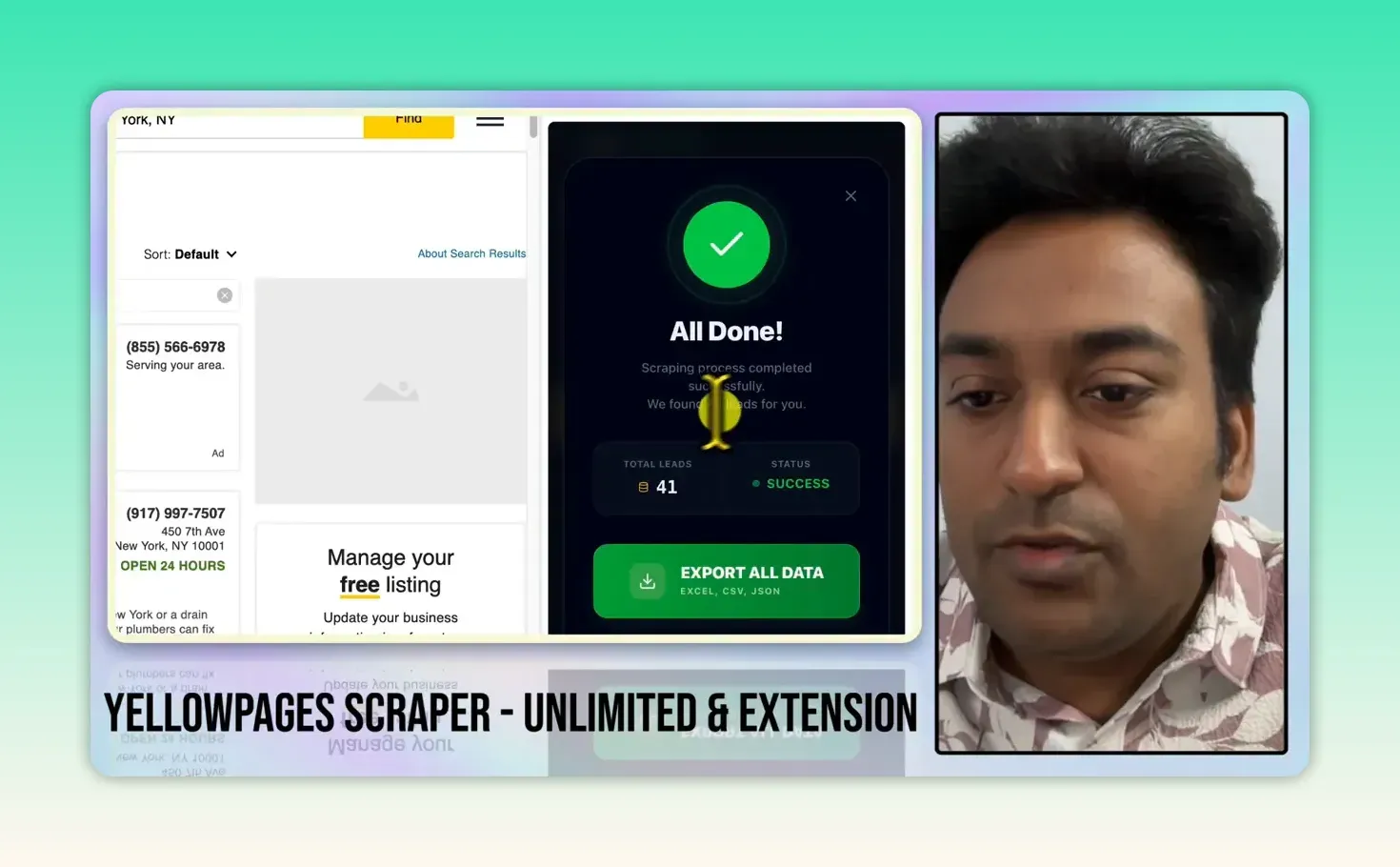
On a longer run you can pause and continue later, which is useful when you want to stop and check the results. I stopped this run after it found 41 leads. That is what one short search produced, not a promise for every niche or city.
How do you export the leads to Excel?
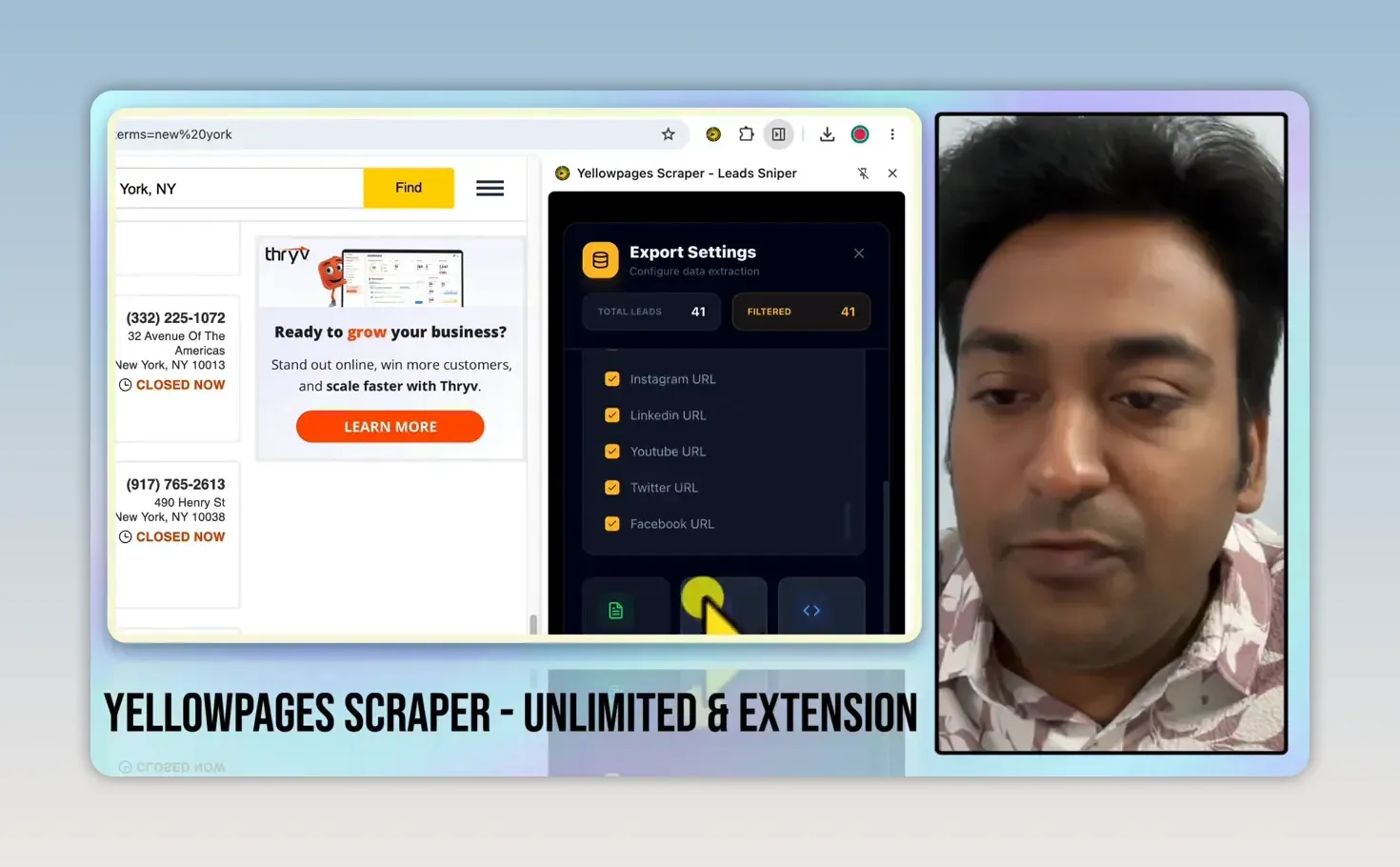
Click Export All Data, choose how to handle duplicates, pick the fields, and download as Excel, CSV or JSON. For duplicates you can match on the unique listing page URL, or on the phone number if you don’t want several listings that share one number.
I usually export every available field. I can delete columns later in Excel, but I can’t analyze a field I didn’t keep. For a narrower job, you can select only the fields you need or export one column: a calling list might only need phone numbers.
The file I opened also held rows from an earlier test, doctors rather than plumbers, so I’d separate and check the rows before treating it as a New York plumber list. An exported sheet is a starting point, not a ready-made outreach campaign.
What information can you use to qualify prospects?
The export had business names, full addresses, phone numbers, latitude and longitude, opening hours, payment methods, ratings and review counts, websites, meta descriptions and social media URLs. An email column was there too, filled in for only a few rows. What each business has depends on what is in its Yellow Pages listing.
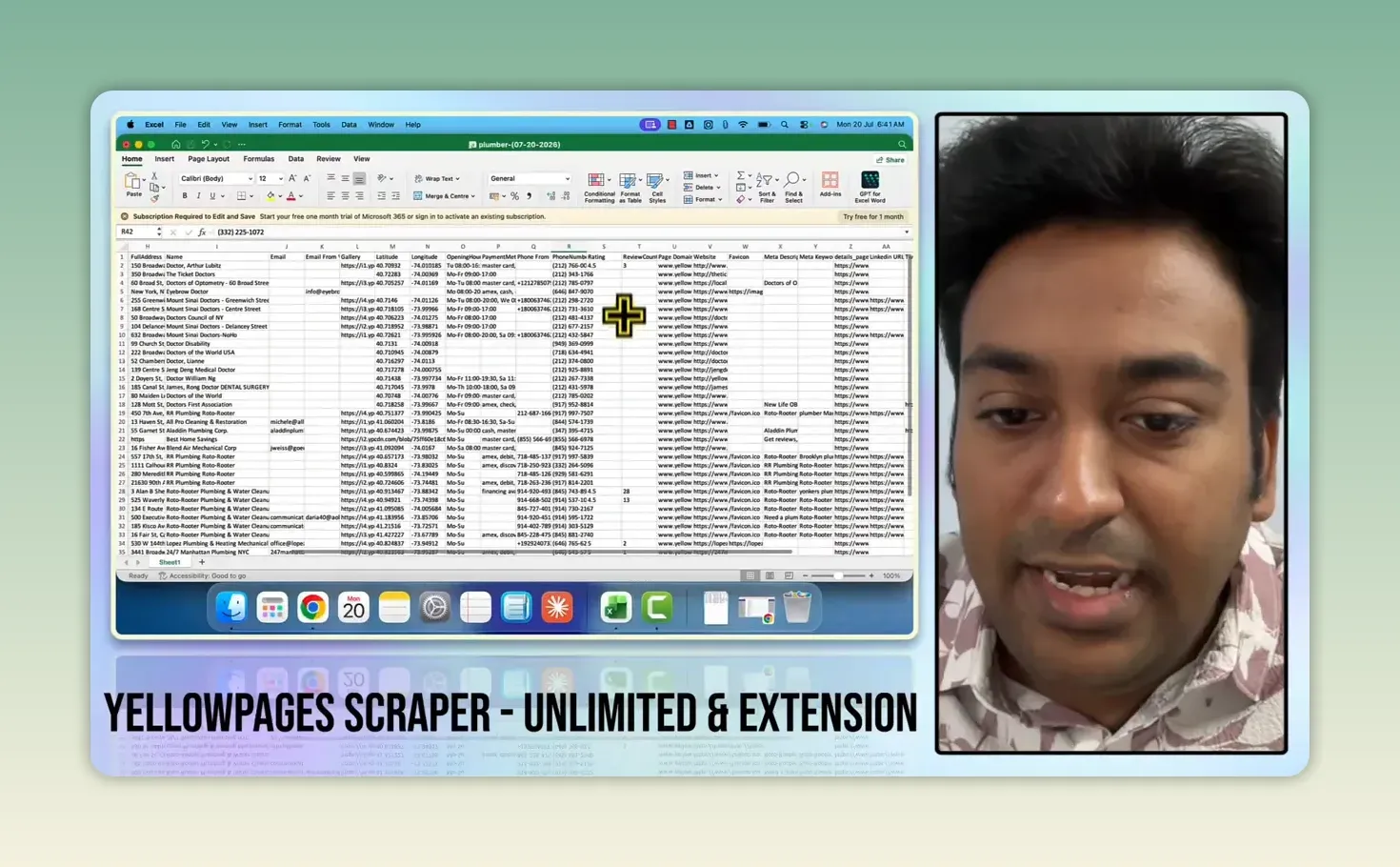
Phone numbers were filled in on every row I checked. I still wouldn’t call every number because it’s there. First I look for a reason I might be able to help:
- A low rating or few reviews can point to a reputation management opportunity.
- No website listed is worth checking, because the business may have one elsewhere before you pitch web design.
- A weak or dated website deserves a closer look for redesign or SEO work. My domain authority checker extension gives a quick read on how strong the site is.
- Social media links show how the business presents itself online.
A missing website field doesn’t prove there’s no website, and a low rating doesn’t mean the owner wants help. Treat these as clues: check the business, then make an offer that matches what you found. Before you call or email anyone, check the cold outreach rules in their country and Yellow Pages’ own terms of use.
How do you turn the list into a prospecting process?
Start with a narrow niche and location, export everything, remove duplicates and unrelated rows, then research the businesses that show a possible need. Use Yellow Pages alongside Google Maps and Google Search to learn more about each prospect instead of relying on one listing.
The next step is not telling everyone you sell digital marketing. It is understanding what the business does now and where you could help. If local SEO is your offer, my Coimbatore Junction case study shows what that work looks like on a real local site, and when you write outreach at volume, my spintax generator keeps messages from reading like copies of each other.
How much does the LeadSniper Yellow Pages scraper cost?
The Yellow Pages Scraper is $149 as a one-time payment, against a list price of $249, with lifetime access and updates and, per the vendor, unlimited leads and no monthly fees. From LeadSniper’s pricing page, checked 24 September 2026. Each scraper is licensed separately at the same price, and the vendor advertises bundle discounts of up to 45% when you buy two to four tools, plus volume discounts on multiple licences. It takes card, PayPal or crypto.
If you want it, start with the free trial here (affiliate link).
LeadSniper pros and cons
What I liked:
- Setup is one niche, one location and a button
- A one-time licence instead of a subscription
- Works in Chrome and Edge, with duplicate handling during the run
- Pause and resume on longer runs
- Export of every field, or only the ones you need, to Excel, CSV or JSON
- Phone numbers were reliably filled in the rows I checked
What held it back:
- Large runs can stop for CAPTCHAs, and hands-off solving means paying for 2Captcha
- Emails and websites depend on the listing, and many rows had no email
- A limited set of countries, which differs between the vendor’s page and the extension
- Leftover rows from earlier runs can end up in the same export, so files need cleaning
Is LeadSniper worth it for finding local SEO clients?
It is worth it if you prospect local businesses regularly and would rather pay once than keep a subscription. In my test, collecting and exporting was straightforward. The real work starts after that: 41 names are only useful if you take the time to find the right businesses, check the details and approach them with a service that fits.
Run the free trial (affiliate link) on your own niche and country first, and buy only if the listings in your market are good enough to work with.
FAQ
Is LeadSniper a one-time purchase?
Yes. Each scraper is sold as a one-time lifetime licence ($149 for the Yellow Pages scraper when I checked), with no monthly fee. Paying for 2Captcha to solve CAPTCHAs automatically is optional and separate.
Does LeadSniper find email addresses?
Only where the Yellow Pages listing has one. My export had an email column, but most rows were blank. LeadSniper sells a separate Domain Email Extractor for that job, which I haven’t tested.
Keep reading
You Might Also Like
LeadSniper Google Search Scraper Review: B2B Prospecting
My LeadSniper Google Search scraper review. Two footprints for doctors in Chennai found 53 LinkedIn leads, exported to Excel, and what to check first.
9 min read
LeadSniper Google Maps Scraper Review: 421 Unique Leads
My LeadSniper Google Maps scraper review. 2,020 searches across 1,010 Indian cities gave 421 unique business leads in about 11 minutes, exported to Excel.
8 min read

Visby AI Review: Tracking My Brand Across AI Answers
My Visby AI review. Real ChatGPT, Gemini and Claude answers and citations per prompt, competitor share of voice, GA4 traffic and a beta report builder.
10 min read