Answer Socrates · Full tutorial
Answer Socrates tutorial: from one seed to a content plan
Part of the Answer Socrates tool listing, 1 in-depth guides plus the full review.
The short answer
Type one seed, get 833 questions in about five seconds, run recursive research to double the set, add social-media questions for the phrasings a search-only tool misses, then cluster the whole thing into topic groups you can plan pages around. In my test on "ai for business" that took the count from 833 to 1,326 keywords in 206 clusters. Export the CSV and the plan lives in a spreadsheet, not the interface.
I tested Answer Socrates on the free tier and paid features, and the tool’s whole argument is speed and volume. One search on “ai for business” targeting the United States returned 833 questions in four to five seconds. A recursive pass took the count to 1,305. Add social-media questions and it landed on 1,326. Cluster all of that and the tool produced 206 topics, at a 69.76 percent cluster rate.
That entire session took under a minute of real time on screen. The workflow below is what to do with that output, in the order I use it.
Start with one seed, on the right country and language
Type a topic, pick a country, pick a language, hit Search. That is the whole setup. The country and language matter because the question dataset for “ai for business” in the United States is not the dataset for the same phrase in India, and running the wrong market wastes one of your daily searches for no reason.
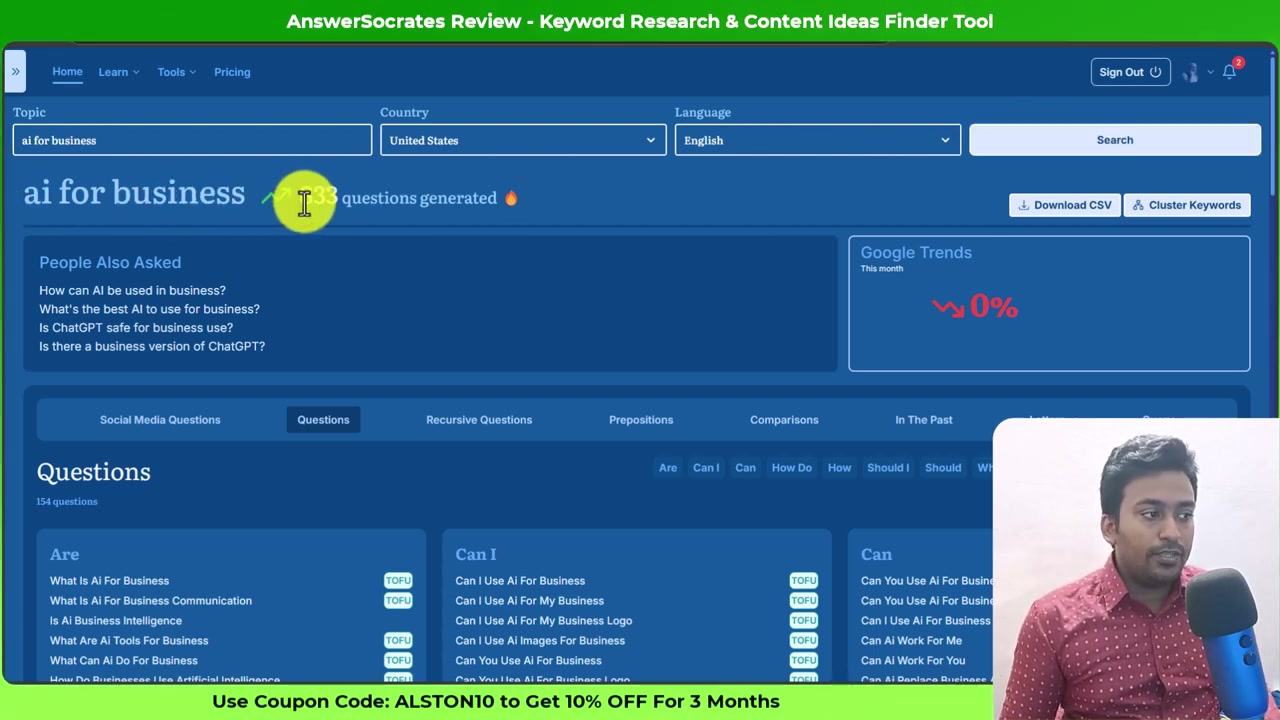
The header on that screen is the number you came for. Everything below it is how to read it.
The Questions tab is sorted by modifier, not by volume
Click through to the Questions tab and the set is grouped by question modifier: Are, Can, Can I, How, How Do, Should, Should I, What, Where Is, Which, Who, Why, Will. That grouping is more useful than a volume-sorted list, because the modifier tells you the intent at a glance without the tool having to guess it for you.
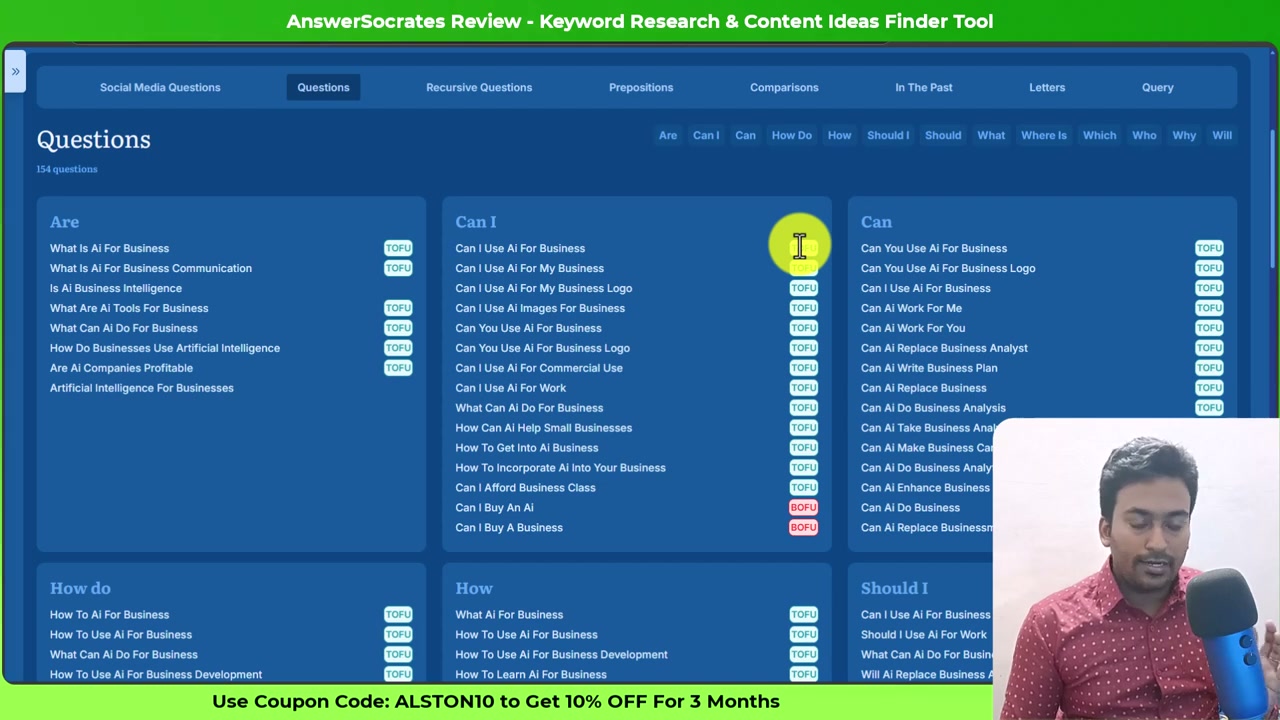
Each row also carries a TOFU or BOFU tag: top-of-funnel informational versus bottom-of-funnel commercial. Treat those as directional. The tool is putting a label on a phrasing pattern, not scoring a search intent the way a full keyword suite would. A “Can I” question tagged TOFU is a research read; a “Should I buy” tagged BOFU is closer to a decision. The label is right about often enough that reading the whole column is faster than second-guessing every row.
154 questions were on the first result set in my test. That is roughly a page’s worth of ideas before you have touched recursive expansion.
Recursive research is where the second layer lives
Recursive Questions is a separate tab, and it does the one thing you cannot do fast by hand: it takes the questions the tool already found and re-queries them, surfacing a second layer.
I hit Generate on that tab and the running total went from 833 to 1,305. Almost all of that increase is genuinely long-tail phrasings that were not in the original set. The tab itself is clumsy — no filtering, no table view, so the second layer is easier to work with in the CSV than in the interface. Which is a real complaint, but the count is the point.
The Social Media Questions tab is the underrated one
The Social Media Questions tab pulls questions from social platforms rather than from a search index. Click Generate, wait, and it appends its own set to the running total.
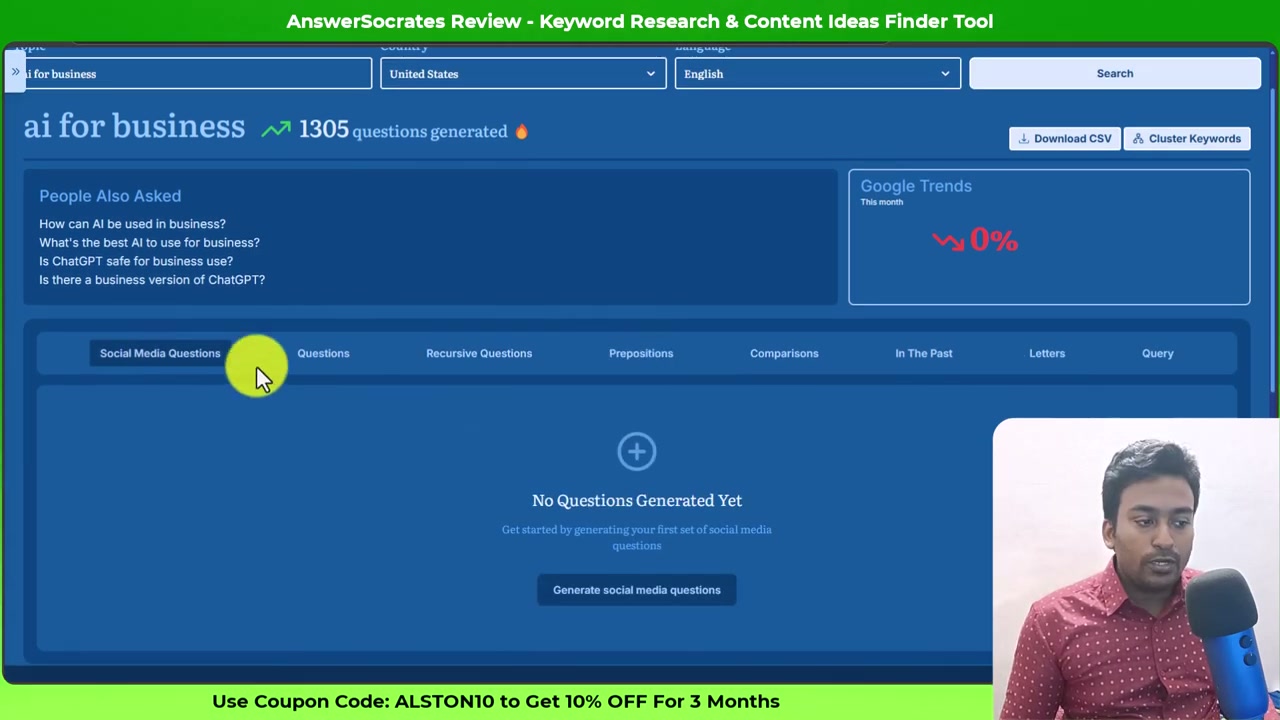
This is the tab I would not skip. The phrasings people use on social platforms are how someone talks to an assistant or types a follow-up prompt: closer to natural language than to search syntax. If any of your work is retrieval-facing, the social set is what an extractable answer or an FAQ has to match. In my test this pushed the running total from 1,305 to 1,326.
Cluster before you plan
You now have 1,326 keywords. That is not a content plan. The plan is topics, and topics come out of clustering.
Click Cluster Keywords. The interface returns metrics you can plan against.
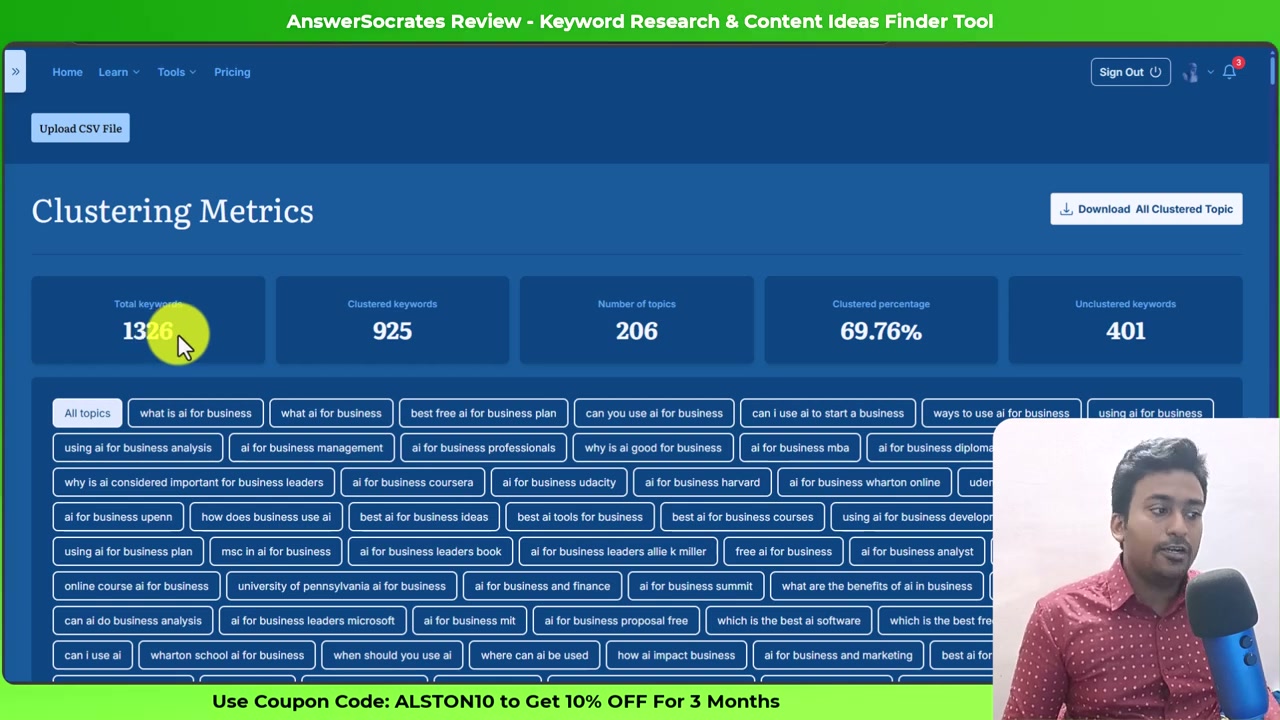
Read those five numbers together. 206 topics is the working number, because topics map to pages and keywords do not. 69.76 percent clustered is fine but not great, and it tells you the tool held its hand up on 401 keywords. Those unclustered rows are usually a mix of one-offs and phrasings the algorithm was not confident about. Some of them are still worth writing about, which is why the CSV matters.
Cluster navigation inside the interface is the weakest part of the workflow. The chips render fine but drilling into a cluster to see its members is fiddly, and there is no bulk edit. The practical move is to export the whole thing and read it in a spreadsheet.
CSV is the real interface
Click Download to pull the whole clustered set as a CSV. Rename it so you can find it later; the tool’s filename convention already includes the market and the seed.
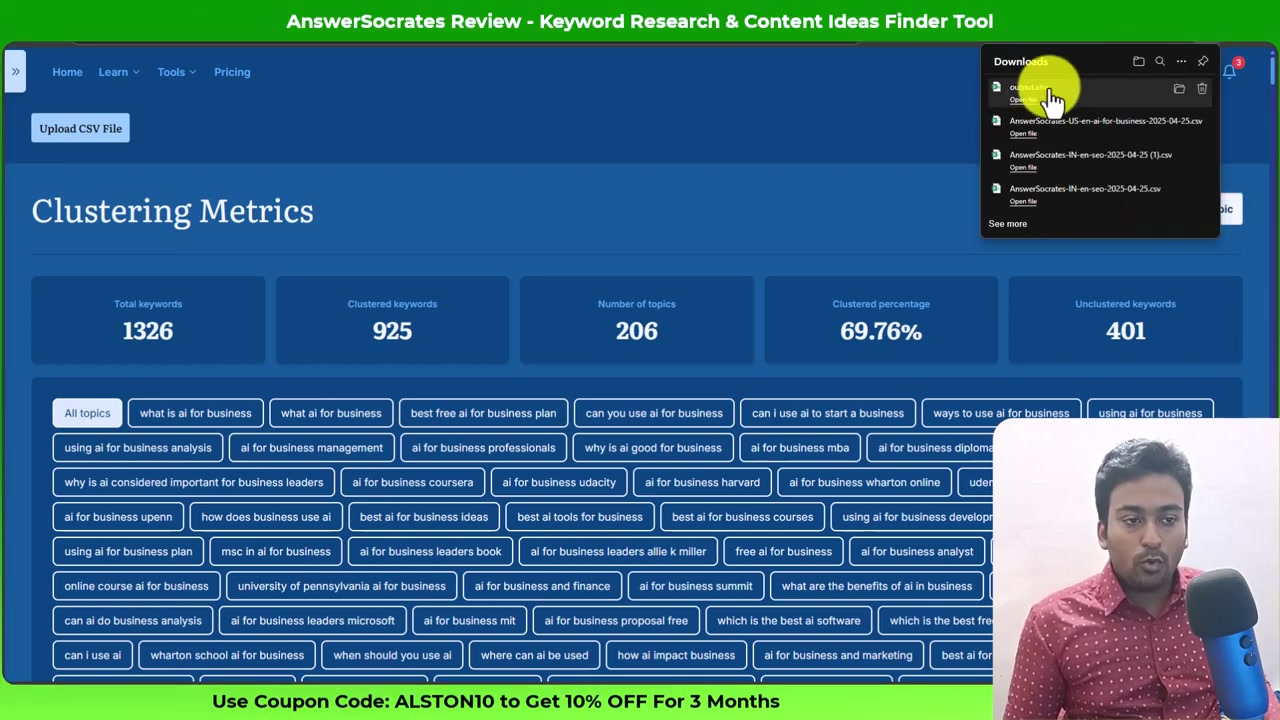
Once the CSV is on disk, the rest of the work happens outside Answer Socrates. Sort by cluster, delete rows that duplicate what you already publish about, decide which clusters need their own page and which are extra sections on an existing one, then take the remaining topic list into whichever tool holds your volume and difficulty data — the numbers Answer Socrates does not give you at the individual-keyword level are the ones that separate the twenty pages worth writing from the two hundred you could write.
That handoff is the whole reason this tool is priced where it is. It gets you from a topic to a triaged list in under an hour. Sizing that list is somebody else’s job.
What this tutorial did not cover
Three things worth naming, so you know what the video and this page leave out:
- Google Trends did not load during my test. It is meant to render inside the results panel; on the seed I ran it stayed at zero and never populated. That is a bug, not a workflow.
- The LLM Brand Tracker is a separate feature, metered in credits per plan, and it is not part of the keyword-research workflow. It is worth a page of its own.
- Pricing. This tutorial shows what the tool does. Whether the free plan is enough, and where the tier boundary bites, are on the Answer Socrates listing with the current published figures and their check date.
The workflow above is the answer to “what do I actually do with this tool”. Everything else is a decision, not a step.
Disclosure: I tested Answer Socrates on the free tier and paid features on 2026-06-11. The full hands-on review is published on zplatform.ai under my own byline. Some links in this article are affiliate links; the deal code ALSTON10 takes 10 percent off for three months on the paid plans. I would use the free tier first regardless.
Questions
How long does an Answer Socrates search take?
Four to five seconds on the free tier for a seed keyword against a specific country and language. A single search on a broad topic returned 833 questions in my test on "ai for business" targeting the United States, and the recursive pass added the rest without a second seed.
What is the difference between recursive and social-media questions?
Recursive re-queries the questions the tool already found to surface a second layer, which is where the genuinely long-tail phrasings live. Social-media questions come from a different source entirely: the phrasings people use on social platforms rather than in a search box, which matches how someone prompts an assistant. Both add to the same running set.
How does clustering help if I already have a keyword list?
A raw list of 1,300 questions is not a plan. Clustering groups them into topics so you can decide which questions belong on one page and which need separate pages. In my test on 1,326 keywords the tool produced 206 clusters at a 69.76 percent cluster rate, with 401 keywords left unclustered. That is the deliverable, not the raw list.
Can I do this whole workflow on the free plan?
Yes, but the free plan caps you at three keyword searches a day, 1,500 cluster credits a month and one CSV download a month. Because a single search can return 800 to 1,300 questions, three searches on well-chosen seeds is genuinely enough for a week of content planning, but the one-CSV-a-month cap is where most people upgrade.
Sources
Each one says which claim on this page it stands behind, and when it was read.
- Answer Socrates pricing Verifies pricing, plans, limits · read 19 August 2026
- Answer Socrates product site Verifies features, availability · read 19 August 2026
- Hands-on Answer Socrates review Verifies features, limits · read 19 August 2026
Where to go next
- Answer Socrates: the full listing What it does, what it costs, and what it cannot do, with every field dated.
- SaaS keyword research, end to end The wider method this tool serves. Read it if you want the strategy rather than the buttons.
- 40+ ChatGPT prompts for SEO keyword research The prompt side of the same job, for when the tool is not the right answer.
- AnswerThePublic, and what changed after the paywall The tool most people compare Answer Socrates against, priced very differently.
- AlsoAsked, and where People Also Asked comes from The other side of the question-research market, focused on PAA specifically.