SEO roadmap, step 2
SEO basics in 2026
A complete SEO fundamentals lesson, in the order that makes each part make sense, with exercises you run on your own site and every claim traced to the documentation it came from.
Jump to a chapter 24
- 01 What SEO actually means now
- 02 How search actually works
- 03 What AI search changes
- 04 Search intent
- 05 Keyword and topic research
- 06 SERP analysis
- 07 Architecture and internal links
- 08 Technical SEO
- 09 On-page SEO
- 10 Content quality in the AI era
- 11 AI-generated content
- 12 E-E-A-T without the nonsense
- 13 Links, mentions and authority
- 14 Entities and topical understanding
- 15 Structured data
- 16 Search appearance
- 17 AI search visibility
- 18 What AI answers actually quote
- 19 Multimodal SEO
- 20 Local and ecommerce, briefly
- 21 Measuring SEO correctly
- 22 The feedback loop
- 23 Myths I would kill
- 24 Test yourself
The point of the next few hours
What you will actually be able to do
Not "understand SEO". These are the specific things you should be able to do by yourself when you close the tab. If one of them still feels impossible afterwards, that chapter failed and I want to know which.
- Explain the difference between crawled, indexed, ranking and cited
- Diagnose why one of your pages is not appearing in Google
- Work out what a person actually wanted from the query they typed
- Decide whether two keywords need one page or two
- Read a results page and say what format it rewards
- Get the handful of on-page elements right without a formula
- Tell the difference between noindex and disallow, and use each correctly
- Say what links and mentions actually do, and what they do not
- Explain what AI search changes, and the much longer list it does not
- Measure visibility, engagement and business outcome separately
- Recognise the common SEO nonsense on sight, and say why it is wrong
Pick a path
Twenty-four chapters is a lot. Choosing a path collapses the ones outside it, and you can open any of them anyway.
Your progress
0 / 0
I have been doing this since 2010. I have owned and run more than a hundred sites, lost two of them entirely to Panda and Penguin, taught it to over 30,000 students, and spent more than $300 as a teenager on things that promised traffic and delivered nothing. That last one is why this page is written the way it is: I already wasted the money, and I would rather you did not.
This is meant to be worked through rather than read. Every few chapters there is a three-minute exercise on your own site, and near the end there are six assignments and a seven-day version if you want the structure. Every claim that could be argued with is linked to a primary source with the date I read it. Where I could not verify something, I say so rather than rounding it into a fact.
One thing before you start. This page is step two of the roadmap, and it assumes something it used to assume silently: that you already know where search happens and which surfaces your buyers actually use. If "search" still means "Google" to you, read search everywhere optimization first. It is about forty minutes and it is the reason this page can spend twenty-four chapters on one surface without apologising for it.
The whole lesson, in six questions
Be discoverable
Can search and AI systems find the URL at all?
Links, sitemaps, architecture. A page nothing points at is a page nothing finds.
Be accessible
Can they fetch it, render it and store it?
robots.txt, status codes, rendering, indexing. Four separate gates, four separate failures.
Be understandable
Can they tell what the page, the site and the brand are?
Titles, headings, internal context, entities, structured data.
Be relevant
Does it answer what the person was actually trying to do?
Intent, not keywords. The SERP tells you what the engine currently believes.
Be worth selecting
Why this page instead of the ten thousand alternatives?
First-hand evidence, original data, verifiable claims. The part a model cannot generate for you.
Be measurable
Can you see whether any of it produced a customer?
Impressions, clicks, citations, signups. Rankings are the middle of the chain.
Those six are the actual mental model. Two hundred ranking factors is not a model, it is a list. Everything in the 24 chapters below sits underneath one of those six questions, and the chips on each card jump straight to the chapters that answer it.
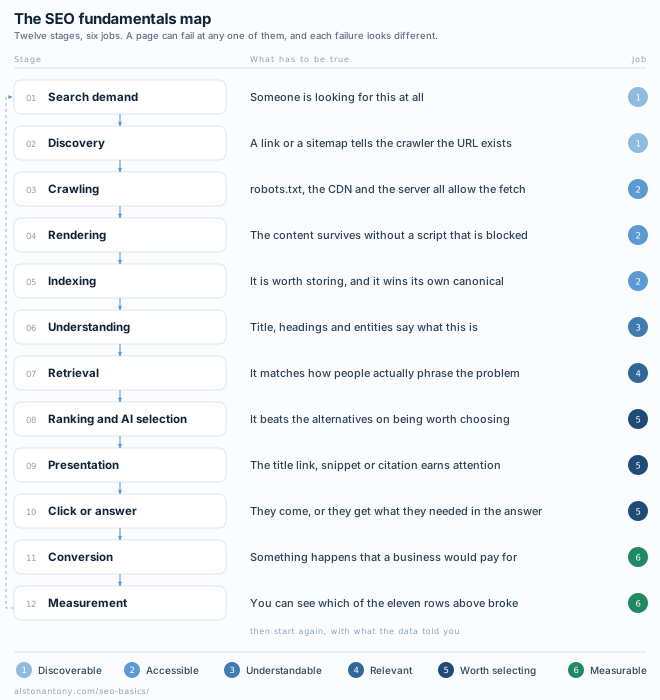
Here is the same thing as one diagram, which is the version I would print and keep near the desk.
The SEO fundamentals map
Twelve stages from "somebody wants this" to "we know whether it worked", and the six jobs underneath them. Every chapter on this page is somewhere on this diagram. If you keep one thing, keep this.
Scroll the diagram sideways to see all of it.
Watch first, five minutes
Google explaining its own machine
Google's own five-minute explanation of crawling, indexing and serving. Start here, then read chapter two, which takes the same three stages and splits them into the seven places a page can actually die.
Published by Google on the Google channel. There are more official videos in the video library further down, one or more per chapter.
What SEO actually means now
If you remember one thing SEO is making your information findable, understandable, trustworthy and useful to the systems people search with. Rankings are a step in that chain, not the goal.
Not in this path.
SEO is the work of making your information discoverable, understandable, trustworthy and useful to search systems and to the people using them. That is the whole definition, and notice what is missing from it: Google, keywords, and the number one.
The belief I want to kill first is that SEO means ranking number one on Google. It is the most common thing a beginner arrives with and it quietly ruins every decision that follows, because it treats one position on one surface as the goal.
Organic discovery in 2026 happens across at least nine surfaces:
- Traditional Google and Bing results
- AI Overviews
- Google AI Mode
- ChatGPT search, and the other AI answer systems
- Image results
- Video results
- Maps and local packs
- Shopping results
- Forum and discussion results, which are somebody else's site carrying your name
A ranking is an intermediate metric. It sits in the middle of a chain that runs visibility, then qualified discovery, then action, then a business outcome. Every step of that chain can be measured. Only one of them pays for anything.
I stopped being able to describe my own results as rankings a while ago. Across the properties I own, the Bing AI Performance report has logged 302,037 Copilot citations in six-month windows, and Search Console has logged Google AI feature appearances since May 2026. Those are not positions. There is no position to report. The unit of measurement changed and the vocabulary has not caught up.
So the working question is never "where do I rank". It is "can the systems people use find me, understand me, trust me, and is any of that turning into customers".
How search actually works
If you remember one thing A page has to survive discovery, crawling, rendering, indexing, retrieval, ranking and presentation. It can die at any one of them, and each failure looks different in Search Console.
Not in this path.
Google Search works in three stages: crawling, indexing, and serving results. That is Google's own framing, and its documentation adds the sentence most SEO courses leave out: not all pages make it through each stage.
The opponent here is "submit your site to Google". There is no submission queue. Google's documentation says the vast majority of pages in its results were never manually submitted, they were found by crawlers following links.
I split those three official stages into seven below, because they fail separately and each failure looks completely different in Search Console. Discovery failing is not crawling failing. Rendering failing is not indexing failing. Treating them as one thing is why people "fix" the wrong problem for months.
From "a URL exists" to "a person sees it"
Seven stages, and a page can die at any of them. Pick one to see what it does, what breaks it, and the exact Search Console screen that tells you whether it worked.
Stage 1 Discovery
Google learns that a URL exists. There is no central registry of web pages, so it builds a list of known URLs from links it has already seen, from sitemaps you submit, and from pages it crawled before.
Where it breaks
- Nothing on your site links to the page and it is not in a sitemap. An orphan.
- The only link to it lives inside JavaScript that never produces an anchor with an href.
- The site is new and no external site links to it, so no crawler has a reason to arrive.
How you check it
Search Console, URL Inspection. "URL is unknown to Google" means discovery failed, not indexing.
The distinction people miss
A sitemap helps discovery. It is not a request for indexing and it is not a ranking signal.
Stage 2 Crawling
A crawler fetches the URL. Googlebot decides which sites to crawl, how often, and how many pages to take, and it slows down when your server complains. HTTP 500 responses read as "back off".
Where it breaks
- robots.txt disallows the path.
- The CDN, WAF or bot-protection rule blocks the crawler user agent or its IP range.
- The page requires a login.
- The server returns 5xx, or times out under crawl load.
How you check it
Search Console, Crawl stats. Server logs if you have them. A curl with the crawler user agent for a fast sanity check.
The distinction people miss
Disallowed is not noindex. A blocked URL can still show up, described only by what other pages say about it, because Google never fetched the page to read your noindex.
Stage 3 Rendering
Google renders the page and runs the JavaScript it finds, using a recent version of Chrome. Rendering matters because sites routinely put their real content in JavaScript, and without running it a crawler sees an empty shell.
Where it breaks
- The script or API endpoint that builds the content is itself disallowed in robots.txt.
- Content only appears after a click, a scroll or a login.
- The client-side fetch fails, or is slow enough to be abandoned.
- Content is served only to visitors who pass a bot check.
How you check it
URL Inspection, "View crawled page", then the rendered HTML. That is what Google actually got.
The distinction people miss
"I can see it in my browser" proves nothing. Your browser has your cookies, your session, and no robots.txt.
Stage 4 Indexing
Google works out what the page is about. It processes the text, the title element, alt attributes, images and video, groups near-duplicate URLs into a cluster, picks the canonical to represent that cluster, and collects signals about it. Then it decides whether to store it at all.
Where it breaks
- The content is judged low value, so it is crawled and then dropped.
- A robots meta noindex, or an X-Robots-Tag header.
- It is treated as a duplicate and a different URL is chosen as canonical.
- The page structure makes the main content hard to isolate.
How you check it
Search Console, Pages report. "Crawled, currently not indexed" and "Discovered, currently not indexed" are two different diagnoses.
The distinction people miss
Indexing is not guaranteed. Google says so in plain text: it does not guarantee that it will crawl, index, or serve your page, even when you follow every rule.
Stage 5 Retrieval
Someone searches. The engine pulls a candidate set out of the index that could plausibly answer the query. In generative features this is the grounding step, and one question can trigger several concurrent queries rather than one.
Where it breaks
- The page is indexed but nothing on it matches how people phrase the problem.
- A stronger page on your own site outcompetes it for the same query.
- The query intent does not match the page format, for example a pricing page against a how-to query.
How you check it
Search Console, Performance, filtered by query. Impressions above zero means you are being retrieved. Zero impressions on an indexed page is a relevance problem, not an indexing one.
The distinction people miss
Retrieval scores passages as much as pages. One page that answers ten questions adequately loses to ten pages that each answer one properly.
Stage 6 Ranking
The candidates get ordered. Relevance is decided by many factors and some of them describe the person rather than the page: their location, language and device. "Bicycle repair shops" returns different results in Paris and Hong Kong.
Where it breaks
- Competing pages show more first-hand experience or better evidence.
- The page is thin relative to the rest of the candidate set.
- Intent is commercial and your page is informational, or the reverse.
How you check it
Search Console average position, read as an average of averages rather than a rank. A rank tracker with a fixed location if you need position by market.
The distinction people miss
There is no single position any more. The same query returns a different page one by country, device and session.
Stage 7 Presentation
The result gets drawn. A title link and snippet, an image, a video thumbnail, a rich result, a local pack entry, a supporting link under an AI answer. What the searcher sees decides whether ranking turns into a click.
Where it breaks
- Google rewrites your title because it does not describe the page.
- The snippet is truncated, or pulled from the wrong part of the page.
- Structured data is invalid, or does not match the visible text, so no rich result.
- You are cited inside an answer where the user never needs to click.
How you check it
Rich Results Test for eligibility. Search Console CTR by query for whether the presentation is working.
The distinction people miss
Ranking and appearance are different problems. A number one with a bad title link loses to a number three with a good one.
Two sentences from Google's documentation are worth memorizing, because between them they close most arguments. Google does not accept payment to crawl a site more frequently or to rank it higher. And Google does not guarantee that it will crawl, index, or serve your page, even if the page follows the Search Essentials.
Read that second one again. Indexing is not a right you earn by publishing. It is a decision made about your page, every time, and "I built it properly" is not an appeal.
Crawled is not indexed is not ranking is not cited
Four separate states. Each one is a gate, and a page can sit at any of them forever. When someone says "my page is not ranking", the first job is finding out which gate it is stuck at.
Scroll the diagram sideways to see all of it.
Crawled
A crawler fetched the URL and got a response.
Proves Access works.
Proves nothing about Nothing about whether Google kept it.
Indexed
Google processed the page, stored it, and chose this URL as the canonical of its cluster.
Proves It is eligible to be shown.
Proves nothing about Nothing about whether anyone will ever see it.
Ranking
It gets retrieved and ordered for at least one real query, so it earns impressions.
Proves It is relevant to something.
Proves nothing about Nothing about whether that something is worth having.
Cited
An AI answer used the page as a grounding source and linked it.
Proves It was picked out of the retrieved set as worth quoting.
Proves nothing about Nothing about whether the reader clicked. Often they do not.
This is the single highest-value distinction on the page. Once someone genuinely holds those four states apart, half the questions they were going to ask answer themselves.
All of that is theory until you look at one of your own URLs, so do that now. Three minutes, free, and the rest of this lesson leans on it.
If you get stuck on the exercise
Google walking through the exact screen
URL Inspection is the single most useful free screen in SEO, and this is the team that built it explaining what each line means. Watch it once and the exercise above becomes obvious.
Google Search Central, from their free Search Console training series.
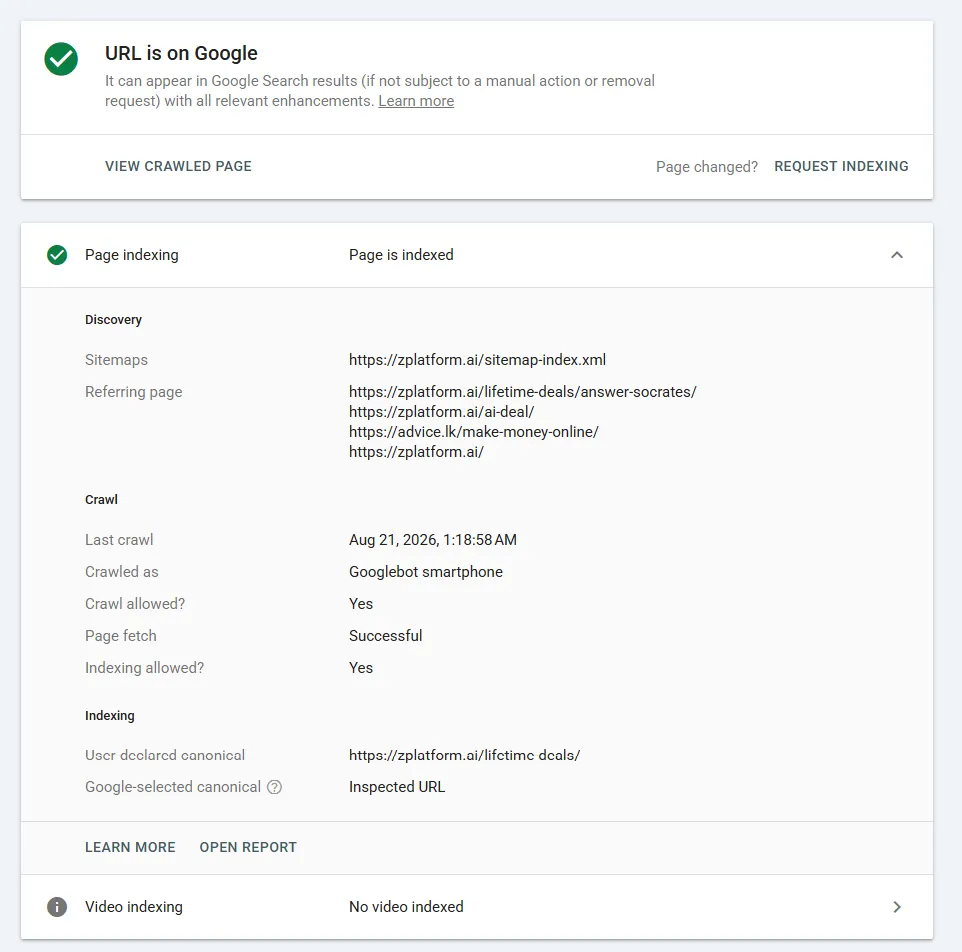
URL Inspection on one of my own pages, with Page indexing expanded
- Look here
- The three headings inside Page indexing: Discovery, Crawl, Indexing. They are stages one, two and four of the diagram above, on one screen.
- Ignore for now
- Request Indexing. Pressing it repeatedly does nothing useful and is the most common displacement activity in SEO.
- What this tells you
- Discovery names the exact routes Google found this URL through, including one external site. Crawl says the fetch succeeded and that it was crawled as Googlebot smartphone. Indexing shows the user-declared canonical and the Google-selected canonical agreeing, which is what winning the canonical vote looks like.
zplatform.ai/lifetime-deals/, Search Console URL Inspection, 21 August 2026. Last crawl on that screen: 21 August 2026, 1:18 AM. Cropped to the two cards, nothing edited.
Three things on that screen are worth slowing down for, because they are the whole chapter in one screenshot.
- Discovery lists the referring pages. Four of them, one on a completely different domain. That is not a theory about how discovery works, it is the actual route, named. Chapter seven is about deliberately creating those routes.
- Crawled as Googlebot smartphone. Not the desktop crawler. If your page is different on a phone, the phone version is the one that counts.
- User-declared canonical and Google-selected canonical match. I voted, and my vote won. When those two lines disagree, that is the "Duplicate, Google chose a different canonical" case in chapter eight, and it is telling you your own signals contradicted each other.
And here is the practical version of the same knowledge. Pick your symptom, get the stage, then work on that one thing rather than everything at once.
Interactive
What is wrong with my page?
Three questions at most. Answer honestly, including "I do not know", and it will name the stage, tell you what it means and give you the next four things to do.
Find your symptom, get the stage
Nearly every beginner SEO problem is one of these eight. Match the symptom, then work on the stage it names instead of doing everything at once.
The page is not in Google at all, and Search Console says the URL is unknown
Add one internal link from a page that already gets crawled. Put it in the sitemap second, not first.
Search Console says "Blocked by robots.txt", or the crawler gets a 403
Read robots.txt, then check the CDN and firewall rules. Bot protection blocks more crawls than robots.txt does.
The page looks fine in my browser, but Google sees almost nothing
URL Inspection, "View crawled page", rendered HTML. If the main content is missing, find which script or endpoint is blocked.
"Crawled, currently not indexed"
Usually a value judgment, not a bug. Ask what this page adds that the indexed alternatives do not.
"Duplicate, Google chose a different canonical than user"
Two of your own URLs are competing. Pick one, canonical the other to it, and make the internal links agree.
Indexed, but zero impressions for months
A relevance problem. The page does not use the words people use, or its format is not what this SERP rewards.
Impressions rising, clicks flat
Sort Performance by impressions and look at CTR. Rewrite the title link for the queries already showing.
Ranking well, nobody signs up
You won a query with no commercial intent. That is a strategy problem and no technical fix touches it.
One more thing before you move on. Later in this lesson there is a single real page of mine followed through all seven of these stages with its actual numbers at each step. It sits down there rather than here because it makes far more sense once you have read the chapters in between.
What AI search changes, and what it does not
If you remember one thing AI search changed retrieval and presentation, not the fundamentals. Google says its generative features are rooted in the same ranking and quality systems as the rest of Search.
Not in this path.
AI search changed the retrieval and presentation layers. It did not create a separate discipline with its own technical stack, and Google says so directly: its generative AI features are rooted in its core Search ranking and quality systems.
I spend most of my working week on AI search and I still think "AI SEO" is a misleading name for most of what it involves. The opponent in this chapter is the idea that there are now two disciplines and you are behind on the new one. There are two surfaces. There is one discipline.
Where AI search is different, and where it is the same machine
The shared stretch is the point. Both flows start with the same index and the same ranking systems. Generative search adds steps at the front and the back, and changes what the person ends up looking at.
Scroll the diagram sideways to see all of it.
What is genuinely new
The fan-out at the front and the synthesis at the back. One question can trigger several concurrent queries, and the output is prose with supporting links rather than a list.
What is unchanged
Everything in the middle. Same index, same ranking and quality systems, same requirement to be indexed and snippet-eligible before any of it applies to you.
What changes for you
The impression is worth less and the citation is worth more, because the reader can finish without clicking. That is a measurement problem before it is an optimisation problem.
What is genuinely new is worth naming precisely, because the precision is what makes it actionable. Google describes two techniques behind its generative features:
- Retrieval-augmented generation, also called grounding. The model relies on the core Search ranking systems to retrieve relevant, current pages from the index, then reviews the specific information in those pages to build a response, with clickable links to the pages that support it.
- Query fan-out. A set of concurrent, related queries the model generates to fetch more information than the original question would return on its own.
Fan-out is the one that changes how you plan content, so here it is with Google's own worked example rather than mine.
One question, several searches
Generative search may issue a set of concurrent related queries to gather what it needs before answering. That is why optimizing for one exact keyword string is an incomplete model of the question being asked.
The question asked
how to fix a lawn that's full of weeds
Google's own worked example, published in its guide to optimizing for generative AI features.
Source: Optimizing your website for generative AI features on Google Search
What gets investigated 3 searches
- best herbicides for lawns
- remove weeds without chemicals
- how to prevent weeds in lawn
The question asked
best CRM for a 10-person SaaS startup
One buying question. At least six distinct information needs sitting under it, each with its own SERP and its own winners.
What gets investigated 6 searches
- best CRM for SaaS companies
- CRM for small teams
- HubSpot vs Pipedrive
- CRM pricing for 10 users
- CRM automation features
- SaaS CRM reviews
The question asked
is my site blocked from ChatGPT search
A diagnostic question. Every sub-query is mechanism, which is why a page that only defines the terms gets nowhere near it.
What gets investigated 4 searches
- OAI-SearchBot robots.txt
- GPTBot vs OAI-SearchBot difference
- how to check if ChatGPT can crawl my site
- ChatGPT search citations not showing
The consequence is not "write longer pages". It is that a single exact-match keyword is an incomplete description of the question being asked. Someone asking about the best CRM for a ten-person team is having six searches run on their behalf, and the sites that own the sub-questions get pulled into the answer even when they never targeted the headline query.
A warning I will repeat later because it is the mistake this insight causes: the answer is not a page for every sub-query. Google names that specifically as a scaled content abuse risk and as an ineffective long-term strategy. Cover the question properly, in as few pages as it honestly takes.
One more precision point. AI Overviews and AI Mode may use different models and different techniques, so the links they show will differ, and AI Overviews only appear when Google's systems judge them additive to normal Search, which means they often do not appear at all. Anyone quoting you a single "AI Overview presence" number for your whole market is quoting a sample and calling it a measurement.
For the deeper version of this mechanism, I wrote up why fan-out is a passage problem rather than a page-length problem in Query fan-out in SEO.
Search intent, which is a person and not a category
If you remember one thing The query is not the intent. Work out what the person is trying to accomplish, then check the results page, because it is the engine telling you what it currently believes.
Not in this path.
The query is not the intent. Two words in a search box are the compressed, lossy output of something a person wanted, and your job is to reconstruct the want rather than match the string.
The opponent here is search volume as the primary input. Volume tells you how many people typed something. It tells you nothing about what any of them were trying to do, and a page built to serve the wrong reading of a 12,000-a-month keyword earns impressions and nothing else.
The same query, several different people
Pick a query and read the jobs hiding inside it. The label matters far less than the answer to one question: what is this person trying to get done?
Two words, six jobs. Nobody types this wanting a definition, and nobody types it ready to pay either. The SERP has to hedge, which is why it mixes review roundups, category pages and provider homepages.
What is it?
informationalA definition, and how it differs from normal hosting
Page that wins it Explainer
Which one?
commercialA tested shortlist with prices and trade-offs
Page that wins it Review roundup
Buy it
transactionalPlans, price, checkout
Page that wins it Pricing page
Compare two
commercialA head-to-head on the one thing they care about
Page that wins it Versus page
Free option
informationalThe honest answer about what free costs you
Page that wins it Explainer
Move a site
navigationalA migration procedure that does not lose the email
Page that wins it Tutorial
A learning query with no purchase in it. The person wants a mental model they can use today, and they decide in about eight seconds whether you are going to waste their afternoon.
Complete beginner
informationalWhat the words mean, in an order that builds
Page that wins it Fundamentals guide
Needs a checklist
informationalThe finite list of things to actually do
Page that wins it Checklist
Evaluating a hire
commercialEnough to tell a real SEO from a fraud
Page that wins it Buyer guide
Refreshing 2015 knowledge
informationalOnly what changed, not the whole subject again
Page that wins it What changed
Navigational with commercial weight. They know the brand already. The job is not to explain what Ahrefs is, it is to answer the price question faster than the vendor does and add the thing the vendor will not say.
Just the number
navigationalCurrent plan prices without a sales page
Page that wins it Pricing reference
Is it worth it
commercialCost per useful job against the alternatives
Page that wins it Verdict
Cheaper option
commercialWhat you actually lose by downgrading
Page that wins it Alternatives
The traditional classifications are worth knowing and not worth memorizing: informational, commercial investigation, transactional, navigational, local. They are a filing system, not an insight. Plenty of real queries sit in two at once and the label does not tell you what to build.
The question that does is: what is this person trying to accomplish? Then go and look at the results page, because the SERP is the engine's current published answer to exactly that question. If every result is a comparison table, Google has decided this is a comparison query, and your beautifully written definition page is going to lose to whatever is in position eight.
Intent also drifts. A query that was informational in 2023 can be commercial in 2026 because the market matured and the SERP followed. This is why intent gets re-checked on a refresh and not assumed from an old spreadsheet.
Keyword and topic research
If you remember one thing Keyword research is choosing which problems you will be the best answer to. Relevance, intent and opportunity all outrank search volume.
Not in this path.
Keyword research is deciding which problems you are going to be the best answer to, and volume is the fourth-most-useful input into that decision.
The opponent is the process almost every beginner is taught: open a tool, sort by volume, filter by difficulty, export, write. That process produces a list of strings, and a list of strings is not a plan.
Four filters, in this order:
- Relevance. Does this search belong to your business and your audience? A high-volume query you have no right to answer is a distraction with a spreadsheet attached.
- Intent. What does this person actually need? See the chapter above.
- Demand. How much of it exists, from every source, not just the volume column.
- Opportunity. Can you realistically compete, and would winning matter to the business? Both halves. Winnable and worthless is the most common trap.
Demand is bigger than the volume column. It includes:
- Search volume, as an estimate, always named as an estimate
- Related queries and autocomplete
- Long-tail phrasings, where most real searches live
- Question phrasings, which tell you the shape of the confusion
- Your actual customer conversations, support tickets and sales calls
- Forums and communities where people already argue about this
- The SERP itself, and what it chooses to show
- Search Console, which is the best keyword tool I own and the only one reporting queries where a real person saw a real page of mine
Then there is the hierarchy that stops you building forty pages where four belong. Keyword, then query cluster, then topic, then user problem. These four strings look like four pages to a tool and are one page to a person:
- how to create website with AI
- AI website creator
- build site using AI
- AI WordPress site builder
Same intent, near-identical SERPs, one job to be done. One page. Google's 2026 guidance is explicit that creating separate content for every possible variation of how people might search, including fan-out queries, is both a policy risk and an ineffective long-term strategy, and that a high quantity of pages does not make a website higher quality or more relevant.
I have written the long version of this process, as step three of this roadmap, in keyword research and search demand. This chapter is the mental model. That page is the work, and it comes with the metrics pulled live so you can see volume and traffic potential disagree rather than take my word for it. The free Excel template is the working file you record the decisions in.
SERP analysis, before you write anything
If you remember one thing Read the results page before you build anything. It is the only free, current, first-party statement of what the engine believes this query means.
Not in this path.
Read the results page before you decide what to build, because it is the only free, current, first-party statement of what the engine currently believes about this query.
The opponent is the metric that gets quoted instead: keyword difficulty. A difficulty score is a third-party model's guess, and I have watched people skip a query with a KD of 40 that two thin affiliate pages were holding, and grind for a year on a KD of 12 owned by three national brands.
Six things to record, and they take four minutes:
- Page types. Product pages, category pages, tutorials, comparisons, tools, forums, videos, news. If nine of ten results are one type, that is the format.
- Surfaces present. AI Overview, images, video, local pack, shopping, discussions. Each one is a slot you might be able to take.
- Who is winning. National brands or small specialists. A page of specialists is an invitation. A page of brands is a longer project.
- What the top results have in common. Not word count. Format, depth, evidence, freshness.
- What every one of them is missing. This is where your angle comes from.
- Whether the SERP is even about your reading of the query. If it is not, you found a different query.
Then ask the useful question: what job is the engine trying to do with this page? Everything on that results page is Google's attempt to satisfy an intent it has inferred. Understand the attempt and you know what you are competing with.
Treat volume, difficulty, CPC, DA and DR as inputs, never as answers. Two of them are third-party scores from Moz and Ahrefs, not Google metrics, and none of them has ever opened a results page and looked at it.
Site architecture and internal linking
If you remember one thing Your architecture decides which of your pages get found at all. Hubs fix depth and orphans at the same time, and internal links move authority around your site rather than into it.
Not in this path.
Your site is an information architecture, and its shape decides which of your pages ever get found. This is the most under-taught beginner topic and the one with the highest leverage per hour.
The opponent is "internal links pass juice". They move authority around your own site. They do not create it. If the whole domain has very little, you are carefully redistributing very little, and no linking pattern fixes that.
Nine pages, two structures, completely different outcomes
Click depth is how many links from the home page a crawler must follow to reach a URL. The same nine posts can sit at depth 5 behind pagination, or at depth 2 behind a hub. Only one of those gets crawled reliably.
Buried Pagination as navigation
Depth 5 is rarely recrawled, and the orphan is never reached at all.
Hub linked Topics as navigation
Nothing deeper than depth 3, no orphans, and the sub-hubs cross-link.
What an internal link is actually doing
They let people move
The oldest job and still the main one. A reader who finishes a page and has nowhere useful to go leaves.
They let crawlers find URLs
Google discovers most pages by extracting links from pages it already knows. A crawlable link is how a new URL enters the system at all.
They say what a page is about
Anchor text and the sentence around it are context. "Click here" throws that away for nothing.
They move authority around your own site
Around. Not into. If the whole domain has little authority, internal links redistribute very little, and no linking pattern fixes that.
The pieces worth getting right, in order of how often they are wrong:
- Hub pages. One page per real topic that links to everything under it and is linked from your navigation. This is the fix for depth and for orphans at the same time.
- Crawl depth. Count the clicks from your home page to your most important page. If the answer is more than three, that is the project.
- Orphan pages. Pages nothing links to. Run any crawler over your site and you will find some, and they will surprise you.
- Anchor text. Describe the destination. "Click here" throws away free context for nothing.
- Breadcrumbs. They help people locate themselves and they state your hierarchy in one line. Two jobs, small cost.
- Crawlable links. An anchor tag with an href. Google lists crawlable links and making important content findable through internal links among its core best practices, and a click handler on a div is not a link.
A practical way in: I built a free AI internal linking tool because doing this by hand across a few hundred URLs is miserable, and the build takes about 30 minutes. The prompt is in the post. The suggestion quality comes from the URL list you index, not from the model.
Technical SEO, the part you actually need
If you remember one thing Technical SEO is removing the barriers between your content and the systems that need to discover, fetch, render, index and present it. Nothing more mystical than that.
Not in this path.
Technical SEO for a beginner is five concepts, not a career. You need to understand crawlability, indexability, canonicalization, status codes and sitemaps well enough to recognize which one is broken. You do not need to become a server engineer.
The opponent is the 200-point audit. I have been handed several. Most of the items are hygiene worth ten minutes, presented with the same weight as the two items that were actually costing the site its traffic.
Crawlability
Can a crawler fetch the URL. The three things that stop it are robots.txt, your CDN or firewall blocking the bot, and pages behind a login. In my experience bot protection blocks more crawls than robots.txt does, and it is the one nobody checks because nobody configured it deliberately.
Indexability, and the mistake that costs the most
Whether you have told search engines they may store the page. A robots meta noindex, or an X-Robots-Tag header, is how you say no.
noindex and disallow are different controls, and they do not stack
Three ways to try to remove a page. Two of them produce the same wrong result, and one of those two is the combination people reach for when they want to be extra sure.
Scroll the diagram sideways to see all of it.
Disallow only
The URL can still be listed, described only by what other pages say about it. You blocked the fetch, not the listing.
noindex only
This is the one that works. The crawler has to reach the page to read the rule, so leave it crawlable.
Both at once
Identical to the first row, and it is the most common self-inflicted wound in technical SEO. The disallow hides the noindex you were relying on.
If you want a page out of the index, leave it crawlable and let the crawler read the noindex. Doing both at once is the most common self-inflicted wound in technical SEO, and it is worth being able to explain the mechanism rather than just remembering the rule.
Canonicalization
During indexing, Google groups near-identical URLs into a cluster and picks one to represent it. That chosen URL is the canonical, and it is the one that may be shown.
Four URLs, one page, one winner
During indexing, Google groups URLs whose content is near-identical and picks one to represent the group. That one can be shown. The others are alternates. This is why the same product reachable through three category paths is a problem you created, not one Google invented.
Scroll the diagram sideways to see all of it.
You vote with rel=canonical, your internal links and your sitemap. You do not get a veto.
You get a vote, through rel=canonical, your internal links and your sitemap. You do not get a veto. When Search Console says "Duplicate, Google chose a different canonical than user", it is telling you your vote lost, and usually that your own signals disagreed with each other.
You can see both sides of that vote on the URL Inspection screenshot in chapter two: "User declared canonical" is my vote, "Google-selected canonical" is the verdict, and on that page they agree. Those two lines disagreeing is the entire diagnosis.
Status codes
- 200, here it is
- 301 and 308, moved permanently, use these for real moves
- 302 and 307, temporary, so do not use them for permanent moves
- 404, not here, which is a perfectly correct answer
- 410, gone deliberately, a stronger signal than 404
- 5xx, my server is unwell. Googlebot reads this as "slow down", so a flaky server costs you crawl coverage
A 404 is not a problem to be eliminated. A 404 on a URL that used to earn traffic is. Those are different jobs and treating them the same is how sites end up redirecting everything to the home page, which is worse than the 404.
Sitemaps, and what they do not do
A sitemap tells search engines which pages you think matter and when they changed. It helps discovery. It does not request indexing and it is not a ranking signal.
Google's own guidance is more relaxed than the industry's: you might not need a sitemap if your site is about 500 pages or fewer, comprehensively linked internally, and light on media and news. You probably do need one if the site is large, brand new with few external links, or heavy on video and images.
The rest, briefly, because it is genuinely brief
- HTTPS. Table stakes. Not a differentiator since about 2017.
- Mobile. Most searches are mobile. If it does not work on a phone, nothing else on this page matters.
- JavaScript. Google renders pages and runs the JavaScript it finds using a recent version of Chrome. It usually works. It breaks when the script or the API endpoint is itself blocked, so check the rendered HTML rather than trusting your browser.
- Speed and Core Web Vitals. Real, worth fixing, and not a shortcut. Page experience is one part of a larger picture, and Google says explicitly not to focus on only one or two aspects of it.
- Redirects. Point them at the closest equivalent page, and keep chains to one hop.
- Duplicate content. Not a penalty. It splits signals and wastes crawling on URLs you do not care about, which is a different and more boring problem.
- Crawl traps. Faceted navigation and calendars that generate infinite URLs. The site looks enormous and none of it is worth storing.
- URL structure. Readable, stable, lowercase, no dates you will regret. Then stop thinking about it, and never change a published URL without a redirect.
One relieving note, straight from Google's 2026 guidance: you do not need perfect semantic HTML. The web in general is not valid HTML and Google can understand it. Semantic HTML is still worth writing, mostly because screen readers and, increasingly, browser agents parse your page with it.
Watch, six minutes
The file that causes the most accidental damage
Worth six minutes before you ever edit robots.txt. Most of the disasters I have been called in to look at started with someone confidently adding a Disallow line.
Google Search Central.
If you want the ordered version of this as something to work through, the technical SEO checklist is the same content as a list you can tick.
On-page SEO, with the formulas removed
If you remember one thing Use the words your readers use, in the places that describe the page. Google names the title and the main heading specifically. There is no density target and never was.
Not in this path.
On-page SEO is making the page's subject and value obvious to a person and to a machine at the same time, which is a writing problem far more than a settings problem.
The opponent is the optimization formula: keyword in the first 100 words, keyword in an H2, density between one and two percent, exact match in the URL. None of that has a documented basis and all of it makes pages worse to read.
What Google actually asks for is one sentence in its Search Essentials, and it is worth quoting closely: use words that people would use to look for your content, and place those words in prominent locations on the page, such as the title and main heading, and other descriptive locations such as alt text and link text.
That is it. Here is what it means element by element.
- Title element. The main subject and the value, in the words a searcher would use. It is also the biggest lever you have on click-through rate, which is a different job from ranking and often the more valuable one.
- H1. One per page, and it should make the page's purpose obvious in isolation.
- Headings. A real hierarchy, because it is how both a skimmer and a retrieval system find the part of the page that answers them. Google notes that people appreciate content organized into paragraphs and sections with headings that give it a clear structure.
- Main content. Use the terminology your readers use. If your industry says "customer relationship management" and every buyer types "CRM", write CRM.
- URL. Readable and stable. Stable is the important half.
- Internal links. Meaningful anchor text, in context, pointing at the pages that genuinely help next.
- Images. Useful imagery, sensible filenames, real alt text. Alt text is for people who cannot see the image, and it happens to be one of the descriptive locations Google names.
- Video. Increasingly useful, because search is multimodal and video is a separate surface you can win. Chapter 19.
- Meta description. This is presentation, not ranking. It is your pitch in the results page, Google will often rewrite it, and stuffing keywords into it does nothing at all.
Notice there is no word count here. Google states there is no ideal page length, and that shorter or longer can both work depending on your audience and subject. Write until the argument is finished, then stop.
Content quality when information is free
If you remember one thing Commodity information is free now. The only durable advantage is the part of your content a model could not have produced without you.
Not in this path.
Generic information became a commodity the moment a model could produce a competent version of it in four seconds, which means the only content worth writing in 2026 is content a model could not have produced without you.
This is the biggest chapter on the page because it is the biggest change, and it is not a technical one. The opponent is "comprehensive content wins". Comprehensiveness was a moat when assembling everything known about a subject took a week. It costs nothing now.
Google's 2026 guidance is unusually direct about this. It says creating content people find unique, compelling and useful will likely influence your presence in generative AI search more than any of the other suggestions in the guide, and it draws a line between commodity and non-commodity content with its own examples: "7 Tips for First-Time Homebuyers" against "Why We Waived the Inspection and Saved Money: A Look Inside the Sewer Line". The first could have been written by anyone. The second could only have been written by someone who was there.
The same document tells you not to just recycle what others have already said, or what could easily be produced by a generative AI model. That sentence is in Google's documentation, and it is the most useful editorial instruction Google has published in years.
The test I actually use
Before I publish anything, one question: could ChatGPT produce essentially this page without knowing anything about me, my company or my experience?
If yes, it is commodity content and I should not be surprised when it goes nowhere. If no, I have to be able to say what the difference is in one sentence, and that sentence usually turns out to be the angle the page should have led with.
What actually counts as a difference
- Original research, and the data behind it
- First-hand experience of the thing, described specifically
- An experiment, including the ones that failed
- Screenshots and exports from your own accounts
- Benchmarks, with the method stated
- A tool, a template or a calculator that does the job rather than describing it
- A case study with real numbers and real dates
- Original photos and video of the actual thing
- A genuinely clearer explanation, or a better synthesis, which is a real contribution and the one most people underrate
- Information that did not exist before you published it
My version of this is buying things. I have bought and tested more than 500 SaaS products with my own money since 2019, and the reason I can write a useful review is not writing skill, it is the receipt. Four of them are still on my card. A model can describe a tool's feature list. It cannot tell you which four you would keep paying for after six years, and that is the only part anyone actually wants.
You do not need my history. You need yours. The support inbox, the migration that went wrong, the customer question you answer twice a week, the number in your own dashboard. Those are the assets, and almost nobody publishes them.
AI-generated content, and what is actually allowed
If you remember one thing AI-generated content is not against the rules. Publishing many pages without adding value is, and that was true long before generative AI existed.
Not in this path.
AI-generated content is not against the rules. Publishing many pages without adding value for users is, and it has been against the rules since long before generative AI existed.
Google's own wording is that generative AI can be particularly useful when researching a topic and for adding structure to original content, and that using such tools to generate many pages without adding value for users may violate its spam policy on scaled content abuse. Note where the line falls. Not on the tool. On the outcome.
The opponent is a two-sided myth, and both sides cost money. One side says AI content is automatically penalized, so people avoid a tool that would genuinely help them research and organize. The other side says AI content is fine, so people publish four hundred pages of nothing and lose the whole site. Neither reads what the policy says.
Where AI genuinely helps, in my own workflow:
- Research and reading things faster than I could
- Organizing a mess of notes into an argument
- Outlining, and arguing with the outline
- Editing, especially cutting
- Idea generation against a real constraint
- Data analysis, where I can check the answer
- First drafts of sections where I already know the conclusion
What it cannot do is be the value. It has no accounts, no invoices, no customers and no scars. The principle I would give a beginner: AI should increase your leverage, not replace the thing that made the page worth reading.
Two more specifics from Google's guidance. It says to focus on accuracy, quality and relevance especially when generating content automatically, including the metadata that shows up in results: title elements, meta descriptions, structured data and alt text. And it suggests that sharing how a piece of content was created can give readers useful context, which is a good idea for reasons that have nothing to do with search.
One thing to ignore completely: AI detectors. They are probabilistic classifiers that routinely flag plain human writing, Google has never described using one, and optimizing your prose to please one makes it worse. If you want to know whether a page is any good, read it.
Google also points at the sections of its Search Quality Rater guidelines covering scaled content abuse and content created with little effort, originality or added value. Worth reading, with the caveat Google itself attaches: raters' ratings do not directly influence ranking. The guidelines describe what good looks like. They are not a lever.
E-E-A-T without the nonsense
If you remember one thing E-E-A-T is not a score and Google says it is not a ranking factor. It is a way of asking who made this, how, and why, and trust is the part that matters most.
Not in this path.
E-E-A-T is not a ranking factor and not a score, and Google says so in the same document that explains it: while E-E-A-T itself is not a specific ranking factor, using a mix of factors that can identify content with good E-E-A-T is useful.
The opponent is the checkbox version. Add an author bio, add a photo, add credentials to the footer, and your E-E-A-T score goes up. There is no score to go up. What you did was make the page slightly more trustworthy to a human, which is worth doing for that reason alone.
The four parts are experience, expertise, authoritativeness and trust. Google adds two things worth holding on to. Trust is the most important of the four, and the others contribute to it. And content does not have to demonstrate all four: some pages are helpful because of experience, others because of expertise, and a first-hand review of a cheap gadget needs no formal credentials at all.
There is also a weighting worth knowing. Google says its systems give even more weight to content aligning with strong E-E-A-T on topics that could significantly affect health, financial stability, safety, or the welfare of society, which it calls Your Money or Your Life. If you are writing about medication or mortgages, the bar is genuinely higher. If you are reviewing keyboards, it is not.
The three questions that replace the checklist
Google frames its own guidance as who, how and why, and it is a better framework than any tool's audit:
- Who created this? Is there a real, named, findable person or organization behind it, and can a reader tell?
- How was it produced? Was it tested, measured, researched, automated? Would you be comfortable explaining the method?
- Why does it exist? To help someone do something, or to catch search traffic? Google's phrasing is people-first content against content made primarily to manipulate rankings, and the honest answer to this one predicts more than the other two.
How that shows up in practice: real named authors with real pages, first-hand demonstration, a proper About page, transparency about how you make money, sources you actually link, original research, credentials where they are relevant, and reviews from people who used the thing. Do those because they are true. The moment they become a checklist you are producing trust theatre, which readers spot immediately.
Which raises the obvious question about this page, so here is the answer rather than the theory.

Who is teaching this, and why you should not just take my word for it
The previous chapter, applied to this page
Chapter 12 says the useful questions are who made this, how, and why. It would be a poor lesson if I asked you to hold your own pages to that and did not answer it here. So here it is, with links to whatever you would need to check me.
Senior Digital Marketing Manager, Brainstorm Force · MSc Computer Software Engineering, Distinction
01
Who wrote it
One named person with a findable history, not an editorial team behind a brand. Alston Antony, doing SEO since 2010, currently Senior Digital Marketing Manager at Brainstorm Force.
The full background02
How it was produced
Every factual claim was checked against the primary documentation on 21 August 2026, and the source list carries the date each document was last updated. Where a number came from my own accounts, the property and the export date are named. Where I could not verify something, the page says so instead of rounding it into a fact.
The 22 sources, dated03
Why it exists
Because I burned about $300 as a teenager on things that promised traffic and delivered nothing, and beginner SEO advice has got worse since then, not better. This page is free, has no email gate and sells nothing. If it eventually earns me a client, it will be because it was useful first.
How this site makes moneyThe experience part, as numbers you can go and check
302,037
Bing Copilot citations earned by owned properties
Bing AI Performance · 6-month windows
30,000+
Students taught across all platforms
Udemy plus direct and free courses · Aug 2026
617
YouTube videos published
YouTube · Aug 2026
500+
SaaS products personally bought and tested
Since 2019
Those are counts from properties I own, with the tool and the window named. They are evidence that I have done this at some scale. They are not evidence that it will work on your site, and anyone presenting portfolio numbers as a forecast for you is selling something.
Links, mentions and being worth referencing
If you remember one thing Links help discovery, understanding and authority assessment. The durable strategy is becoming something worth referencing, not acquiring a number of references.
Not in this path.
Links still matter, and the mental model that makes them work is not "get more" but "become something worth referencing".
Two opponents this time, from opposite directions. "More backlinks means higher rankings", which produces a thousand worthless placements. And "links are dead now", which is what people say when they cannot get any.
Links do three jobs for a search system:
- They are how new URLs get discovered
- They are evidence of a relationship between two things
- They contribute to an assessment of authority and popularity
Which is why quality is not a nicety. One genuine editorial reference from a relevant authoritative site is a different kind of object from a thousand directory submissions, blog comments, automated placements, private network links, or paid links, and the last category is a spam policy violation rather than a gray area.
Which brings up the part of this chapter that was missing the first time I wrote it, and it matters most if you have ever put an affiliate link on a page.
Three link attributes worth knowing
For ordinary editorial links you need nothing at all. These three exist to tell Google what your relationship with the destination is, and one of them keeps affiliate sites out of real trouble.
rel="sponsored"
Advertisements and paid placements, affiliate links included
Google recommends marking paid links this way. Not marking them is what turns an affiliate page into a link scheme.
<a rel="sponsored" href="https://example.com/">Partner tool</a>rel="ugc"
Links your users created: comments, forum posts, profiles
Google recommends it for user-generated content. You can drop it for contributors who have earned trust over time.
<a rel="ugc" href="https://example.com/">a commenter’s link</a>rel="nofollow"
The other two do not fit, and you would rather not be associated with the page
The fallback, not the default. Ordinary editorial links need no rel attribute at all.
<a rel="nofollow" href="https://example.com/">a source I am citing critically</a> You can combine them
Space or comma separated, so rel="ugc nofollow" is valid and means both.
They are not a crawl block Google says links carrying these attributes generally will not be followed, but the destination may still be found through sitemaps or links from other sites, so it can still be crawled.
For your own pages, use the right tool If you need Google not to fetch a page on your own site, that is a robots.txt disallow. If you need it out of the index, that is noindex. Not nofollow.
The useful widening is from links to reputation. A search or AI system assembling an answer about your category is reading everything said about you across the web, and only some of it is a hyperlink. That means:
- Digital PR, meaning giving journalists something real to report
- Research people want to cite, which is the most reliable link magnet there is
- A free tool that does something genuinely useful
- Statistics you gathered and nobody else has
- Expert commentary, on the record, with your name on it
- Industry relationships, which is the unglamorous one that works
- Real community participation, where you are a member rather than a campaign
- Brand mentions without a link, which still carry your name into the corpus
- Reviews from people who paid you money
One caution, because it is the newest bad idea in this area. Google lists seeking inauthentic mentions among the things you can ignore, noting that its generative features depend on the same quality and spam systems as the rest of Search. Buying mentions is buying links with extra steps.
"Become something worth referencing" is slower than "build 50 links this month" and it is the only version that compounds. The internal linking tool I mentioned earlier got referenced because it was a working tool somebody could use, not because I emailed anyone about it.
Entities, brands and topical understanding
If you remember one thing Search systems try to resolve things, not just match strings. The work is saying the same true facts about yourself everywhere you say anything.
Not in this path.
An entity is a distinguishable thing: a person, a company, a product, a place, an organization, a concept. Search systems do not only match strings, they try to understand things, their attributes, their relationships and their context.
The opponent is the mystical version, sold as entity stacking or entity SEO, usually involving a lot of profile creation. The real work is duller and more effective: say the same true things about yourself in every place you say anything.
Search systems match things, not just strings
An entity is a distinguishable thing: a person, a company, a product, a place, a concept. What makes it usable is not the name, it is the attributes and the named relationships around it.
A graph you can verify
Scroll the diagram sideways to see all of it.
Nothing here is exotic. It is a set of facts stated consistently enough that a machine can be confident about them, which is all "entity" has ever meant.
The same shape, for your business
- is named One spelling, everywhere. Pick it and never drift.
- is a The category you want to be shortlisted in, said plainly.
- is run by A real named person with a real page about them.
- makes Your products, each with its own page rather than a bullet.
- is based in Where, if location matters to the buying decision.
- is described by Third parties who say the same thing you do.
Where you say these things matters less than whether they agree. An About page, an author page, your product pages, your structured data and your off-site profiles all describing the same thing the same way is the whole exercise. This is not entity stacking and there is no trick to it.
Why consistency does the work: a system that reads three different descriptions of your company on three of your own pages has no confident answer to give when someone asks about you. It is not being difficult. You gave it three answers.
So keep your organization information, product information, person information, About page, external profiles, structured data and naming in agreement. When I widened my own positioning from "AI SEO expert" to "SEO and AI search expert", the actual work was not the decision, it was updating every profile so nothing disagreed. That is entity work. It is admin, and it matters.
The relationship labels are the part people skip. "Related to" is not a relationship. "Develops", "is a", "is used for", "is based in" are relationships, and they are what turns a pile of pages into something a system can reason about. This is also the layer at which AI answers decide whether you are a thing worth recommending or a page that happened to be retrieved.
Structured data, in one page
If you remember one thing Structured data changes how a result can be displayed, not whether it gets retrieved. It makes you eligible for rich results. Eligible is not entitled.
Not in this path.
Structured data is a standardized way of telling a machine what the things on your page are, and it changes how your result can be displayed rather than whether it is retrieved.
The opponent is "schema boosts rankings". It does not. Google's own framing is that structured data provides explicit clues about the meaning of a page, and that adding it can make you eligible for rich results. Eligible is the operative word. It is not a promise.
The format to use is JSON-LD. The types most sites need are a short list: Organization, Person, WebSite, BreadcrumbList, Article, Product, LocalBusiness, Recipe, Video, FAQPage. Pick the two or three your pages genuinely are and stop.
Three rules that prevent almost every problem:
- It must match the visible text. Google lists this among its practices for AI features specifically. Marking up a rating nobody left is the fastest way to lose rich result eligibility entirely.
- Never fabricate the thing to get the markup. No inventing an FAQ so you can add FAQPage. The markup describes the page, it does not conjure it.
- Validate it. The Rich Results Test tells you what you are eligible for. Search Console tells you what actually happened.
And for the AI question, since it comes up constantly: Google says structured data is not required for generative AI search and there is no special schema.org markup you need to add, while still recommending it as part of your overall SEO strategy for rich result eligibility. There is no AI schema. Anyone selling you one is selling you something else.
Watch, if you are going to implement it
Structured data at exactly this level
Pitched at beginners rather than developers, which is rare for this subject. Watch it instead of reading a plugin's documentation.
Google Search Central.
Search appearance, which is not one position
If you remember one thing You are optimising a presence, not a position. A modern results page is a dozen surfaces and most of them are won differently.
Not in this path.
You are not optimizing a position, you are optimizing a presence, because a modern results page is made of a dozen surfaces and most of them are won differently.
The opponent is ten blue links, which is the page beginners still picture and which has not existed for years. On plenty of queries there is no position one worth having, and on others the winnable slot is an image, a video or a local pack entry that nobody in your market has bothered to claim.
What a result page is actually made of
You are not competing for a position. You are competing for a place on a page made of ten different surfaces, each won a different way and each measured somewhere else.
Scroll the diagram sideways to see all of it.
- 1
AI Overview
Being indexed, snippet-eligible, and the clearest source on one sub-question
Measured in Search Console, generative AI performance report (impressions)
- 2
AI Mode
The same, across a fan-out of related queries rather than one
Measured in Search Console, generative AI performance report (impressions)
- 3
Blue link
Relevance, plus a title link and snippet worth clicking
Measured in Search Console, clicks and CTR by query
- 4
Featured snippet
Answering the exact question in an extractable block near the top
Measured in Search Console, position one with unusual CTR
- 5
Image result
A useful original image, descriptive filename, real alt text, on an indexable page
Measured in Search Console, Image search type
- 6
Video result
A video that is the point of the page, not decoration on it
Measured in Search Console, Video search type
- 7
Local pack
A complete, current Business Profile and genuine local relevance
Measured in Business Profile performance
- 8
Shopping
Product data through Merchant Center: price, availability, reviews
Measured in Merchant Center, Search Console product results
- 9
Discussions and forums
Being a real participant somewhere people already argue about this
Measured in Referral traffic, not Search Console
- 10
Rich result
Valid structured data that matches the visible text
Measured in Search Console enhancement reports
This is also the honest introduction to image SEO, video SEO and structured data, without turning a fundamentals page into twenty tutorials. Each of those is a surface. Each surface has a specialist guide. What you need now is to know they exist and to check which ones appear for your queries, because that check takes a minute and changes what you build.
Watch, four minutes
Every part of a result, named by Google
Useful for the vocabulary alone. Once you can name the parts of a result you can talk about which one you are losing, which is a much better conversation than "we dropped".
Google Search Central.
AI search visibility, and the controls that actually exist
If you remember one thing There is no separate technical layer for Google AI features. A page needs to be indexed and snippet-eligible, and after that it competes on being worth selecting.
Not in this path.
Most of what gets sold as AI SEO is SEO. Google's position is that to be eligible as a supporting link in AI Overviews or AI Mode, a page must be indexed and eligible to be shown in Search with a snippet, and that there are no additional technical requirements.
The opponent is a whole cottage industry. Special files, special markup, special formatting, special page structures. Google's guide has a mythbusting section that names most of it and tells you to ignore it, and I would rather send you to that page than to mine.
There is one control worth knowing about, and it is new enough that most guides do not mention it. Search Console now has a Search generative AI control under Settings, which governs whether your site can appear in AI Overviews, AI Mode and generative features in Discover. The default for all properties is to include your site. Excluding it means no impressions and no traffic from those features, it takes a few days to take effect, and it does not affect the rest of Search or model training. It is rolling out to a subset of owners, so it may not be in your account yet.
Then there are the levers that were already there:
- robots.txt for Googlebot. Google treats AI as built into Search, so this is the crawl control. There is no separate Google AI crawler to allow.
- nosnippet, data-nosnippet and max-snippet. Limit what can be shown from a page, including inside AI features. data-nosnippet is the surgical one, for a single block.
- noindex. The blunt instrument. Out of Search entirely.
- Google-Extended. Limits training and grounding in some of Google's other AI products. Google states it does not affect a site's inclusion in Google Search and is not a ranking signal there, and people repeatedly expect it to remove them from AI Overviews. It does not.
ChatGPT is a different company with a different crawler and this is where sites hurt themselves by accident. OpenAI's documentation is clear: if you want your pages available in ChatGPT's search answers, allow OAI-SearchBot. Sites opted out of it will not be shown in ChatGPT search answers, though they can still appear as navigational links.
Which crawler controls which outcome
Search crawling and model training are not the same permission. Get these confused and you can disappear from an answer engine while believing you protected your content.
Googlebot
GoogleControls Crawling for Google Search, AI features included
Disallowing it means You leave Google Search entirely, AI answers with it
Google treats AI as part of Search, so there is no separate AI crawler to allow. The robots.txt rule for Googlebot is the control.
Google-Extended
GoogleControls Training of future Gemini models, and grounding in Gemini Apps and Vertex AI
Disallowing it means Gemini Apps and Vertex AI training and grounding. Not Google Search
Google states it does not affect a site’s inclusion in Google Search and is not a ranking signal there. People repeatedly expect it to remove them from AI Overviews. It does not.
OAI-SearchBot
OpenAIControls Surfacing sites in ChatGPT search results
Disallowing it means You will not show in ChatGPT search answers, though you can still appear as a navigational link
This is the one to allow if you want ChatGPT citations. OpenAI says a robots.txt change takes around 24 hours to register.
GPTBot
OpenAIControls Crawling content that may train OpenAI foundation models
Disallowing it means Your content should not be used in model training
Independent of OAI-SearchBot. You can allow search and refuse training, and that is the setting most publishers actually want.
ChatGPT-User
OpenAIControls A fetch triggered by something a person asked ChatGPT to do
Disallowing it means Little, because the request is user-initiated so robots rules may not apply
OpenAI states it is not used to decide whether content appears in search. Do not use it as your search control.
A robots.txt that allows search and refuses training
User-agent: OAI-SearchBot
Allow: /

User-agent: GPTBot
Disallow: /
Copy this only if it is what you want. Disallowing GPTBot is a real editorial choice with real trade-offs, and it is not the default I recommend to everyone. Decide, then write the rule.
The distinction to carry away: crawling for AI search and crawling for model training are not the same permission. They are separate settings with separate consequences, and calling every AI crawler "GPTBot" is how a site removes itself from an answer engine while believing it protected its content.
If you want the deeper, more skeptical version of all this, including what I have measured and what I cannot, that is the AI SEO pillar.
Watch, six minutes
Google's own quarterly update on the AI reporting
The Search Central team walking through the generative AI reports and the newer Search Console surfaces. Worth watching over any third-party explainer of the same thing, because it is the team that shipped it.
Google Search Central. If you follow one channel for this subject, follow theirs and not a news aggregator.
What AI answers actually quote
If you remember one thing A passage gets quoted when it is specific, checkable and survives being lifted out of the page. No formatting ritual substitutes for that.
Not in this path.
A passage gets quoted when it is specific, checkable and self-contained, and none of the formatting rituals being sold as AI optimization change that.
The opponent is the fake formula: write exactly 40-word answer blocks, chunk every paragraph, add a summary in a specific format, and you will get cited. I have not seen anyone demonstrate that causally, and Google's guidance contradicts the mechanism directly. It says there is no requirement to break content into tiny pieces, that its systems handle multiple topics on a page and surface the relevant part, and that you do not need to write in a specific way for generative AI search because its systems understand synonyms and general meaning.
So instead of a formula, here are the properties that make a passage genuinely reference-worthy, for a machine and for a person, and which will still be true in three years:
- Explicit. The claim is stated, not implied across three paragraphs.
- Factual. It has a subject, a value and a unit.
- Organized. It is under a heading that says what it is.
- Verifiable. A reader can go and check it.
- Evidenced. There is a source, a method or a dataset behind it.
- Current. It carries a date, so staleness is visible.
- Specific. A number rather than an adjective.
- Original. It did not exist elsewhere first.
- Contextually complete. It survives being lifted out of the page, which is exactly what is going to happen to it.
The difference this makes, in two sentences about the same product:
- Useless: "Our tool is extremely fast."
- Reference-worthy: "In our test of 1,000 WordPress installations, median setup time was 41 seconds."
The second one is specific, attributable, verifiable and dated. It is also the only one a journalist, a competitor's comparison page or an AI answer can use, which is why it earns references and the first one earns nothing.
One precision note for measuring any of this. A citation is a linked source inside an answer, a mention is your name appearing with no link, and a link is a hyperlink on someone else's page. Three different things, and tools that report them as one number are reporting a number, not a measurement.
Multimodal SEO, or one asset and five surfaces
If you remember one thing Search is not text-only. One piece of real expertise, expressed as text, images, video and data, competes on four surfaces instead of one.
Not in this path.
Search is not text-only, so the efficient move is to build one piece of real expertise and express it in the four or five formats different surfaces reward.
The opponent is the text-only content plan, which leaves image, video, product and place surfaces uncontested for no reason other than habit.
Google's 2026 guidance recommends supporting your textual content with high-quality relevant images and videos when it makes sense, and points out that its generative features can bring those formats in too, which means more opportunities for your site to appear beyond a page link. That is a fairly direct invitation.
Practically, instead of publishing only "How to configure X", the same afternoon of knowledge becomes:
- The written tutorial, which owns the query
- Screenshots of the actual interface, which are evidence as well as illustration
- A diagram of the thing the screenshots cannot show
- A demonstration video, which is its own surface and its own audience
- A data table, if you measured anything, which is the part people quote
I have published 617 videos, and the reason they belong in an SEO conversation is not the view count. It is that the video, the screenshots and the written page are the same expertise pointed at four different discovery surfaces, and the marginal cost of the second, third and fourth is small once you have done the work.
A caution that follows from the last chapter: do not make a video because a page exists, or a page because a video exists. Make the second format when the format genuinely serves the subject better, which for anything involving an interface is most of the time.
My own version, if you prefer video
Lesson one of the beginner series
The same fundamentals, spoken, from my beginner series. Reading this page is faster. Watching is better if you want to hear how the ideas connect, and it is the format this page was written to accompany.
Part of a free multi-lesson series on my channel. No signup, no funnel.
Local and ecommerce, briefly and honestly
Not in this path.
Both are the same fundamentals plus a second system you have to feed, and each deserves its own guide rather than a paragraph pretending to be one.
What matters here is knowing that the second system exists, because a local business doing perfect on-page SEO and ignoring its Business Profile has left the actual work undone.
Local
- Google Business Profile, complete and current, which is the system
- Reviews, in volume and recency, which is the part you cannot fake
- Location and service area, stated consistently everywhere
- Business information that agrees across every listing you appear in
- Local relevance, meaning content about the place and not just in it
Ecommerce
- Product pages that are pages, not template output with a SKU
- Product data quality, which is the thing that actually gates you
- Merchant Center, which is how the product surfaces get fed
- Availability and price, accurate, because wrong data is worse than no data
- Reviews
- Product structured data, matching what the page shows
Google's own generative-search guidance calls out both directly: where appropriate, its AI responses can include product listings, product information and information about local businesses, and it names Merchant Center and Business Profile as the way to keep that information visible. If you are either of those businesses, that is not an optional extra.
Measuring SEO correctly
If you remember one thing Visibility, then engagement, then business outcome. A report that never reaches the third tier is a traffic report, not an SEO report.
Not in this path.
SEO performance is not rankings. It is a three-tier funnel that runs visibility, then engagement, then business outcome, and the tier everyone reports is the one that matters least.
The opponent is the ranking report. It moves, it is easy to produce, it feels like progress, and it can improve for a year while nothing happens to the business. I have seen sites go up on every tracked keyword and down on signups, because the queries were the wrong queries.
Visibility, engagement, outcome. In that order, and never stopping at the first
Rankings sit in tier one. They are a means, and they are the tier most agencies report because it is the tier that moves first. Read every row with its caveat attached.
Visibility
Were you present. Cheap to measure, easy to mistake for success.
Impressions
Search Console, Performance
An impression is a chance, not an outcome.
Average position
Search Console, Performance
An average of averages. It is not a rank, and it moves when your query mix changes.
AI feature impressions
Search Console, generative AI performance report
Impressions only, AI Overviews and AI Mode, and still rolling out to a subset of properties.
Copilot citations
Bing Webmaster Tools, AI Performance
Public preview. Covers Microsoft surfaces, not ChatGPT.
ChatGPT and Perplexity citation share
Manual or automated prompt testing
No per-site report exists. Results vary by user, location and run, so treat them as samples rather than measurements.
Engagement
Did being present cause anything. This is where most reporting stops.
Clicks
Search Console
GSC clicks and GA4 sessions count different events and will never match.
CTR by query
Search Console
The fastest read on whether your title link and snippet are doing their job.
Organic sessions
GA4
Consent settings change the number. Know your consent setup before you trust a trend.
AI referral traffic
GA4, source and medium
Real, and small for most sites. Referrals from AI assistants are identifiable in analytics.
Crawler hits by user agent
Server or CDN logs
The only place you can prove an AI crawler reached a page rather than assume it.
Business outcome
The only tier a founder is actually paying for.
Signups and leads
Your product or CRM
Everything above this is instrumentation. This is the result.
Trial to paid
CRM joined to the landing page
Needs the search source carried through signup, which is engineering work, not an SEO setting.
Revenue by entry page
GA4 or product analytics
Attribution is a model. Name the model before you quote the number.
The tools you actually need, and all three are free:
- Google Search Console. Non-negotiable. It is the only place you see Google's own view of your site: what it crawled, what it indexed, what it showed, and for which queries.
- Google Analytics 4, or any analytics you trust, for what happened after the click.
- Bing Webmaster Tools. Consistently skipped, and it is free, less crowded, and its AI Performance report, in public preview, shows when your site is cited in Copilot and Bing AI answers.
Rather than describe those screens, here are four of them from one of my own properties, with the one thing to look at on each. Same account and same export window as the worked example below, so the numbers tie together.
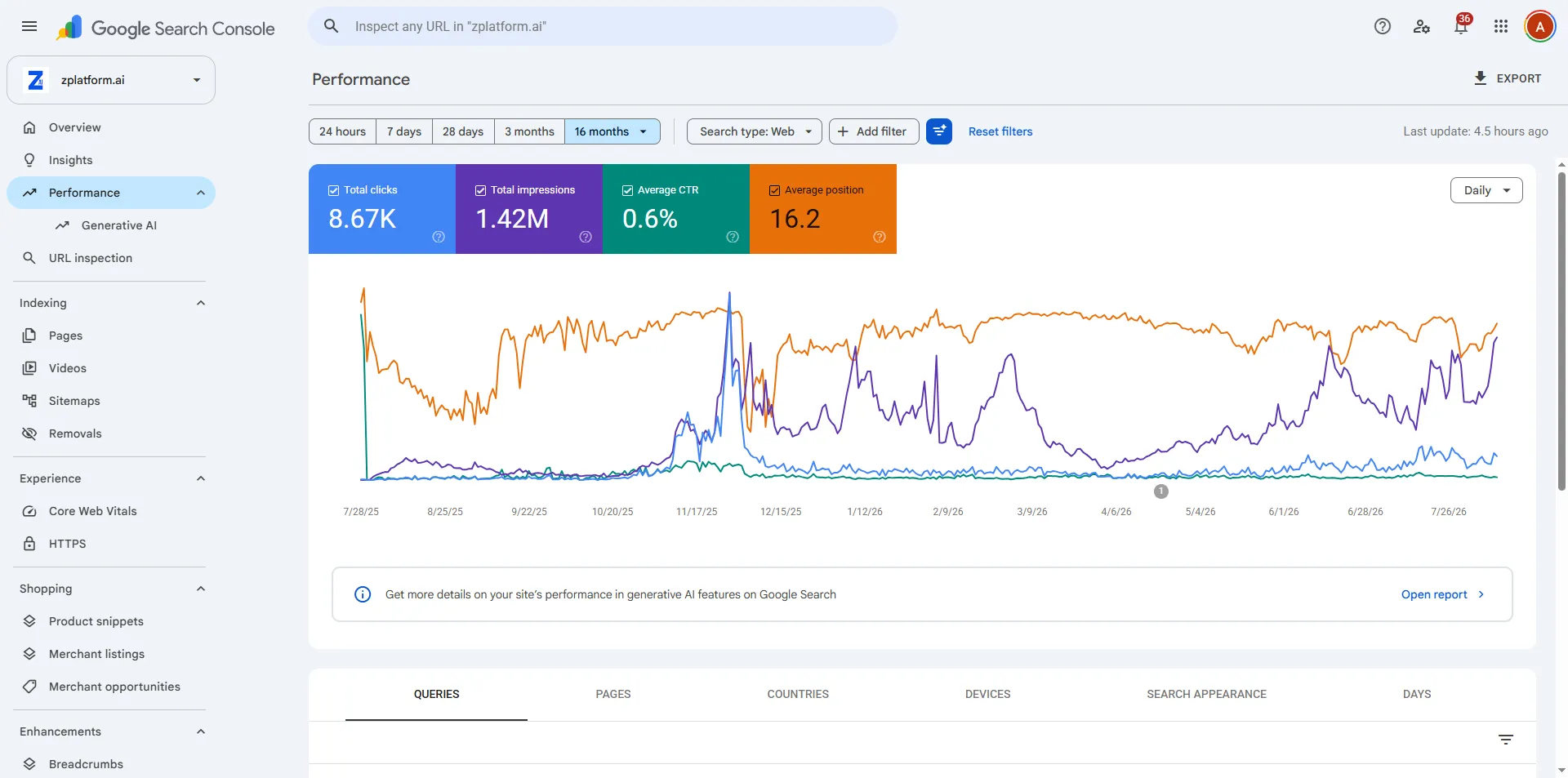
Search Console, Performance, 16-month view
- Look here
- The gap between the impressions line and the clicks line.
- Ignore for now
- The average position number. It is an average of averages and it moves when your query mix changes.
- What this tells you
- 1.42M impressions and 8,666 clicks is a 0.61% click-through rate. That is not a failure, it is a diagnosis: most of these impressions are queries this site should never have been shown for.
ZPlatform.ai, Search Console, 16 months ending 13 August 2026. Full export on the case study.
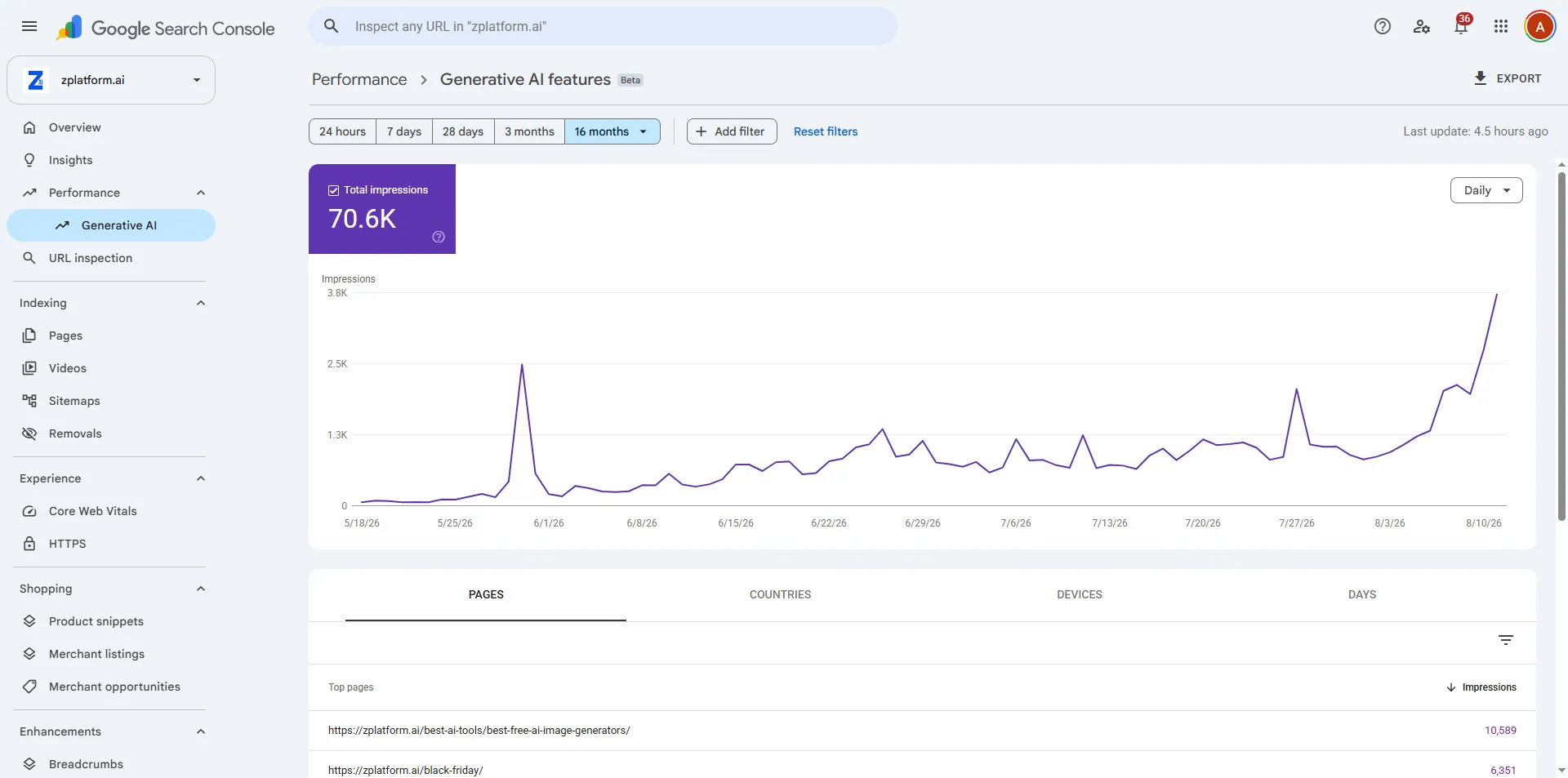
Search Console, the Generative AI performance report
- Look here
- The metric name. It says impressions, and there is no clicks column.
- Ignore for now
- Any instinct to compare this directly with the web performance report. Different surface, different counting.
- What this tells you
- 70,618 appearances across 804 pages inside Google AI features. This is the report most guides describe wrongly, because they assume it reports clicks.
ZPlatform.ai, Search Console. Report data begins 18 May 2026.
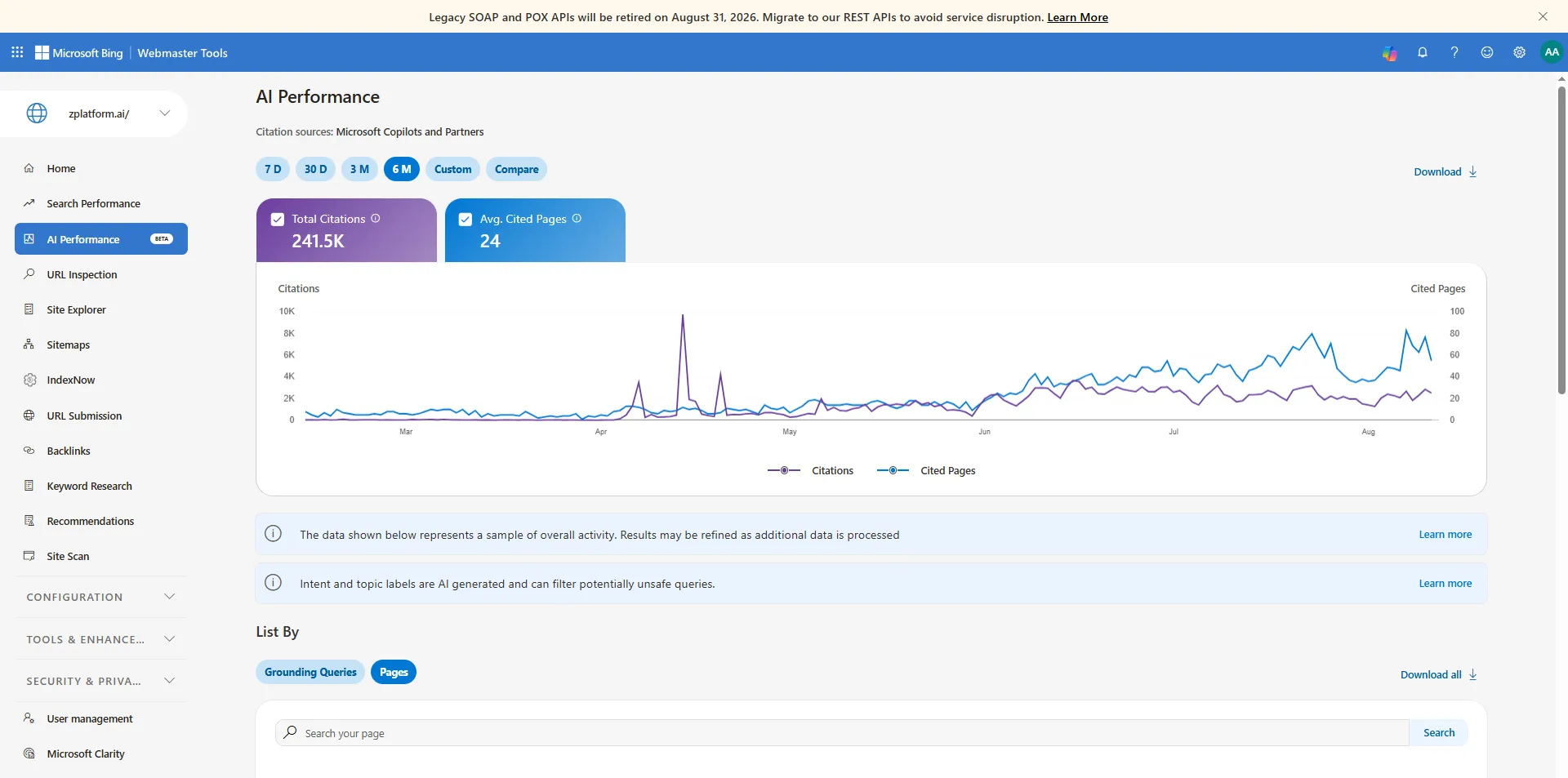
Bing Webmaster Tools, AI Performance, in public preview
- Look here
- Total citations. This is a count of being used as a source, not a count of visits.
- Ignore for now
- The temptation to add this to your Google numbers. They are separate ecosystems measured separately.
- What this tells you
- 241,500 Copilot citations against 2,496 Bing clicks over overlapping windows. Being the answer and being visited have become two different things, and only one of them shows up in most reporting.
ZPlatform.ai, Bing AI Performance, 6-month window ending 13 August 2026.
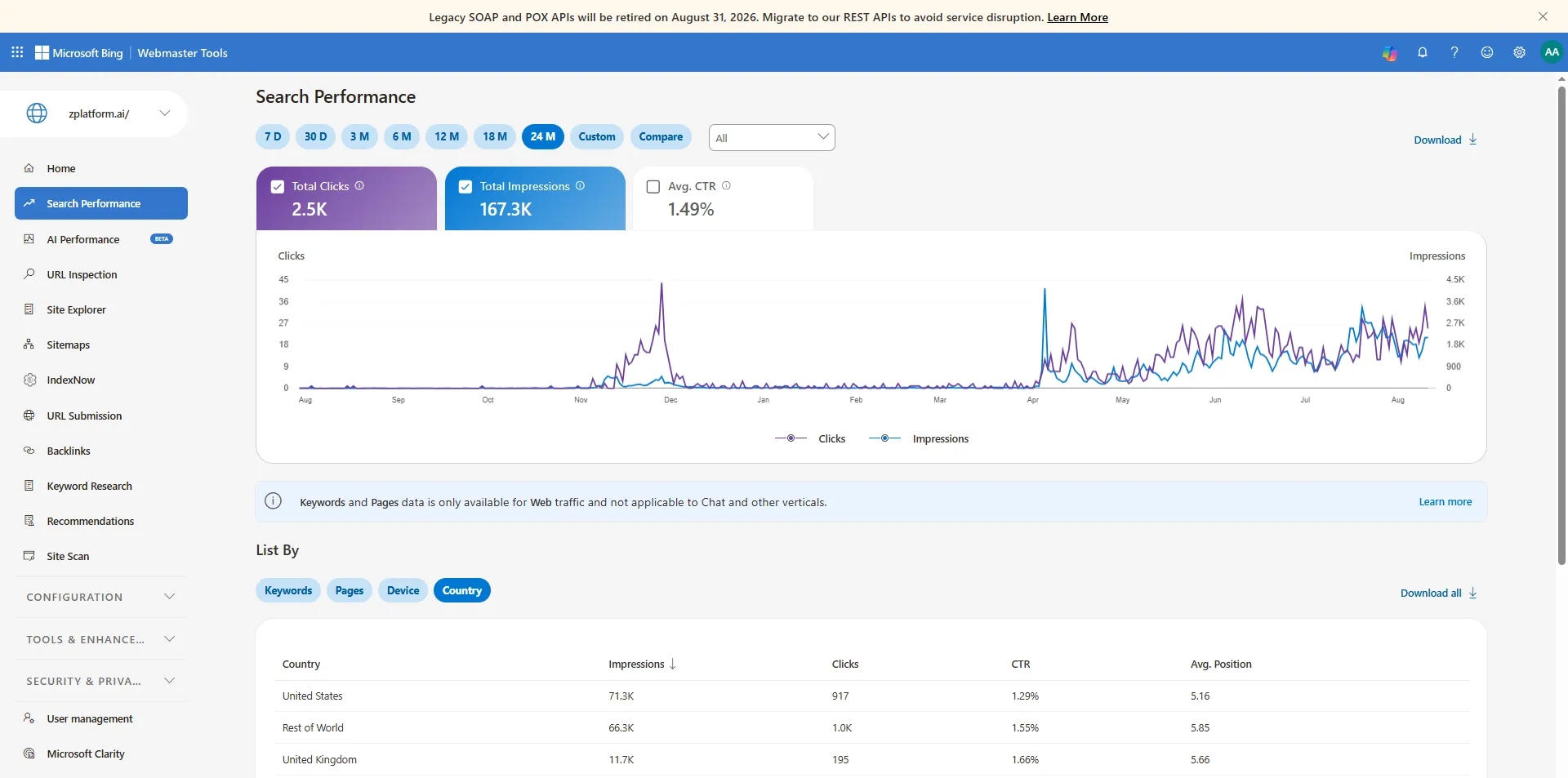
Bing Webmaster Tools, ordinary search performance
- Look here
- The click and impression totals, then compare them with the citation figure above.
- Ignore for now
- The absolute size. Bing is smaller than Google for almost everyone, and that is not the point here.
- What this tells you
- Bing is free, less crowded, and it is the only place a site owner can currently see Copilot citation data at all. Skipping it is skipping the only AI visibility report that names your pages.
ZPlatform.ai, Bing Webmaster Tools, 24 months ending 13 August 2026.
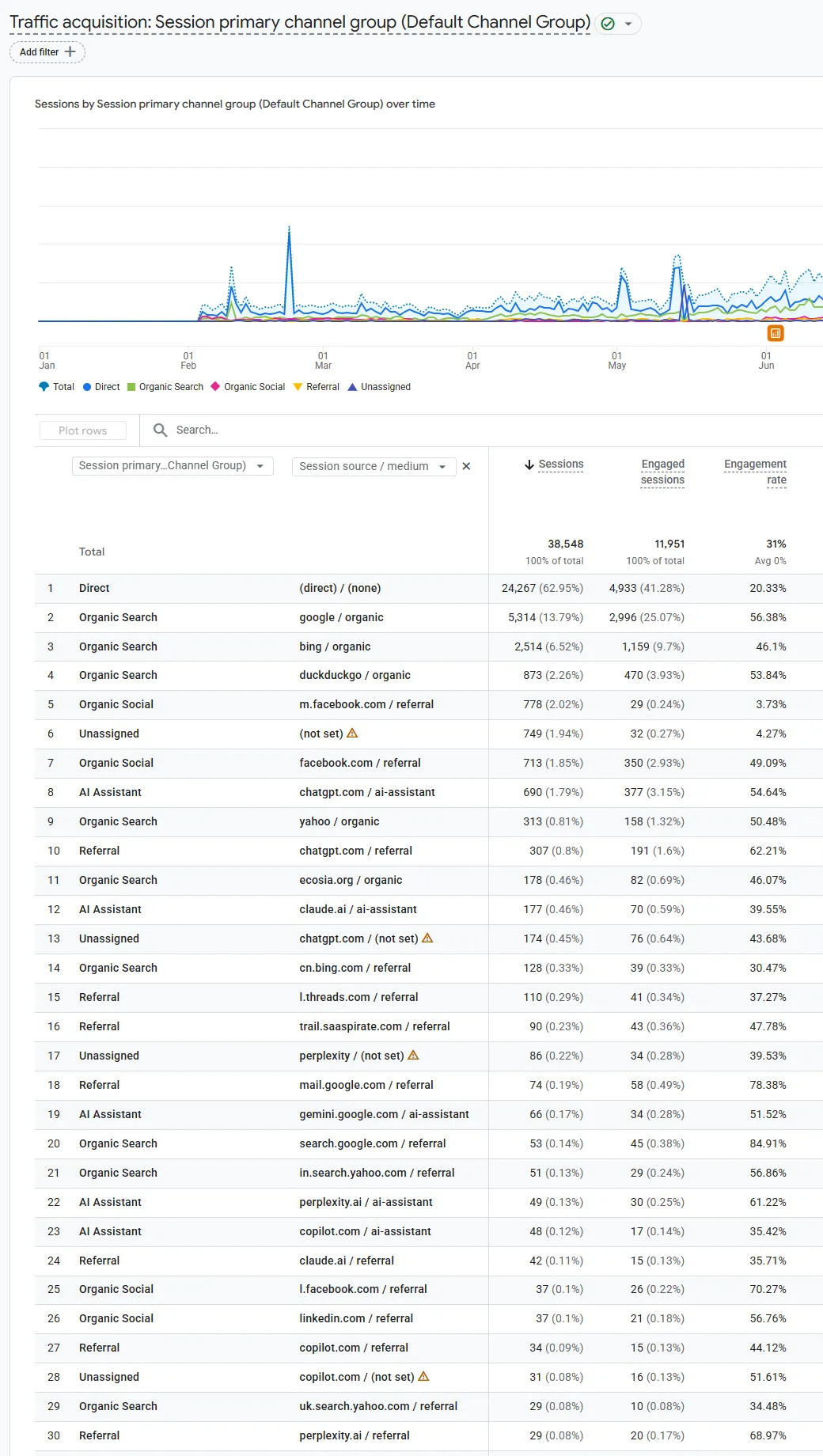
GA4, Traffic acquisition, with the AI Assistant channel visible
- Look here
- Row 8. GA4 now has a channel called AI Assistant, and chatgpt.com is sitting in it. Then look for chatgpt.com again further down the same table.
- Ignore for now
- Session counts as absolute truth. Consent settings change this number and most people do not know their own consent setup.
- What this tells you
- AI assistants are now a named channel in GA4, they are a real and small share of traffic, and the same assistant is filed under several different channels in one report. The next table is what happens when you add those up.
zplatform.ai, GA4 Traffic acquisition, 1 January to 22 August 2026, 38,548 sessions. Cropped to the report and the first 30 rows, nothing edited.
That report is also the most useful piece of original data I can put on this page, so I counted it. GA4 files chatgpt.com under 4 different channel labels, so reading only the AI Assistant row undercounts ChatGPT by 42% on this property, and every assistant together by 41%.
Your AI traffic is real, and GA4 files it under four different names
Counted off the report above. zplatform.ai, 1 January to 22 August 2026, 38,548 sessions in total. GA4 now has an "AI Assistant" channel and it does not catch everything: chatgpt.com alone appears under 4 different channels in this one report. That is the part that matters for anyone reporting these numbers to somebody else.
1,756
sessions from AI assistants
4.6% of all sessions
33%
of the size of google / organic
5,314 sessions from Google organic
41%
of AI sessions missed
if you read only the AI Assistant channel, which reports 1,030 of 1,756. For chatgpt.com alone the undercount is 42%
By assistant, adding up every channel it was filed under
Every row, exactly as GA4 filed it
| Source | GA4 channel | Medium | Sessions | Share | Engagement |
|---|---|---|---|---|---|
chatgpt.com | AI Assistant | ai-assistant | 690 | 1.79% | 54.64% |
chatgpt.com | Referral | referral | 307 | 0.80% | 62.21% |
chatgpt.com | Unassigned | (not set) | 174 | 0.45% | 43.68% |
chatgpt.com | Organic Search | organic | 11 | 0.03% | 81.82% |
claude.ai | AI Assistant | ai-assistant | 177 | 0.46% | 39.55% |
claude.ai | Referral | referral | 42 | 0.11% | 35.71% |
perplexity | Unassigned | (not set) | 86 | 0.22% | 39.53% |
perplexity.ai | AI Assistant | ai-assistant | 49 | 0.13% | 61.22% |
perplexity.ai | Referral | referral | 29 | 0.08% | 68.97% |
gemini.google.com | AI Assistant | ai-assistant | 66 | 0.17% | 51.52% |
copilot.com | AI Assistant | ai-assistant | 48 | 0.12% | 35.42% |
copilot.com | Referral | referral | 34 | 0.09% | 44.12% |
copilot.com | Unassigned | (not set) | 31 | 0.08% | 51.61% |
l.meta.ai | Referral | referral | 12 | 0.03% | 41.67% |
google / organic | Organic Search | for scale | 5,314 | 13.79% | 56.38% |
(direct) / (none) | Direct | for scale | 24,267 | 62.95% | 20.33% |
What to actually do with this Do not report the AI Assistant channel as your AI traffic. Filter by source hostname instead, and add up every channel it appears under. On this property that is the difference between 1,030 and 1,756 sessions, and for chatgpt.com on its own the difference between 690 and 1,182.
The engagement column is the interesting one Sessions from assistants engage at 35% to 69% here, against 20.33% for Direct. Small, and not junk traffic. I would not generalise that from one property, and neither should you.
What this is not Not a benchmark. One site, one window, in a category where people ask assistants about software all day. Your split will be different. The method is the transferable part, not the 4.6%.
For the AI surfaces specifically, Search Console now has a Generative AI performance report covering AI Overviews and AI Mode. Two details matter and both get misreported. It shows impressions, not clicks. And it is rolling out to a subset of properties, so an empty report can mean "not enabled for you yet" rather than "you are not appearing".
For ChatGPT, Perplexity and the rest, there is no per-site report. You can see referral traffic in analytics when someone clicks through, and you can test prompts yourself, but prompt testing is non-deterministic and varies by user, location and run. Treat those numbers as samples. I run them, I publish them, and I label them as estimates, because that is what they are.
Four precision points that stop most reporting arguments:
- Clicks are not sessions. Search Console clicks and GA4 sessions count different events and will never match. Stop reconciling them.
- Average position is an average of averages. It is not a rank, and it moves when your query mix changes even if nothing else did.
- Estimated traffic is not traffic. If the number came from a third-party tool, say "Ahrefs estimates" out loud.
- Server logs are the only proof of a crawl. Everything else is inference.
- One assistant, several channels. Filter GA4 by source hostname, not by the AI Assistant channel, or you will under-report by roughly what the table above shows.
One real page, all the way through
Not in this path.
You now know all seven stages, so here is one URL I own passing through every one of them with its actual figures at each step.
This is the section a generic guide cannot write, and not because of the writing. It needs a page you own, enough measured history to show, and the willingness to publish the parts that look bad. Two of the ten steps below are things I would change about my own setup, and they are marked rather than quietly fixed before the screenshot.
The worked example
One real page, through all seven stages
Every chapter on this page describes a stage. This is a single URL I own passing through all of them, with the actual numbers at each step. It is the most-cited page across everything I operate, which is the only reason there is enough data to show.
-
Discovery ch 7
The page is linked from the site’s own AI tools hub and listed in two sitemaps, one of them an image sitemap.
Evidence
robots.txt declares sitemap-index.xml and image-sitemap.xmlDiscovery was never left to chance. A hub link plus a sitemap is the whole mechanism.
-
Crawling ch 8
robots.txt allows everything, then explicitly allows ten AI crawlers by name.
Evidence
User-agent: * / Allow: / , plus GPTBot, Google-Extended, ClaudeBot, PerplexityBot and six moreAnd here is the flaw I am leaving in, because it teaches more than a clean example would: OAI-SearchBot is not named. It is allowed by the wildcard, so nothing is broken. But the file lists the training crawler and not the search one, which is exactly the confusion chapter 17 is about.
-
Rendering ch 8
The main content is in the HTML response. No rendering step is required to read it.
Evidence
17,848 words and 78 H2 headings present in the raw fetchThe cheapest rendering strategy is not needing one.
-
Indexing ch 8
A self-referencing canonical, and no robots meta tag at all.
Evidence
canonical points at itself; no noindex presentNothing clever. Most indexing problems are caused by settings someone added, not settings they forgot.
-
Keyword and intent ch 4
The target is a commercial-investigation query. People want a shortlist, not a definition.
Evidence
"best free ai image generator", average position 1.74 on Bing, 5.78% CTR, 240 clicksA 5.78% click-through rate at position 1.74 is what intent match looks like in a number. Compare it with the site-wide 0.61% below.
-
On-page ch 9
The title and the H1 are deliberately different, and both lead with the number.
Evidence
title: "61 Best Free AI Image Generators in 2026 (Ranked) | zPlatform.ai" / H1: "61 Best Free AI Image Generators in 2026 (Tested and Ranked)"The title is written for the results page, where length is budgeted and the brand suffix costs characters. The H1 is written for the person who already clicked, so it has room for "Tested and". Same subject, two jobs.
-
Worth selecting ch 10
Sixty-one tools, tested, with a stated ranking method and 72 images.
Evidence
"How I Ranked These 61 Free AI Image Generators" is an H2 on the pageThat heading is the whole non-commodity argument. A model can list 61 image generators. It cannot tell you how these 61 were ranked, because that happened in a room.
-
Multimodal ch 19
72 images, an image sitemap, and six JSON-LD blocks including Article, ItemList and FAQPage.
Evidence
72 img elements, 6 structured data blocksOne piece of expertise, pointed at the web result, the image result and the rich result at the same time.
-
Appearance ch 16
It shows up as a blue link, inside Google AI features, and as a Copilot citation.
Evidence
10,589 Google AI appearances, 108,546 Bing Copilot citationsThree surfaces from one page. None of them required a different technical setup.
-
Measurement ch 21
Across the whole site: 1.42M impressions, 8,666 clicks, 0.61% click-through rate over 16 months.
Evidence
0.61% CTR site-wide, against 5.78% on the one query aboveThis is the unflattering part and I am leaving it in. A 0.61% site-wide CTR means most of those impressions are queries this site should never have been shown for. The page above works. The average does not, and an average is what most people report.
The full case study, with the raw exports and the parts I cannot prove
The loop, which is the only process you need
If you remember one thing SEO is a loop, and the only part that makes it work is changing things because the data said so rather than because a checklist did.
Not in this path.
SEO is a loop, not a project, and the only part that makes it work is that step ten feeds step one with evidence instead of opinion.
The opponent is the checklist mentality: a list of tasks, done once, ticked off, filed. A list has an end. Search does not.
The loop, which is the only part you actually have to remember
Every chapter on this page is a step in this circle. Run it once and you have done SEO. Run it forty times and you have a site.
- 01
Find the problem
A real question your audience asks, in the words they ask it in.
- 02
Read the intent
What are they trying to accomplish, not which keyword did they type.
- 03
Study the SERP
What format is winning, and what job is the engine trying to do here.
- 04
Make it better or different
Different is easier than better and works as well. Bring the thing only you have.
- 05
Get the basics right
Title, headings, the words people use, one clear subject per page.
- 06
Link it in
From a page that already gets crawled, with anchor text that says what it is.
- 07
Confirm it is reachable
URL Inspection. Rendered HTML, not your browser.
- 08
Tell people
The audience you already have is how the first links and mentions happen.
- 09
Watch Search Console
Impressions first, then clicks, then whether the queries are the ones you wanted.
- 10
Fix what the data says
Not what the checklist says. Then start again at step one.
Run this once, on one page, all the way through. That is more useful than reading every chapter above twice, because the loop is where all of it becomes yours. Then do it again with what the data told you the first time.
The myths I would kill first
If you remember one thing Most bad SEO advice is not invented, it is out of date. Knowing whether a claim was never true, is inflated, or is a true fact with a false conclusion tells you how to argue with it.
Not in this path.
Most bad SEO advice is not invented, it is out of date, and knowing which category a claim falls into tells you how to argue with it.
I sorted these three ways rather than calling them all myths, because the interesting ones are not simply false. Some were never true. Some are a real mechanism inflated into a promise. Some are a true statement with a wrong conclusion bolted on, and those are the ones that survive being debunked, because the person repeating them can point at something real.
Twenty things not to spend your Saturday on
Sorted by how each one fails, not by topic. Filter by failure mode, then open any claim for what is actually true and where that comes from.
dead Was never true, or stopped being true years ago
twisted A real mechanism, stretched into a false promise
misread True statement, wrong conclusion drawn from it
dead Keyword density matters
There is no target ratio, and there never was a published one. Use the words people use, in the places that describe the page, then stop counting.
dead Put the exact keyword everywhere
Google says outright that you do not need to write in a specific way for AI search, because its systems understand synonyms and general meaning. Exact-match padding just makes the page worse to read.
Optimizing your website for generative AI features on Google Search , Google Search Central, Updated 10 July 2026
dead Meta keywords still count
Google stopped using the meta keywords tag in 2009. It is inert.
dead 2,000 words ranks better
Google states there is no ideal page length, and that shorter or longer can both work depending on the audience and the subject.
Optimizing your website for generative AI features on Google Search , Google Search Central, Updated 10 July 2026
twisted One page per long-tail variation
Creating separate content for every possible variation of how people might search, fan-out queries included, is named in Google’s own guide as a scaled content abuse risk and an ineffective long-term strategy.
Optimizing your website for generative AI features on Google Search , Google Search Central, Updated 10 July 2026
misread DA and DR are Google metrics
They are third-party estimates from Moz and Ahrefs. Useful for comparing two sites inside the same tool on the same day. Not a Google score, and not an input to ranking.
twisted More backlinks means higher rankings
Links help discovery, understanding and authority assessment. A hundred irrelevant placements do not aggregate into one good editorial reference, and buying them is a spam policy violation.
Spam policies for Google web search , Google Search Central, Checked 21 August 2026
misread A sitemap gets you indexed
A sitemap helps discovery on large, new or media-heavy sites. Google says a well-linked site of about 500 pages or fewer may not need one at all, and indexing is never guaranteed.
Learn about sitemaps , Google Search Central, Updated 10 December 2025
misread Indexed means ranking
Search Console can show a page as indexed while it earns zero impressions for a year. Indexed means eligible. Nothing more.
misread Schema markup boosts rankings
Structured data clarifies meaning and makes you eligible for rich results. Google says it is not required for generative AI search and there is no special schema for it.
Optimizing your website for generative AI features on Google Search , Google Search Central, Updated 10 July 2026
twisted Core Web Vitals lift rankings on their own
Page experience is one part of a much larger picture, and Google says not to focus on only one or two aspects of it. Fixing LCP on a page nobody wants to read changes nothing.
Creating helpful, reliable, people-first content , Google Search Central, Updated 10 December 2025
dead AI-generated content is automatically penalized
Google says generative AI is useful for research and for adding structure. What violates policy is generating many pages without adding value, which is scaled content abuse regardless of how the pages were made.
Guidance on using generative AI content on your website , Google Search Central, Checked 21 August 2026
twisted Publishing hundreds of AI articles builds topical authority
It builds a large site. Google’s own wording: a high quantity of pages does not make a website higher quality or more relevant to users.
Optimizing your website for generative AI features on Google Search , Google Search Central, Updated 10 July 2026
dead Exact-match domains are a strategy
A keyword in the domain is worth close to nothing, and it costs you a brand you could have built an entity around. Buying an expired one to inherit its history is its own named spam policy.
Spam policies for Google web search , Google Search Central, Checked 21 August 2026
dead AI detectors tell you what Google will do
They do not. They are probabilistic classifiers with false positives on plain human writing, and Google has never described using one. Judge the value of the page instead.
dead Chunk every paragraph so AI can read it
Google says there is no requirement to break content into tiny pieces, and that its systems handle multiple topics on a page and show the relevant part.
Optimizing your website for generative AI features on Google Search , Google Search Central, Updated 10 July 2026
dead You need an llms.txt file
Google says plainly that you do not need new machine-readable files, AI text files, markup or Markdown to appear in Google Search including its generative features, because Search does not use them. Whether another system chooses to read one is a separate and much smaller question.
Optimizing your website for generative AI features on Google Search , Google Search Central, Updated 10 July 2026
dead There is a special AI schema
There is not. Google states there is no special schema.org markup you need to add for generative AI search.
Optimizing your website for generative AI features on Google Search , Google Search Central, Updated 10 July 2026
twisted Getting mentioned anywhere helps AI visibility
Google lists seeking inauthentic mentions among the things you can ignore, and says its spam systems and its generative features both depend on the same quality filters.
Optimizing your website for generative AI features on Google Search , Google Search Central, Updated 10 July 2026
misread E-E-A-T is a score you can raise
Google states E-E-A-T itself is not a specific ranking factor. It is the frame its quality raters are trained on, and of the four parts, trust is the one that matters most.
Creating helpful, reliable, people-first content , Google Search Central, Updated 10 December 2025
The llms.txt one deserves a sentence of its own because it is current and it is being sold hard. Google's documentation says plainly that you do not need to create new machine-readable files, AI text files, markup or Markdown to appear in Google Search including its generative capabilities, because Search itself does not use them. Creating one neither helps nor hurts your Google visibility. Whether some other system chooses to read it is a genuinely separate question, and a much smaller one than the people selling llms.txt audits would like you to think.
For what it is worth, the site in the worked example above has an llms.txt. I left it there because it costs nothing and another system might read it one day. That is the whole honest position, and it is a long way from "add llms.txt to rank in AI".
Test yourself
Not in this path.
Thirteen questions, every answer sourced to a primary document. If you get one wrong, the explanation tells you the mechanism, not just the letter.
Nothing you answer leaves your browser. There is no endpoint, no email gate and no account. Your answers are saved locally so a half-finished attempt survives a closed tab, and the reset button really does clear them.
Test yourself
Thirteen questions that separate SEO from folklore
Every answer is sourced to Google's or OpenAI's own documentation, dated. If an explanation here disagrees with something you paid for, the documentation wins.
0
of 13
Answer the first question to start
-
Show the answer
Correct B. Google fetched the page and decided not to store it
Crawled and indexed are two different states. Google reached the page, processed it, and chose not to keep it. That is almost always a judgment about the content rather than a technical fault, and resubmitting does not fix it.
In-depth guide to how Google Search works Google Search Central, Updated 18 December 2025
-
Show the answer
Correct C. Nothing beyond making discovery easier
A sitemap is a hint about what exists and what changed. Google says directly that it does not guarantee it will crawl, index or serve a page, and that a well-linked site of a few hundred pages may not need a sitemap at all.
Learn about sitemaps Google Search Central, Updated 10 December 2025
-
Show the answer
Correct B. Add a noindex rule and leave the URL crawlable
A disallowed URL never gets fetched, so Google never sees the noindex, and the URL can still surface described by the pages that link to it. Doing both is the classic self-inflicted wound: the noindex has to be visible to the crawler to work.
Block Search indexing with noindex Google Search Central, Updated 10 December 2025
-
Show the answer
Correct B. No. Google Search does not use it
Google’s guide to generative AI features lists llms.txt under things you can ignore, and says Search itself does not use these files. Creating one neither helps nor hurts Google visibility. Whether another system reads it is a separate question, and a much smaller one.
Optimizing your website for generative AI features on Google Search Google Search Central, Updated 10 July 2026
-
Show the answer
Correct B. A model issuing several related queries to gather more information before answering
Google describes it as a set of concurrent related queries the model generates to fetch additional results. Its own example: "how to fix a lawn that’s full of weeds" fans out to "best herbicides for lawns", "remove weeds without chemicals" and "how to prevent weeds in lawn". Optimizing for one exact string is an incomplete model of the question being asked.
Optimizing your website for generative AI features on Google Search Google Search Central, Updated 10 July 2026
-
Show the answer
Correct C. Nothing beyond being indexed and eligible to show with a snippet
Google states there are no additional technical requirements: the page must be indexed and eligible to be shown with a snippet. The one setting worth knowing about is the Search generative AI control in Search Console, which includes your site by default.
AI features and your website Google Search Central, Updated 10 December 2025
-
Show the answer
Correct B. The frame Google’s quality raters are trained on, not a single ranking factor
Google says E-E-A-T itself is not a specific ranking factor, while adding that its systems use a mix of signals that identify content with good E-E-A-T, and that trust is the most important of the four. So an author bio does not raise a score. There is no score.
Creating helpful, reliable, people-first content Google Search Central, Updated 10 December 2025
-
Show the answer
Correct B. Generating 400 near-identical pages, one for every query variation
The policy is about outcome, not tooling. Google says generative AI is useful for research and structure, and that using it to generate many pages without adding value for users may violate the scaled content abuse policy. The same policy applies to pages written by hand.
Guidance on using generative AI content on your website Google Search Central, Checked 21 August 2026
-
Show the answer
Correct B. Clarifies meaning and makes you eligible for rich results
It gives explicit clues about the meaning of a page and makes it eligible for richer result formats. Eligible, not entitled. Google also says structured data is not required for generative AI search and there is no special schema for it, though it stays worth having for rich results.
Introduction to structured data markup in Google Search Google Search Central, Updated 10 December 2025
-
Show the answer
Correct B. OAI-SearchBot
OAI-SearchBot is the search crawler. GPTBot is for model training, and the two settings are independent, so you can allow search while refusing training. ChatGPT-User is a user-triggered fetch, and OpenAI says explicitly that it is not used to decide whether content can appear in search.
Overview of OpenAI crawlers OpenAI, Checked 21 August 2026
-
Show the answer
Correct B. One page
Same intent means one page. Google warns specifically against creating separate content for every possible variation of how people might search, and calls it ineffective as a long-term strategy as well as a policy risk.
Optimizing your website for generative AI features on Google Search Google Search Central, Updated 10 July 2026
-
Show the answer
Correct B. Impressions from AI Overviews and AI Mode
It reports impressions, grouped by page, country, device and date, for AI Overviews and AI Mode. Impressions, not clicks. And it is still rolling out to a subset of properties, so an empty report is not proof of an empty result.
Generative AI performance report (Search) Search Console Help, Checked 21 August 2026
-
Show the answer
Correct C. Content people find unique, compelling and useful rather than a commodity restatement
Google’s wording is that creating content people find unique, compelling and useful will likely influence your presence in generative AI search more than any of the other suggestions in its guide. Everything technical is a precondition. This is the actual competition.
Optimizing your website for generative AI features on Google Search Google Search Central, Updated 10 July 2026
Now go and do it
Not in this path.
Reading this page does not make you able to do SEO, and I would be selling you something if I implied otherwise. The next three blocks are the part that does.
Start with the setup. Everything after it assumes you can see your own data, and you cannot diagnose search without Search Console.
Before anything else
Your first SEO setup
Eight things, all free, about an hour in total. This is the instrumentation. Doing SEO without it is doing decoration and hoping.
0/8
Deliberately not a 2,000-word setup tutorial. Each of these has good official documentation, and the measurement chapter above says which tool does what.
Then the six assignments. One per job, in the order the jobs come, and each one produces something real on your site rather than a note in a document.
The six assignments
One assignment per job
Bigger than the three-minute exercises and meant to be done once, properly. Finish all six and you have done a real, if small, piece of SEO work on your own site.
0/6
Ticks are stored in your browser and nowhere else. Nothing is sent anywhere, which matters because these ask you to audit your own site.
And if you would rather have a schedule than a list, the same work spread over a week. About thirty minutes a day.
If you want a schedule
The seven-day SEO fundamentals challenge
Same material, paced. Day seven is the one people skip, and it is the one that turns the other six into something you can repeat.
0/7
On day seven, write the numbers down with the date. In 30 days that dated baseline is the only thing that will tell you whether any of this worked.
The six jobs, one more time
Not in this path.
If you keep one thing from this page, keep these. Every technique, tool and tactic in SEO sits under one of these six questions, and any advice that does not answer one of them is probably decoration.
Be discoverable
Can search and AI systems find the URL at all?
Links, sitemaps, architecture. A page nothing points at is a page nothing finds.
Be accessible
Can they fetch it, render it and store it?
robots.txt, status codes, rendering, indexing. Four separate gates, four separate failures.
Be understandable
Can they tell what the page, the site and the brand are?
Titles, headings, internal context, entities, structured data.
Be relevant
Does it answer what the person was actually trying to do?
Intent, not keywords. The SERP tells you what the engine currently believes.
Be worth selecting
Why this page instead of the ten thousand alternatives?
First-hand evidence, original data, verifiable claims. The part a model cannot generate for you.
Be measurable
Can you see whether any of it produced a customer?
Impressions, clicks, citations, signups. Rankings are the middle of the chain.
A tactic that cannot be filed under one of those six is a tactic without a mechanism. That is the test I would give a beginner for evaluating any SEO advice, including mine: ask which of the six jobs it does, and ask how you would know if it had not worked. If neither question has an answer, you are being sold something.
Glossary
Every word this lesson uses, defined once, in the plainest phrasing that is still correct.
Not in this path.
Reference
Every word this lesson uses, in plain terms
SEO has a vocabulary problem: the same word gets used for four different things, usually by someone selling something. These are the definitions this page holds to throughout.
27 terms
- AI citation
- A linked source inside an AI-generated answer. Not the same as a mention, which has no link, or a backlink, which is on someone else’s page.
- Anchor text
- The visible, clickable words of a link. They describe the destination, which is why "click here" wastes the slot.
- Average position
- An average of averages across every impression. Not a rank, and it moves when your query mix changes even if nothing else did.
- Backlink
- A link to your page from someone else’s site. Helps discovery, understanding and authority assessment. Buying them is a spam policy violation.
- Canonical
- When several URLs hold near-identical content, the one the engine picks to represent the group. You vote with rel=canonical, internal links and your sitemap.
- Click-through rate CTR
- Clicks divided by impressions. The fastest read on whether your title link and snippet are earning the click you already ranked for.
- Conversion
- The action you actually wanted: a signup, an enquiry, a purchase. The only tier of measurement a business pays for.
- Crawl
- A single fetch of a URL by a crawler. Being crawled says nothing about whether the page was kept.
- Crawl depth
- How many links a crawler must follow from the home page to reach a URL. Deeper pages get crawled less often.
- Crawler bot, spider, user agent
- A program that fetches web pages automatically. Googlebot is one. So are OAI-SearchBot and dozens of others.
- E-E-A-T
- Experience, expertise, authoritativeness, trust. The frame Google’s quality raters are trained on. Google states it is not itself a ranking factor.
- Entity
- A distinguishable thing: a person, company, product, place or concept, with attributes and named relationships to other things.
- Grounding
- Retrieving real current documents and building the answer from them, rather than from what the model memorised. Also called retrieval-augmented generation.
- Impression
- One appearance of your page in results. A chance, not an outcome, and the metric most easily mistaken for success.
- Index
- The store of pages a search engine has processed and kept. Being in it makes you eligible to be shown, and nothing more.
- noindex
- A rule in the page’s HTML or HTTP headers telling engines not to keep the page. The crawler has to be able to fetch the page to see it.
- Orphan page
- A page nothing on your site links to. Findable by sitemap at best, and often not at all.
- Query
- The exact string a person typed. Not the same thing as what they wanted.
- Query fan-out
- A generative system issuing several related queries of its own to gather more than the original question would return. Google publishes the term and an example.
- Ranking
- Ordering the retrieved candidates. There is no single position any more: it varies by country, device and session.
- Render
- Running the page the way a browser would, including its JavaScript, so the content that scripts build becomes visible to the crawler.
- Retrieval
- Pulling a candidate set of pages out of the index in response to a query, before any ordering happens.
- robots.txt
- A file at the root of your site telling crawlers which paths not to fetch. It controls crawling, not indexing.
- Scaled content abuse
- Google’s policy name for generating many pages, by any method, without adding value for users.
- Search intent
- What the person was actually trying to accomplish. Reconstructed from the query, the results page and common sense.
- SERP
- Search engine results page. In 2026 it is a page of about a dozen different surfaces, not ten blue links.
- Structured data
- Machine-readable markup, usually JSON-LD, stating what the things on a page are. Affects how a result can be displayed, not whether it is retrieved.
Nothing matches that. If it is a real SEO term and it is not here, it is either in the metrics the measurement chapter covers, or it is jargon somebody invented to sell a course.
Watch Google explain Google
Not in this path.
Where I would send you instead of a third-party course. All official, all free, ordered by the chapter they belong to.
Watch the primary sources
25 videos from Google's own channel
Ordered by the chapter they belong to. I would rather send you to Google explaining Google than write my own worse summary of the same material, and none of these are affiliate anything.
- How Google Search Works (in 5 minutes) embedded above The whole machine in five minutes. Start here.
- Introducing How Search Works The series opener, if the five-minute version left you wanting more.
- How Google Search crawls pages Stage two of the pipeline, from the people who built it.
- How Google Search indexes pages Stage four, including duplicate handling and canonicals.
- How Google Search serves pages Stages five to seven, retrieval through presentation.
- URL Inspection Tool embedded above The exact screen the practice block below asks you to open.
- Help! Google Search isn't indexing my pages Google walking through the same diagnosis the tool above automates.
- Getting the most out of the URL inspection tool The deeper tour, once you know what you are looking at.
- How Robots.txt Works embedded above Six minutes that prevent the most common self-inflicted SEO wound.
- Canonical URLs: How Does Google Pick the One? Why your canonical is a vote and not an instruction.
- How to avoid duplicate content Duplicate content is not a penalty. This explains what it actually is.
- Duplicate Content and Multiple Site Issues The messier real-world version, across several sites.
- 3 Tips for Crawling Errors Short, and covers the errors you will actually hit.
- Deliver search-friendly JavaScript-powered websites Older, still the clearest explanation of rendering.
- How AI Is Changing Google Search and SEO Google’s own framing, which is notably calmer than the industry’s.
- Thoughts on SEO and SEO for AI, part 1 Long, unstructured, and more honest than most conference talks.
- Google Search Gen AI Reports, Search Profiles and more (Q2 2026) embedded above The quarterly update covering the reporting this chapter describes.
What this page deliberately leaves out
Not in this path.
Ten subjects belong in their own guides, and cramming them in here would have diluted the model this page exists to build.
A full technical audit walkthrough
Needs a real site on the screen to be worth anything.
Technical SEO checklistKeyword research, properly
Its own discipline, and the part beginners under-invest in most.
Keyword research, step 3Log-file analysis, crawl budget, regex
Starts to matter above roughly 100,000 URLs. Almost nobody reading this is there yet.
Advanced schema implementation
Pick the two types your pages genuinely are, then stop.
Programmatic SEO
A scaled content abuse risk in the wrong hands, which is most hands.
International SEO and hreflang
One wrong tag can hide an entire language. Deserves its own page.
Local and ecommerce SEO in depth
Different systems, different tooling, different measurement.
Link building tactics
Tactics date. The principle in chapter 13 does not.
Core Web Vitals optimization
An engineering task, and rarely the reason a page is invisible.
AI visibility tracking tools
I have paid for several. The category is young and the measurement is noisy.
AI SEO pillarAdvanced crawl-budget work, regex, prompt tracking, agent optimization and the protocol arguments are all missing for the same reason: they are real, and none of them is why your page is not showing up.
Page history
What changed on this page, and when, because the documentation underneath it keeps moving.
Not in this path.
Page history
What changed, and when
Google's documentation on these subjects changed repeatedly through 2026. So this page will keep changing, and the changes get listed rather than absorbed silently into an "updated" date.
-
21 August 2026
First publication
- First version published, 24 chapters, against Google and OpenAI documentation as it stood on this date.
- Added Google’s guide to optimizing for generative AI features, updated 10 July 2026, as the primary source for the AI chapters.
- Added the Search Console generative AI performance report, and the detail that it reports impressions rather than clicks.
- Added the Search generative AI control in Search Console, which most guides have not caught up with.
- Added the OAI-SearchBot against GPTBot distinction, which is where sites remove themselves from ChatGPT by accident.
- Recorded Google’s position that Search does not use llms.txt.
-
Same day, second pass
- Turned the page from a reference into a lesson: learning outcomes, three reading paths, chapter levels, eight practice blocks, six assignments and a seven-day challenge.
- Added the interactive diagnosis tool, built on the same symptom table.
- Added one real page, zplatform.ai’s image-generator guide, followed through every stage of the pipeline with its actual numbers.
- Added the three link attributes, sponsored, ugc and nofollow, which were a genuine gap.
- Added a glossary of search mechanics, and linked the existing metrics glossary rather than duplicating it.
- Added the printable one-page fundamentals map.
- Added 25 verified Google Search Central videos, every id checked against the YouTube oEmbed endpoint.
-
Same day, third pass
- Replaced the last two screenshot placeholders with real captures, so every figure on the page is now a real screen from a real account.
- Counted the GA4 Traffic acquisition report and published the result: GA4 files chatgpt.com under four different channel labels, so reading only the AI Assistant channel undercounts ChatGPT by 42% and all assistants together by 41% on this property. I have not seen that published anywhere else.
- Used the URL Inspection capture to show discovery, crawl and canonical selection on one screen, and cross-referenced it from the canonicalization section.
If you find something here that a current Google or OpenAI document contradicts, that is a bug in this page and I would rather hear about it than have it quietly rot. The contact page works.
Sources
Every claim above, traced to the document it came from, with the date it was read.
Not in this path.
Everything on this page, sourced
22 primary sources, each read on 21 August 2026. Where a document prints its own last-updated date, that date is shown instead, because that is the one that tells you whether the guidance has moved since I wrote this.
Google Search Central 18
- Optimizing your website for generative AI features on Google Search Updated 10 July 2026
- AI features and your website Updated 10 December 2025
- In-depth guide to how Google Search works Updated 18 December 2025
- Google Search Essentials Updated 10 December 2025
- Creating helpful, reliable, people-first content Updated 10 December 2025
- Guidance on using generative AI content on your website Checked 21 August 2026
- Spam policies for Google web search Checked 21 August 2026
- Introduction to structured data markup in Google Search Updated 10 December 2025
- Learn about sitemaps Updated 10 December 2025
- Block Search indexing with noindex Updated 10 December 2025
- Make your links crawlable Checked 21 August 2026
- JavaScript SEO basics Checked 21 August 2026
- How to specify a canonical URL Checked 21 August 2026
- Qualify your outbound links to Google Updated 10 December 2025
- Image SEO best practices Checked 21 August 2026
- Video SEO best practices Checked 21 August 2026
- Add and manage your business details on Google Search Checked 21 August 2026
- List of Google's common crawlers Checked 21 August 2026
Search Console Help 2
- Generative AI performance report (Search) Checked 21 August 2026
- Search generative AI control Checked 21 August 2026
OpenAI 1
- Overview of OpenAI crawlers Checked 21 August 2026
Bing Webmaster Blog 1
If one of these pages now says something different from what I have written above, the page wins and this one is out of date. That is the deal with documenting a moving target, and pretending otherwise is how SEO advice from 2019 is still being sold in 2026.