SEO Tool Reviews
Alt Magic Review: AI Alt Text on Autopilot in WordPress
My Alt Magic review from a WordPress test. Automatic alt text for new uploads, bulk generation for 331 older images, and where the AI still got it wrong.

In this Alt Magic review, I tested an AI tool that writes image alt text for you, so you don’t write and paste a description for every image. After a couple of days it was good at that one job, and the WordPress plugin turned it into an almost set-and-forget part of publishing: new uploads get alt text automatically, and bulk generation fills in older images. Most descriptions were good, but not all, so I still check the ones that explain an important step.
No affiliate links: the Alt Magic deal link in this review is a non-referral link and earns me nothing. How I review tools. I recorded this test in May 2025. Prices were checked on 28 September 2026.
Prefer to watch? Here is the full test.
Jump to a part of the video:
- 00:56 How it helps image SEO
- 05:06 Scanning a website
- 06:06 Automatic alt text in WordPress
- 07:12 Settings, language and API
- 11:26 The manual way
- 14:17 The automatic way, in bulk
What changed since I tested it?
A few things. I tested the plugin on alstonantony.com when it still ran on WordPress; the site has since moved off WordPress, but the plugin works the same on any WordPress site. On 28 September 2026, Alt Magic’s pricing page lists AI image renaming as a beta feature, which was only planned when I recorded this, and says it supports more than 150 languages. The pricing has also changed; details are further down.
Why do image SEO and alt text matter?
Because images can bring readers too, and because some readers can’t see them. When I publish a post, I’m not only trying to rank the page. Its images can appear in image search, and someone who finds an image that answers their question can follow it back to the page. Google’s image SEO guidance explains how it uses them.
Image SEO has several parts: image size, file name and alt text. Alt Magic focuses on alt text. It doesn’t compress images, so you still need something else for that.
Alt text isn’t only for search engines. People who can’t see an image may use a screen reader, and a useful description helps them follow the page. That reason matters to me as much as SEO. The W3C images tutorial is a good reference for what a description needs to say.
What can you do in the Alt Magic app without WordPress?
Upload single images, scan a website, and generate in bulk from a CSV. The image library lets you upload an image and get alt text, which is useful for testing. The website scan takes a site and lists the pages and images with missing alt text; you can generate a suggestion, copy it, open the page and add it yourself.
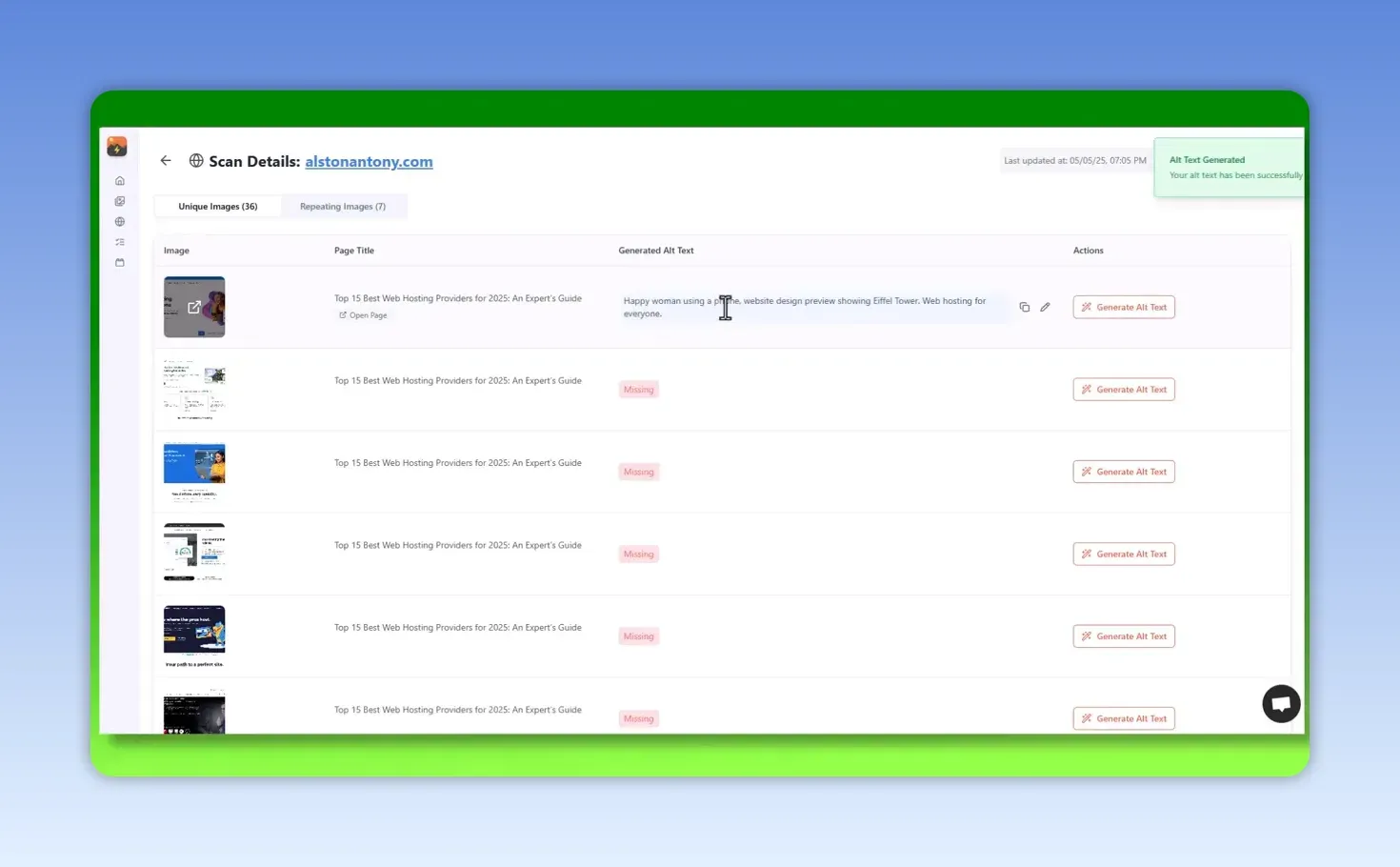
The scan would be useful for inspecting a site or preparing a client report. But copying suggestions back into WordPress one at a time isn’t going to work for me, so I’d rather connect the plugin and let it do the work. Alt Magic also supports Shopify, which I haven’t tested.
How do you connect Alt Magic to WordPress?
- In WordPress, go to Plugins, search for Alt Magic and install it.
- Open the plugin settings, copy the API key from your Alt Magic account, paste it in and click verify.
- Open AI Settings and tick Automatically generate alt text when new images are added.
From then on, new uploads get their alt text filled in without you doing it. Alt text is one part of optimising a site, not a replacement for the rest of SEO.
Which settings should you change before generating?
These are the ones that decide what happens on every upload:
- Alt text language. Pick the language you publish in, even if it isn’t English.
- Other fields. Choose whether the same text also goes into the image title, caption and description. I keep all three on; turn them off if you only want the alt text field filled.
- Prefix and suffix. You can add fixed text before or after every description, such as a brand name. Use it carefully; the result still has to describe the actual image.
- SEO keywords. Alt Magic can read the focus keyword from Yoast SEO, All in One SEO, Squirrly SEO, SEOPress or Rank Math.
- Post title as keywords. If there’s no focus keyword, it uses the title of the post the image is attached to. I often don’t set a focus keyword, so this is the one I rely on.
- Which images to update. I choose only images where the alt text is empty, so it never overwrites a description I wrote.
- Site visibility. There’s an option for a private or protected site; mine was public, so I left it off.
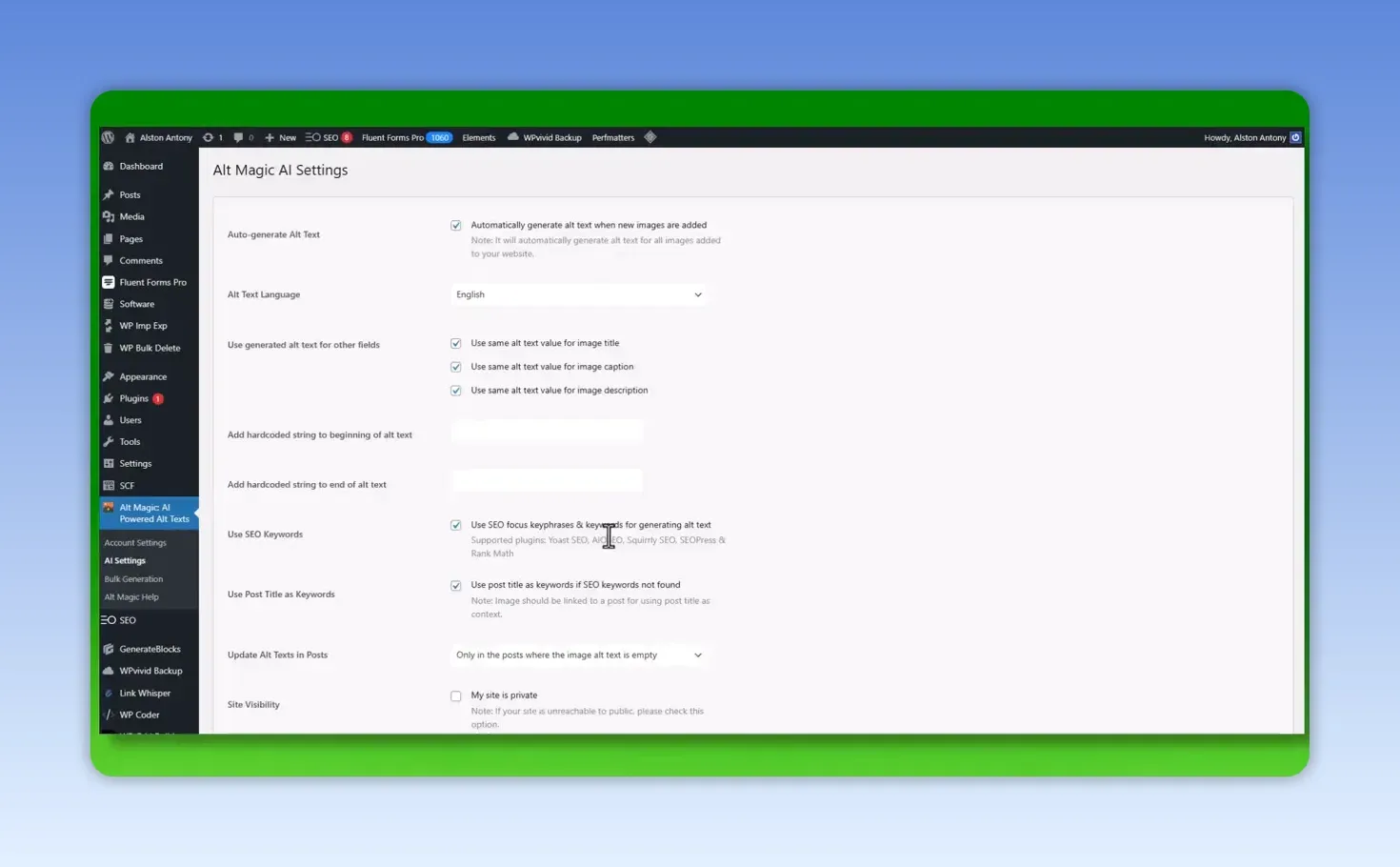
I don’t want a keyword forced into every description. I want alt text that fits the image and the page. If you are still deciding what a post should target, my ChatGPT prompts for keyword research cover that.
How well did it describe existing images?
Mostly well, with one miss. To test an existing image, open it in the WordPress media library and click Generate Alt Text. I tried several different kinds of image rather than trusting the setting alone.
One was a screenshot from a Hetzner server setup tutorial with a confirmation dialog. Alt Magic wrote “Confirmation dialog for Hetzner netboot settings: ‘Confirm’ button highlighted”, which names the step the screenshot shows instead of just calling it a screenshot. It described a Halloween graphic as a smiling jack-o’-lantern wearing a hat and connected it to WordPress Halloween deals.
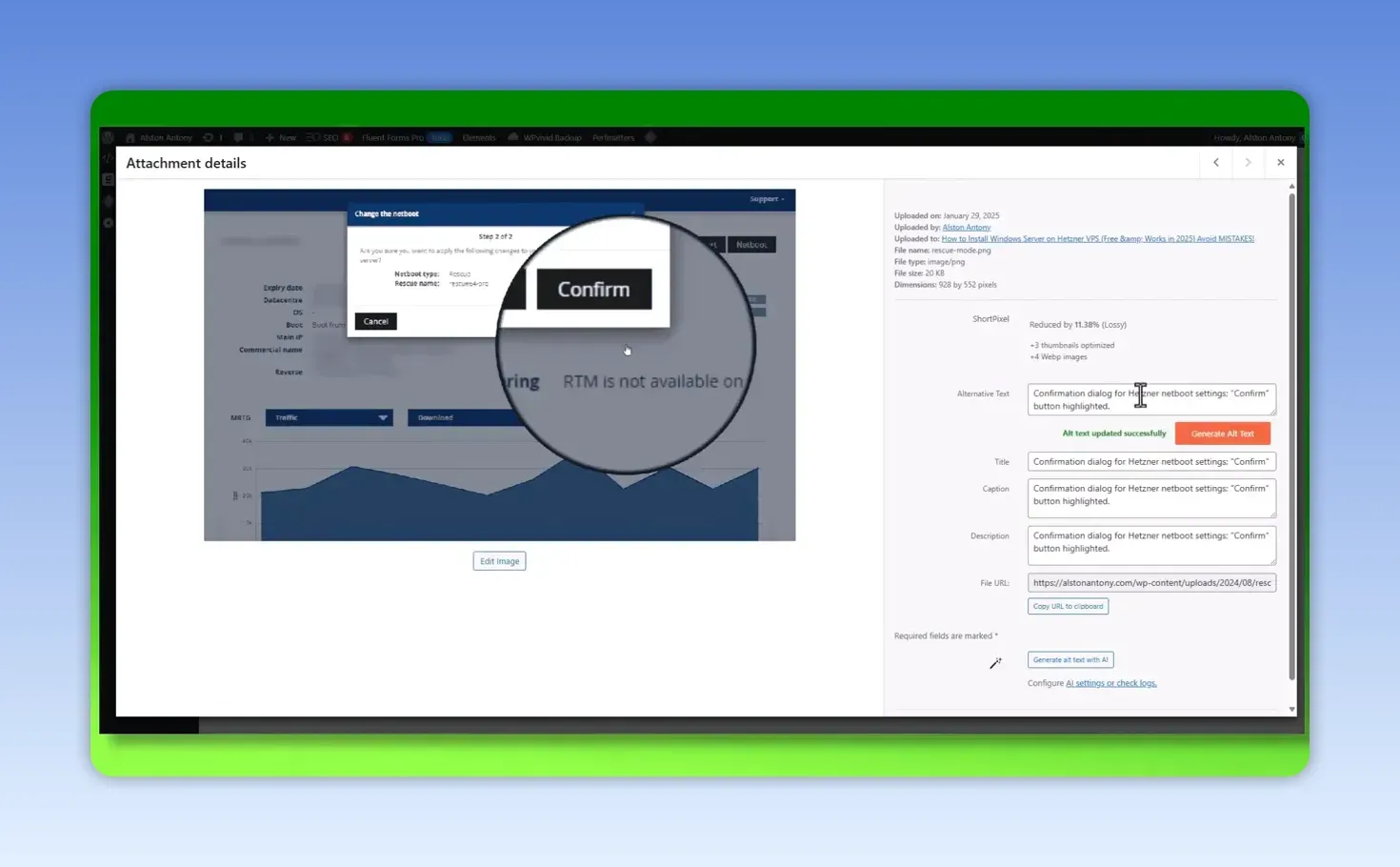
A screenshot from a process involving Pabbly was not completely accurate. A later one, a spreadsheet of email verification results with status and domain, was described much better. So my experience is positive, but not every result is 100% right. When an image explains an important step, check the text.
How do you add alt text to hundreds of existing images?
Use the plugin’s Bulk Generation screen. It shows how many images are in the library, how many are missing alt text and how many credits you have left. On my site, 331 of 416 images had no alt text, and I had 509 credits, so there was enough to cover them.
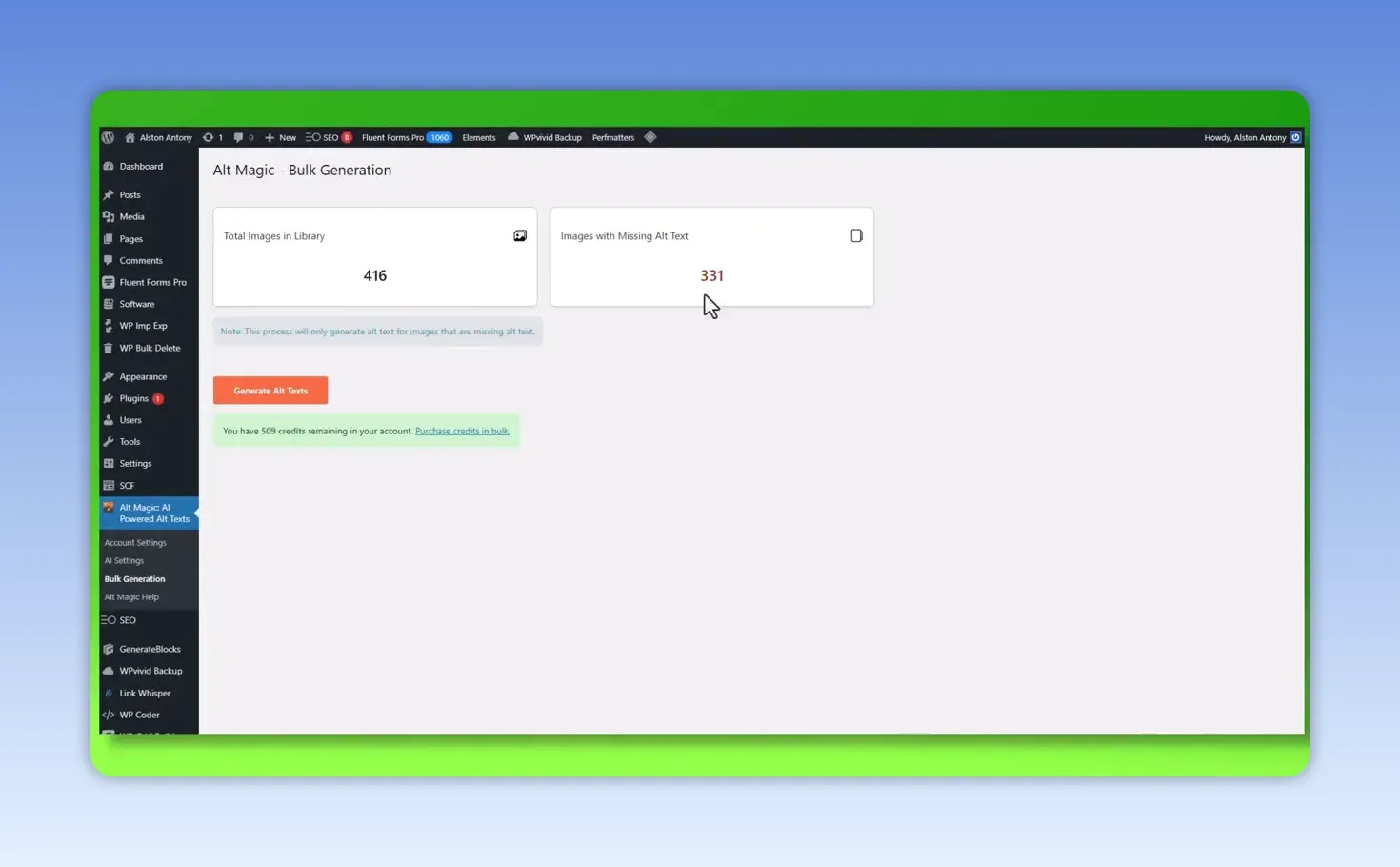
Check you have enough credits for the images you need, then click Generate Alt Texts and let the plugin work through them. Bulk generation for the old images plus automatic generation for new ones is what makes Alt Magic useful on a WordPress site.
How much does Alt Magic cost?
There is a free plan with 50 credits a month, and paid credits are one-time purchases that never expire. One credit covers one image. On 28 September 2026, Alt Magic’s pricing page listed:
| Pack | List price (one-time) | Credits | Cost per image at list price |
|---|---|---|---|
| Starter | $19 | 500 | About 4¢ |
| Growth | $99 | 5,000 | About 2¢ |
| Pro | $199 | 15,000 | About 1.3¢ |
| Scale | $699 | 60,000 | About 1.2¢ |
Every pack was shown at 50% off for a limited time that day, and all packs include the same features and unlimited websites. There was also a deal on SaaSZilla when I recorded this; I couldn’t confirm it is still available.
What I liked and what I didn’t
What I liked:
- New uploads get alt text automatically once the plugin is set up.
- Bulk generation handles the backlog, showing the count and credits first.
- It can use the post title when there is no focus keyword.
- The “only empty alt text” option protects descriptions you wrote yourself.
What I’d watch:
- It covers alt text only; it doesn’t compress images.
- Some screenshots were described inaccurately.
- The website scan’s suggestions have to be copied back by hand without the plugin.
- I haven’t tested the Shopify app.
Is Alt Magic worth it for image SEO?
For a WordPress site with a backlog of images, yes. In a couple of days of testing I didn’t hit a bug, and most descriptions were good. My favourite part isn’t the image library or the scan, but connecting WordPress, choosing the settings, letting the plugin handle new images, and using bulk generation for the old ones.
Review the descriptions for important images, especially instructional screenshots. Alt Magic saves the repetitive work; it doesn’t remove the responsibility for accurate, useful text. For another WordPress plugin I tested on a live site, see my CrawlWP review, and if you turn videos into posts, my Video To Blog AI review covers a tool that writes alt text for its own screenshots.
FAQ
Does Alt Magic overwrite alt text I already wrote?
Not if you set it to update only images where the alt text is empty, which is the option I use.
Does Alt Magic compress images or rename files?
It doesn’t compress images. When I tested it, file renaming was only planned; its pricing page now lists AI image renaming as a beta feature.
Start with the free credits on a handful of images, check the descriptions, then connect the plugin and turn on automatic generation. The deal I mentioned is on SaaSZilla (a non-referral link), and current packs are on Alt Magic’s pricing page.
Keep reading
You Might Also Like

LeadSniper Yellow Pages Review: Finding Local SEO Clients
My LeadSniper Yellow Pages review. One plumber search in New York gave 41 leads with phones, websites and social links, and how I qualify them as clients.
9 min read
LeadSniper Google Search Scraper Review: B2B Prospecting
My LeadSniper Google Search scraper review. Two footprints for doctors in Chennai found 53 LinkedIn leads, exported to Excel, and what to check first.
9 min read

Visby AI Review: Tracking My Brand Across AI Answers
My Visby AI review. Real ChatGPT, Gemini and Claude answers and citations per prompt, competitor share of voice, GA4 traffic and a beta report builder.
10 min read