
Outreach
Cloudflare Email Routing review
A branded inbox on your own domain, free. The cheapest credibility gap in outreach, closed.
Cloudflare Email Routing at a glance
Every row is a verified field or an honest absence. A row is dropped rather than filled with an em dash, so the length of this table says how complete the record is.
| What it is | A branded inbox on your own domain, free. The cheapest credibility gap in outreach, closed. |
|---|---|
| Category | Outreach |
| Best suited for | Anyone still running outreach from a free webmail address, where this closes the cheapest credibility gap available |
| Starting price | Free on every Cloudflare plan; outbound sending needs Workers Paid from $5/month |
| Free plan | Yes |
| Free trial | None offered |
| Main strength | Genuinely free for the inbound half, on every plan, with nothing useful held back for an upgrade |
| Main limitation | Receive and forward only. Replies leave from your destination inbox, so a prospect who wrote to [email protected] gets an answer from your Gmail unless you add a sending service. |
| Evidence | Alston tested |
| Alston video | Yes, embedded below |
| Closest alternatives | ImprovMX, Zoho Mail (free tier), Google Workspace, Google Business Profile |
| Pricing checked | 20 August 2026 |
| Record checked | 20 August 2026 |
What Cloudflare Email Routing is
Email Routing maps addresses on a domain you control to inboxes you already read. Mail to [email protected] arrives in your Gmail; the sender sees your domain, you see one inbox. Cloudflare writes the MX, SPF and DKIM records itself, which is the step a manual forwarding setup usually gets wrong. It is free on every plan, including the free one, and there is no paid tier for the inbound half.
What makes it an SEO decision rather than an IT one is the sender identity. Link building, guest post pitches and unlinked mention requests are cold email to strangers deciding in two seconds whether to reply, and a webmail sender answers that question badly. The same address then does a second job on the site itself: a contact address that matches the domain on the byline, the about page and the Person schema, which is the detail a webmaster checks before linking and a quality rater looks for behind content.
The constraint is structural and worth understanding before you rely on it: this is receive and forward, not a mailbox. Replies leave from whichever inbox you forwarded to, so a branded sender on outbound mail needs Cloudflare's separate Email Sending beta or a third-party SMTP service. It also takes exclusive control of the domain's MX records, which means it cannot run alongside Google Workspace or any other mail host.
What I found testing Cloudflare Email Routing
Setting it up
Five stages, on a domain already using Cloudflare DNS.
- Open Email Routing. In the Cloudflare dashboard the path is now Compute › Email Service › Email Routing, then Onboard Domain. Tutorials that tell you to look for a top-level Email item in the sidebar predate the Email Service reorganisation.
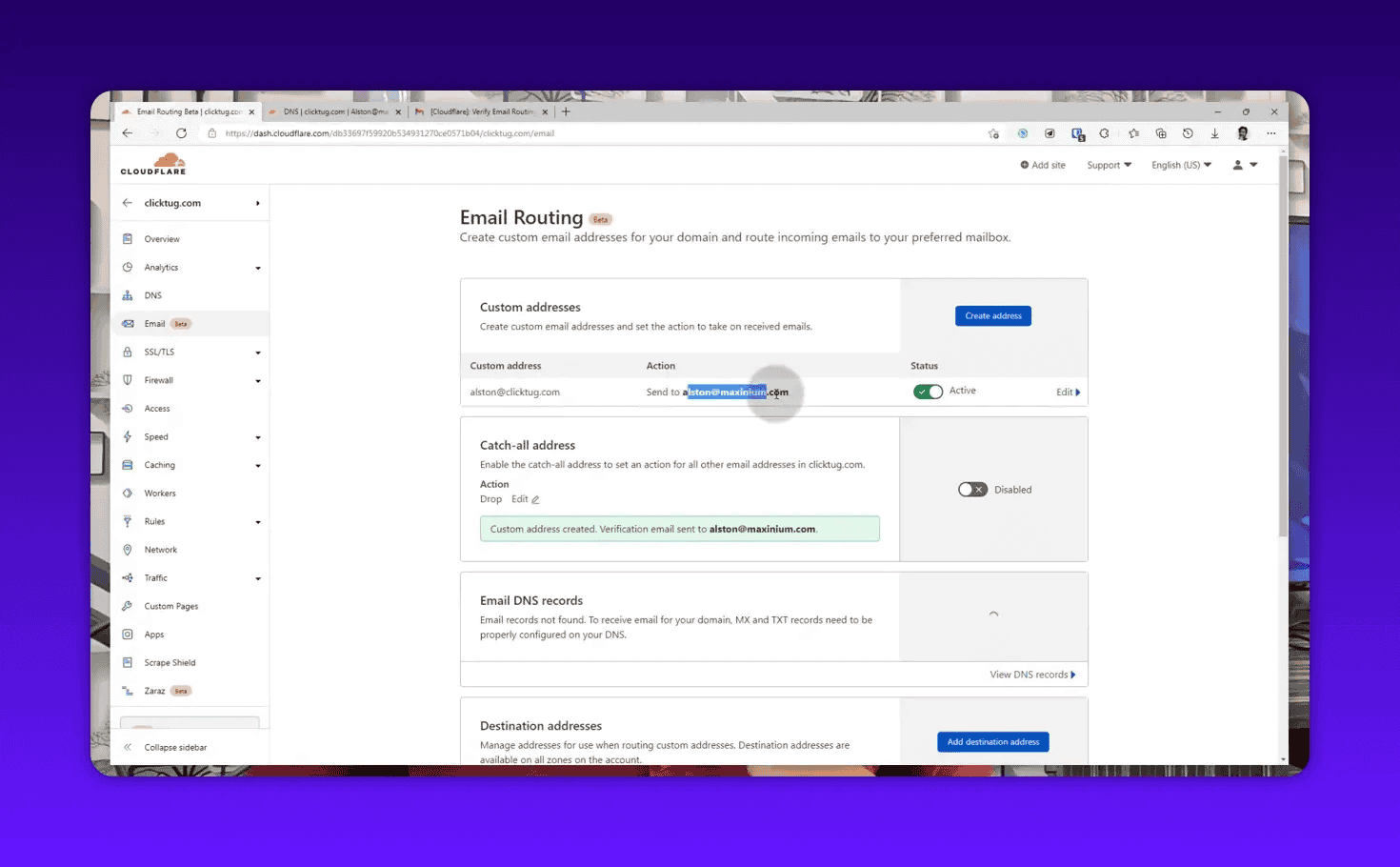
- Create the first address. Two fields: the local part on your domain, and the destination inbox it forwards to.
- Verify the destination. Cloudflare mails that inbox a confirmation link. Until you click it, every rule pointing at the address stays disabled. This is the step people skip and then report as “forwarding is broken”.
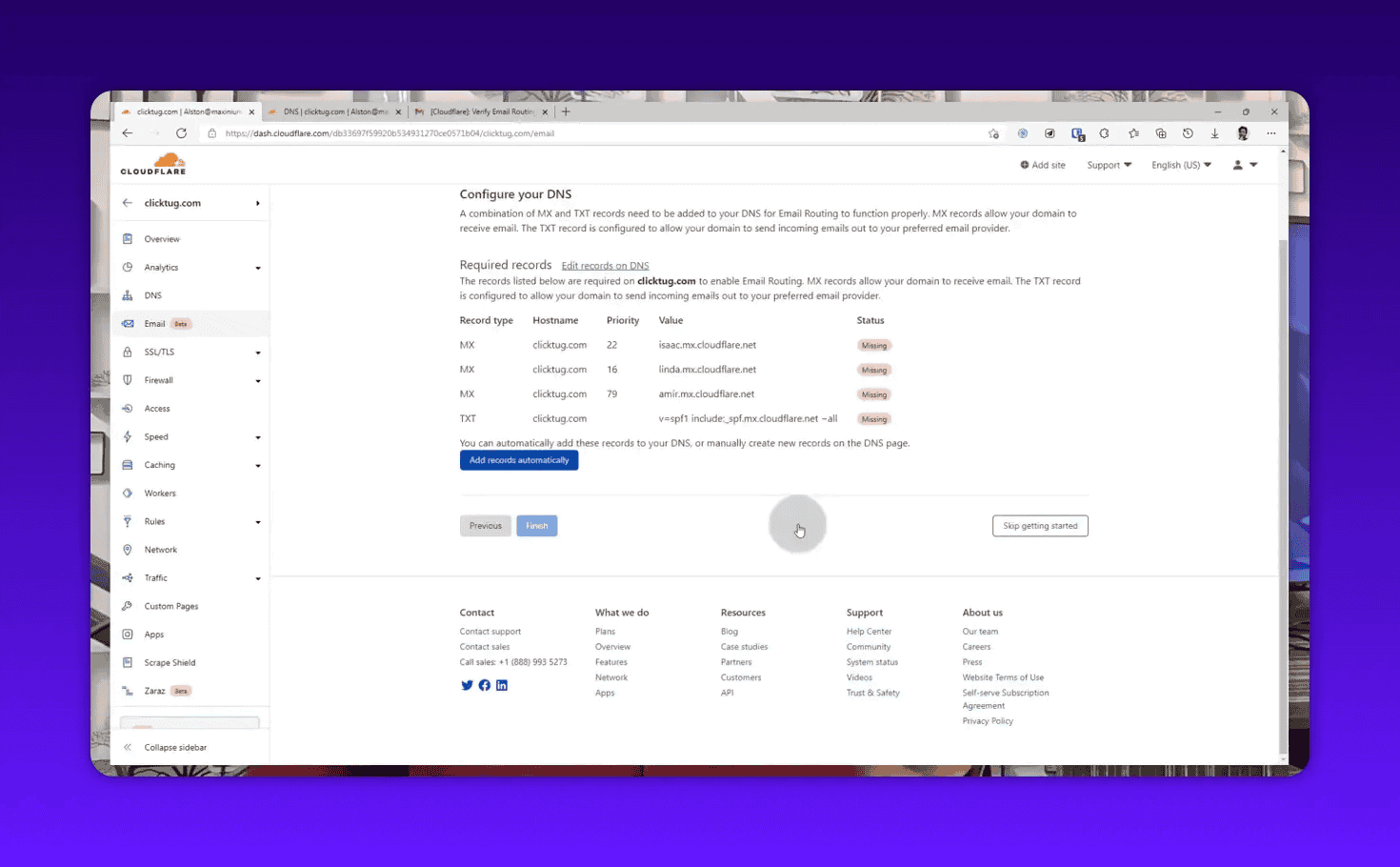
- Let it write the DNS. On a domain with no existing MX records, Cloudflare adds the MX, SPF TXT and DKIM TXT records for you. If the domain does have MX records from another mail host, add Cloudflare’s first, wait for them to go live, then remove the old ones, deleting the old MX records first stops all incoming mail immediately.
- Send a test. From an external account. Delivery is usually seconds; if nothing arrives inside two minutes, the DNS status panel will say why.
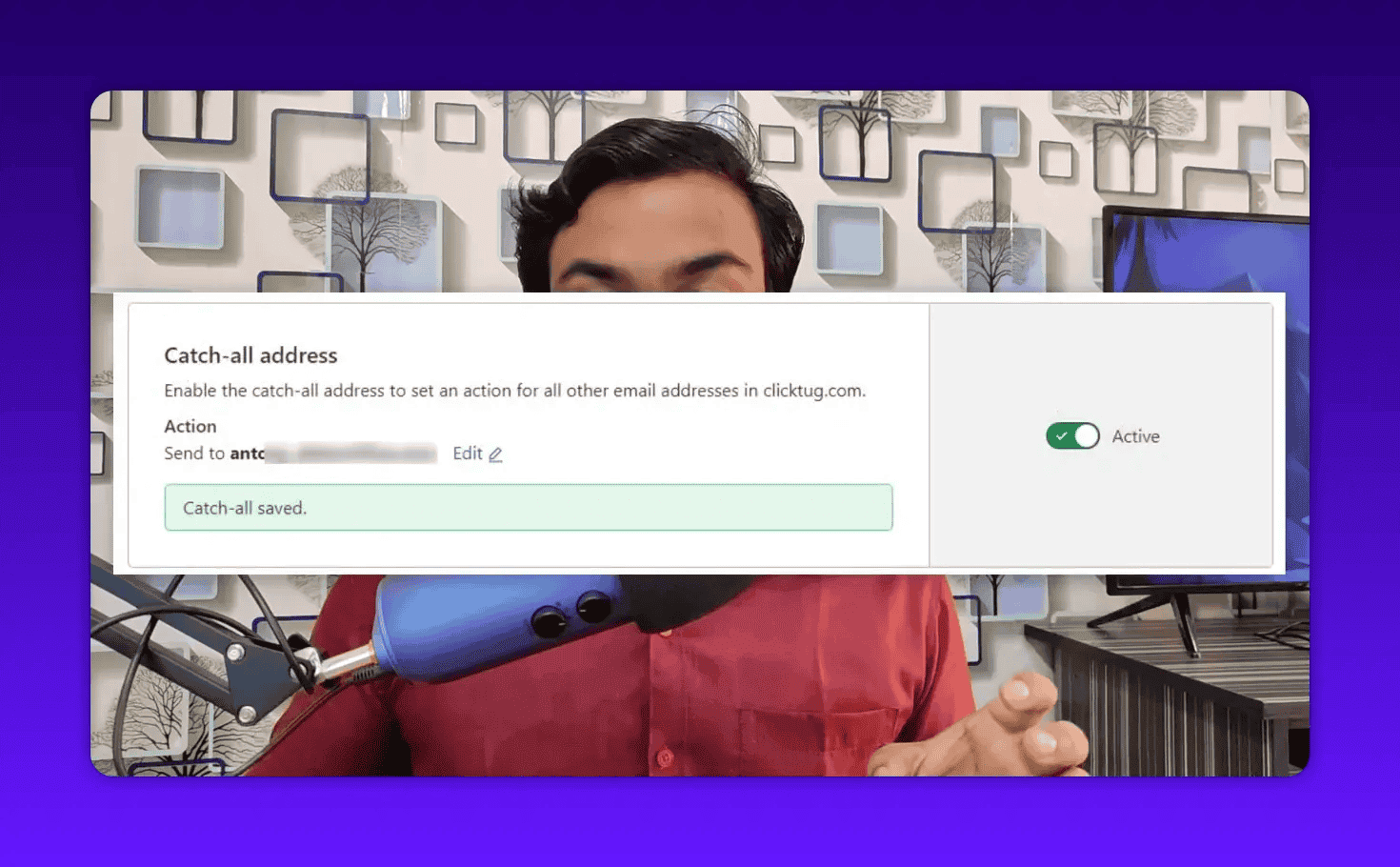
Additional addresses live under Routing Rules, each with its own destination. Catch-all sits at the bottom of the same screen, with the choice between forwarding unmatched mail and silently dropping it.
Where to put the address once it exists
The forwarder is not the win, publishing it consistently is. Author box and byline, contact page,
Person schema, Google Business Profile, citation and directory listings, and the sender field on
your outreach templates. A branded address in one place and a Gmail in four is worse than picking one
and using it everywhere, because consistency is the part that reads as real.
What you can use it for
- Pitch guest posts and links from a domain-matched sender instead of a free webmail address
- Publish an author and contact address that matches the site's domain, on the byline and in Person schema
- Give each campaign its own role address, so replies stay filterable and a spam-hit address is deleted rather than migrated
- Keep one contact address consistent across Google Business Profile, citations and directory listings
- Route registrar, Search Console and hosting alerts to an address a client handover can transfer
The features that matter for SEO
Each one says what it does and the SEO job it serves. A vendor feature list without that second half tells you nothing you could not read on their own site.
Custom forwarding addresses
Maps any local part on your domain to a verified destination inbox, up to 200 routing rules per domain.
Each outreach programme gets its own sender on the real domain (outreach@, guestposts@, press@), so replies stay filterable by campaign and a burned address is deleted instead of migrated.
A destination has to be verified by clicking a Cloudflare email first, and rules pointing at it stay disabled until then.
Catch-all address
Sends anything that matches no rule to one destination, or drops it silently.
A mistyped address on an old citation listing or a years-old byline still reaches you, which is the entire point of publishing a contact address in the first place.
Drop is silent. The sender gets no bounce, so a real enquiry can disappear without either party knowing.
Automatic MX, SPF and DKIM setup
Writes the records the service needs into your Cloudflare DNS zone and reports their live status in the dashboard.
Removes the failure where a branded address is configured, looks correct on the contact page, and silently receives nothing, which is worse than having no address at all.
Only works where Cloudflare is the authoritative DNS for the domain, and it conflicts with an existing mail host's MX records.
Email Workers
Runs a Worker on inbound mail, which can forward to multiple destinations, auto-reply in thread, reject with an SMTP error, or parse the MIME content.
Acknowledge guest post pitches automatically, or reject an entire pattern of paid-link spam at the SMTP layer so it never reaches the inbox you actually work from.
Complex handlers can fail with EXCEEDED_CPU on the Workers Free plan.
Account-level destinations across domains
Verified destinations are held at account level and reusable on any domain in the account, up to 200.
One inbox collects mail for every site you run, which is what makes a role address per client practical rather than an administrative tax.
The 30-domains-per-zone limit covers Email Routing and Email Sending together.
Alston’s video on Cloudflare Email RoutingAlston video
Screenshots
Captures from Alston’s own account.


Pricing and limits
Starting price: Free on every Cloudflare plan; outbound sending needs Workers Paid from $5/month Checked 20 August 2026 Vendor’s own pricing page
| Plan | Price | What it includes |
|---|---|---|
| Email Routing (inbound) | $0 /mo | There is no paid tier for inbound forwarding. Email Workers themselves are billed as Workers.
|
| Email Sending (beta, via Workers Paid) Add-on | $5 /mo | A separate feature of Cloudflare Email Service, not part of Email Routing. $5/month is the Workers Paid minimum that the outbound half sits on.
|
Add-on rows are only ever charged on top of a plan, so they are excluded from the entry price used in the directory’s price filter.
Strengths and limitations
Strengths
- Genuinely free for the inbound half, on every plan, with nothing useful held back for an upgrade
- Writes the MX, SPF and DKIM records itself, which is where hand-rolled forwarding normally breaks
- Role addresses cost nothing, so campaign separation is a dashboard entry rather than a billing decision
- Catch-all recovers misaddressed mail, and the volume of that is higher than most people expect
- Email Workers handle inbound mail programmatically without running a mail server
Limitations
- Receive and forward only. Replies leave from your destination inbox, so a prospect who wrote to [email protected] gets an answer from your Gmail unless you add a sending service.
- The outbound half, Email Sending, is still in beta and needs Workers Paid from $5/month to reach anyone other than your own verified destinations.
- Requires Cloudflare DNS. The domain's nameservers must point at Cloudflare, which rules it out for anyone who cannot move DNS.
- Cannot coexist with Google Workspace, Zoho Mail or any other mail host on the same domain, because MX records are exclusive and both services want them.
- No mailbox, no storage, no webmail. Cloudflare forwards and discards, so there is nothing to search later and no shared inbox for a team.
- "Unlimited addresses" is not literal. It is 200 routing rules per domain and 200 verified destinations per account. Generous, and still a ceiling.
- Strict DMARC alignment on mail you send from the address is your sending provider's problem, not Cloudflare's.
Who it is for, and who should skip it
Worth it if
- Anyone still running outreach from a free webmail address, where this closes the cheapest credibility gap available
- Domains already on Cloudflare DNS, where the whole setup is about ten minutes
- Client sites you may hand over later, since a forwarder transfers and a personal inbox does not
Skip it if
- You need replies to come from the branded address without adding a second service
- The domain is already on Google Workspace or another mail host, since both need the same MX records
- You want stored mail, a webmail interface, or a shared mailbox for a team
Alternatives to Cloudflare Email Routing
Each one answers when it is the better choice, which is the only thing a list of competitors is useful for.
- ImprovMX Choose it when the domain is not on Cloudflare DNS and you cannot move it. ImprovMX forwards from any registrar, though its free tier caps you at one alias.
- Zoho Mail (free tier) Choose it when you need to send from the branded address as well as receive on it, and want that in one product rather than two.
- Google Workspace Choose it when you need real mailboxes, storage, shared inboxes and Gmail integration, and the per-seat cost is worth never thinking about mail again.
- Google Business Profile Choose it when the goal is local contactability rather than email specifically. The profile is where a local searcher looks first, and the address on it should match this one.
Sources and verification
Last verified 20 August 2026 20 days ago
Pricing 20 August 2026 Plans 20 August 2026 Features 20 August 2026 Platforms 20 August 2026 Company 20 August 2026
- Cloudflare Email Routing documentation Documentation verifies features, availability checked 20 August 2026
- Cloudflare Email Service pricing Pricing page verifies pricing, plans checked 20 August 2026
- Email Routing limits Documentation verifies limits checked 20 August 2026
- Enable Email Routing Documentation verifies platforms, availability checked 20 August 2026
- Email Workers Documentation verifies features checked 20 August 2026
- Workers pricing Pricing page verifies pricing checked 20 August 2026
- Email Routing leaves Beta Changelog verifies availability checked 20 August 2026
- About Cloudflare Company verifies company checked 20 August 2026
What changed
- 20 August 2026, Cloudflare has folded Email Routing into a wider "Cloudflare Email Service", which now also has an Email Sending beta for outbound mail on Workers Paid. The inbound half is unchanged and still free. The dashboard path moved to Compute › Email Service › Email Routing, so older tutorials pointing at a top-level Email item describe a navigation that no longer exists.
Questions
Is Cloudflare Email Routing really free?
Yes, for receiving. Inbound forwarding is listed as unlimited on both Workers Free and Workers Paid, and there is no paid tier for it. Cost only appears if you want the outbound half: sending to recipients other than your own verified destinations needs Workers Paid, from $5 a month, with 3,000 emails included and $0.35 per 1,000 after that.
Can I send email from a Cloudflare-routed address?
Not through Email Routing itself. It receives and forwards, so your replies go out from whichever inbox you forwarded to. Cloudflare now has a separate Email Sending beta for outbound, on Workers Paid, exposing both a REST API and an authenticated SMTP endpoint. The alternative is any third-party SMTP provider with SPF and DKIM aligned to your domain.
Does my domain have to be registered with Cloudflare?
No, but its nameservers do have to point at Cloudflare. The documentation is explicit that you must be using Cloudflare DNS. Keep the registration wherever it is, change the nameservers, and Email Routing works the same way.
Can I run this alongside Google Workspace?
No. Both services need control of the domain's MX records and only one can have them. If you already pay for Workspace, stay on it. Email Routing is the answer for domains that have no mail host and only need to receive.
How many addresses can I actually create?
200 routing rules per domain, and 200 verified destination addresses per account shared across all your domains. That is effectively unlimited for a personal brand or an agency's role addresses, but it is a stated ceiling rather than a marketing "unlimited".
Does a branded email address help SEO?
Not as a ranking factor. Nothing reads your contact address and moves you up. What it does is close a trust gap. It supports the experience and trust side of E-E-A-T on author and contact pages, it is the detail a webmaster checks before linking to you, and it measurably changes whether cold outreach gets answered, which is where the links come from.
What happens to mail sent to a forwarder I deleted?
It is rejected at the SMTP level, so the sender gets a bounce. The exception is when a catch-all is enabled, in which case the catch-all picks it up. That is the argument for leaving catch-all on forward rather than drop once an address has ever been published.