Leads-Sniper · Yellow Pages
Leads-Sniper Yellow Pages tutorial: 41 local leads, one seed
Part of the Leads-Sniper tool listing, 3 in-depth guides plus the full review.
The short answer
Type a niche and a location, let the Leads-Sniper Chrome extension scrape Yellow Pages, and export the CSV with the fields you care about. In my test on plumbers in New York the scraper returned 41 unique business leads with phone, address, website, rating and review count. Sort the export by rating and missing website, and the reputation-management and web-design pitch list is on the same screen as the scrape.
I tested the Leads-Sniper Yellow Pages Scraper on plumbers in New York and it returned 41 unique business leads in one job, exported to Excel with phone, address, website, ratings and review counts. The scrape ran in about seven minutes of screen time. This is the workflow.
Install the extension, then pick the market
Leads-Sniper is a Chrome extension, not a cloud service. Install it, activate the Yellow Pages module, and you land on a dialog that asks for the country before it asks for anything else. Yellow Pages coverage is not global; the vendor lists which countries the structure holds for, and picking outside that list wastes a job.

Verify your target market against the current supported list before you buy the Yellow Pages tool specifically. The Google Maps and Google Search scrapers do not carry the same restriction, so if your market is not on the Yellow Pages list, one of the sibling scrapers is the honest answer instead.
Seed the scrape with niche plus location
The setup is one field for the niche and one for the location. I entered “plumbers” and “New York” and hit start. The extension opens Yellow Pages in a tab and iterates through the result pages while you watch, dropping each listing into the running dataset with a de-dup check on the listing URL.
There is no filter step here, and there does not need to be one — the raw dataset is small enough to filter in the CSV. What matters is the seed. A broad niche in a big city returns hundreds; “plumbers in New York” is small enough to run in seven minutes, which is the right size to test the workflow on.
CAPTCHA is the ceiling, not the failure
At around the four-minute mark the tab hit a Yellow Pages CAPTCHA. This is what will happen on any scraper that runs through your local browser on your own IP. Leads-Sniper handles it two ways.
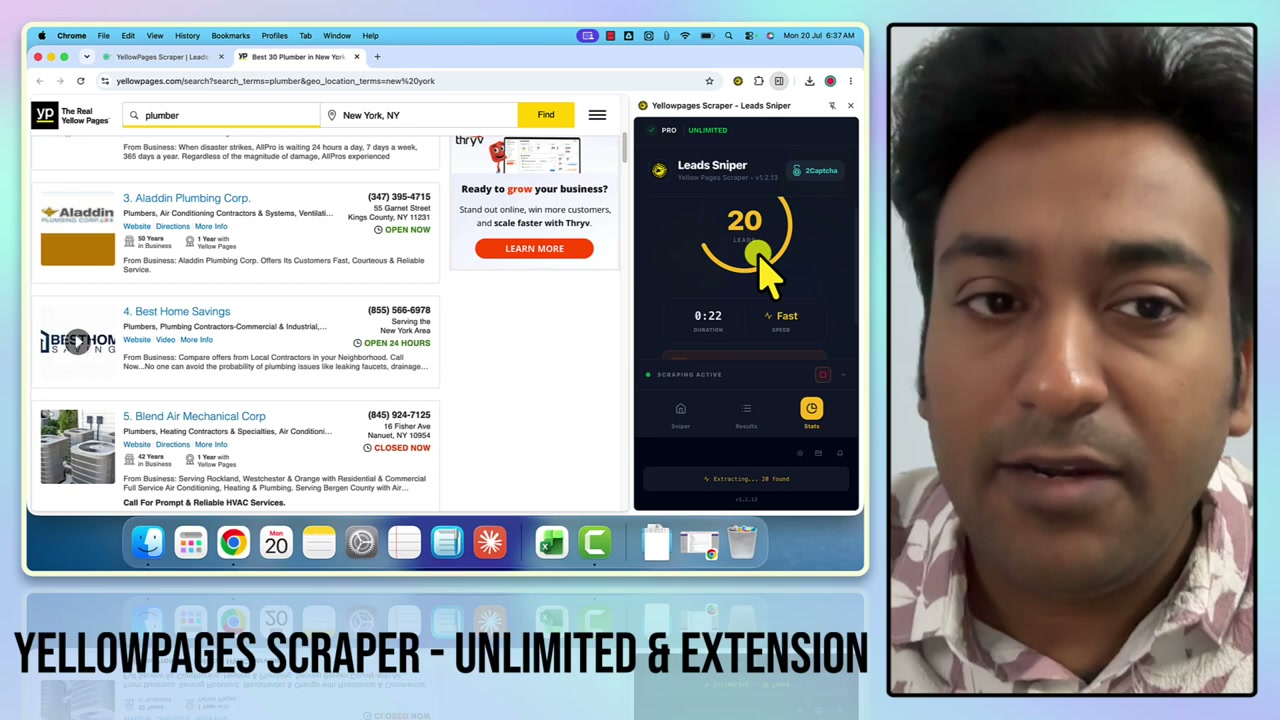
You can wire in a CAPTCHA-solving integration and let it push through automatically. Or you can pause the scrape, solve the CAPTCHA in the tab yourself, and resume — the extension keeps the leads already collected and picks up from the next page. On a burst-once-a-month workflow the manual path is fine; on a daily agency workflow you want the integration.
Neither option turns a browser extension into a cloud scraper. If your job is a hundred cities, you are running that job as a hundred jobs.
Export what you actually need, not everything
The export dialog is where the workflow matters. You get CSV, XLSX or JSON, and the field list is a checkbox per data point rather than an all-or-nothing dump.
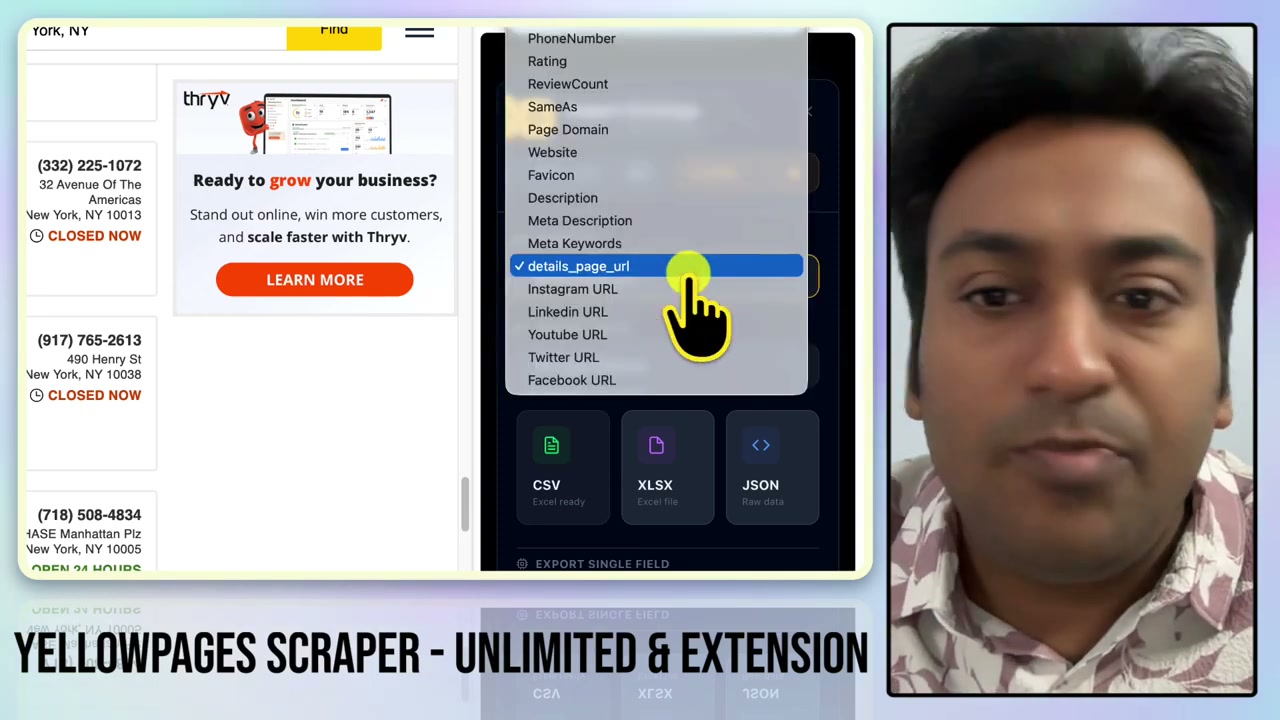
The field selection is the reason to bother with this step rather than just downloading everything. A callers’s spreadsheet wants business name, phone and rating. An outreach team wants business name, website, email and social. A reputation-management pitch wants business name, rating, review count and website. Ship the right file to the right team and the follow-up conversation happens in the CSV, not in a Slack thread about column indices.
The pitch list is the ratings column
The reason to scrape Yellow Pages is not the leads. It is the qualification you can do on the leads before you make a single phone call.
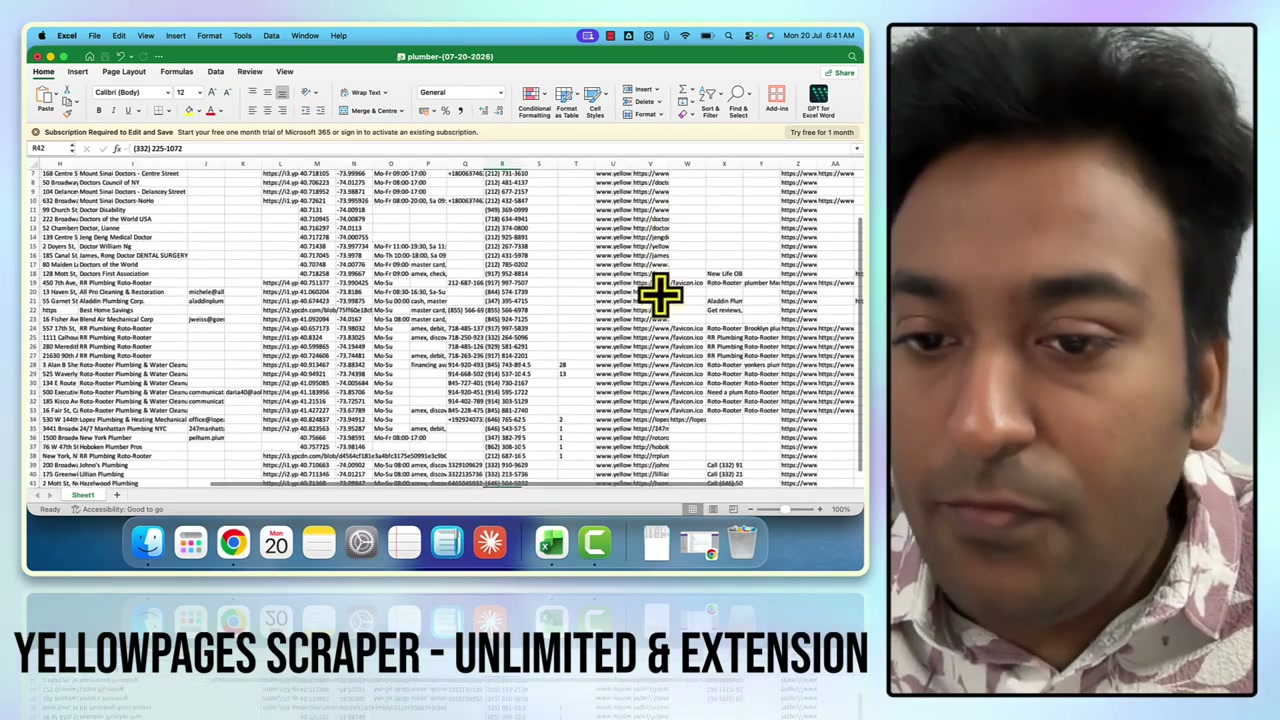
Sort the export three ways and three different pitch lists fall out:
- Rating below 4.0 → reputation-management prospects. A business at 3.4 with 27 reviews has a specific problem that a specific service fixes, and the pitch writes itself.
- Website field empty → web-design prospects. A local business with no website in 2026 is either about to build one or about to hire someone to build one. Missing website plus real reviews is a live pitch.
- Website present but not on the first page for the niche in that city → SEO prospects. The Yellow Pages export gives you the domain; a quick check in Google gives you the position.
Three qualified pitches out of one CSV, from one seed, in one browser session. That is what the price of a lifetime Yellow Pages licence buys you — one workflow, run in bursts, on the CSV rather than in a subscription dashboard.
What this tutorial did not cover
Two things the video and this page leave out:
- Sending the outreach. Leads-Sniper is scrape-only. Emails come out of the export where they exist on the listing; verification and sending live in a separate tool.
- Pricing arithmetic. Whether the $149 lifetime price beats a monthly subscription for your volume is a decision, not a step. The Leads-Sniper listing carries the current pricing, the bundle discounts and the alternatives with the date every figure was read.
For the Google Maps prospect source that runs at ten times the volume in the same tested workflow: the Google Maps Scraper walkthrough. For the footprint-driven cross-platform source: the Google Search Scraper walkthrough.
Disclosure: I tested Leads-Sniper on the Chrome extension in August 2026. Some links in this article are affiliate links, including the deal at 40% off lifetime on the Leads-Sniper listing. I would use the free trial on the tool you want most before you buy anything.
Questions
How many leads does the Yellow Pages Scraper return per job?
The ceiling is what Yellow Pages returns for your niche-and-location combination and what your IP survives before hitting a CAPTCHA. My test on plumbers in New York returned 41 unique leads from one seed. A broader niche or a bigger city returns more; a rare niche returns fewer.
Which countries does the Yellow Pages Scraper support?
Leads-Sniper lists supported markets at limited scope rather than a global list. Verify your target country against the current published list before you buy the Yellow Pages tool specifically, because the coverage is narrower than the Google Maps or Google Search scrapers.
What data does the Yellow Pages Scraper collect?
Business name, address, phone number, website, ratings, review count, social media URLs, latitude and longitude, listing URL, and any other fields visible on the Yellow Pages listing. The export dialog lets you pick which fields go in the CSV so you can ship a phone-only file to a caller or a full record to an outreach team.
How do you handle CAPTCHA on large scrapes?
Two ways. The extension supports a CAPTCHA-solving integration you can wire in, or you can pause when the CAPTCHA appears, solve it manually, and resume the same job without losing the leads already collected. Neither turns a browser extension into a cloud scraper, so size the job before you commit.
Sources
Each one says which claim on this page it stands behind, and when it was read.
- Leads-Sniper pricing Verifies pricing, plans, deal · read 26 August 2026
- Leads-Sniper product site Verifies features, availability · read 26 August 2026
Where to go next
- Leads-Sniper: the full listing What it does, what it costs, and what it cannot do, with every field dated.
- The Google Maps Scraper walkthrough The higher-volume prospecting source. 421 unique leads in the same tested workflow.
- The Google Search Scraper walkthrough The footprint-driven source. Cross-platform prospecting via advanced Google queries.
- Keyword research and search demand The niche-and-location seed the scraper consumes is the local half of a keyword.
Affiliate link. It pays a commission and did not buy this listing or its position.